> ## Documentation Index
> Fetch the complete documentation index at: https://docs.twenty.com/llms.txt
> Use this file to discover all available pages before exploring further.

# 4. Building the UI

> Views, sidebar navigation, a command, and front components.

Right now the objects are only reachable through Settings. Let's give the app a
real presence in the UI: list views, sidebar entries, a one-click
**Generate document** command, a record-page front component to **preview** a
document, and a native rich-text **editor** tab for templates.

## Views and navigation

A [view](/developers/extend/apps/layout/views) is a saved list of a given object.
A [navigation menu item](/developers/extend/apps/layout/navigation-menu-items)
puts that view in the sidebar.

```ts filename="src/views/documents.view.ts" theme={null}
import { defineView, ViewKey } from 'twenty-sdk/define';

export default defineView({
  universalIdentifier: DOCUMENTS_VIEW_UNIVERSAL_IDENTIFIER,
  name: 'All documents',
  objectUniversalIdentifier: DOCUMENT_OBJECT_UNIVERSAL_IDENTIFIER,
  icon: 'IconFile',
  key: ViewKey.INDEX,
  position: 0,
  fields: [
    { universalIdentifier: DOCUMENTS_VIEW_NAME_FIELD_UNIVERSAL_IDENTIFIER,
      fieldMetadataUniversalIdentifier: DOCUMENT_NAME_FIELD_UNIVERSAL_IDENTIFIER,
      position: 0, isVisible: true, size: 280 },
    { universalIdentifier: DOCUMENTS_VIEW_STATUS_FIELD_UNIVERSAL_IDENTIFIER,
      fieldMetadataUniversalIdentifier: DOCUMENT_STATUS_FIELD_UNIVERSAL_IDENTIFIER,
      position: 1, isVisible: true, size: 120 },
    { universalIdentifier: DOCUMENTS_VIEW_TEMPLATE_FIELD_UNIVERSAL_IDENTIFIER,
      fieldMetadataUniversalIdentifier: DOCUMENT_TEMPLATE_FIELD_UNIVERSAL_IDENTIFIER,
      position: 2, isVisible: true, size: 200 },
  ],
});
```

```ts filename="src/navigation-menu-items/documents.navigation-menu-item.ts" theme={null}
import { defineNavigationMenuItem, NavigationMenuItemType } from 'twenty-sdk/define';

export default defineNavigationMenuItem({
  universalIdentifier: DOCUMENTS_NAVIGATION_MENU_ITEM_UNIVERSAL_IDENTIFIER,
  name: 'Documents',
  icon: 'IconFile',
  color: 'green',
  position: 1,
  type: NavigationMenuItemType.VIEW,
  viewUniversalIdentifier: DOCUMENTS_VIEW_UNIVERSAL_IDENTIFIER,
});
```

Add the same pair for templates. Both now show in the sidebar:
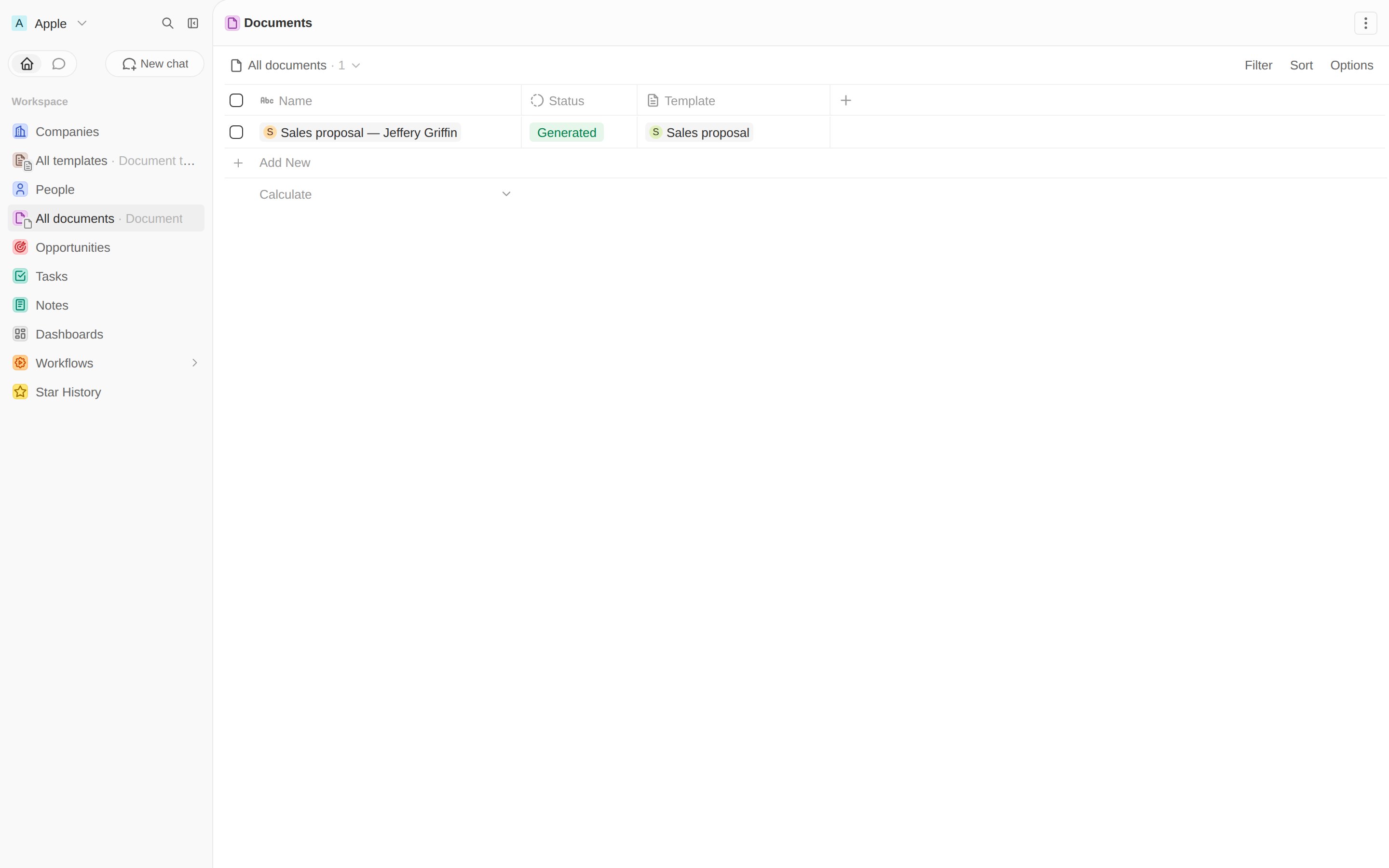
<Frame caption="Documents and Templates in the sidebar, with the generated document listed.">
  <img src="https://mintcdn.com/twenty/sqJBeTZq-W-RDBPU/images/docs/developers/extends/apps/document-generator/04-documents-view.png?fit=max&auto=format&n=sqJBeTZq-W-RDBPU&q=85&s=26d26efeea7825a0e740c5ed21d545f7" alt="Documents view with a generated document" width="2880" height="1800" data-path="images/docs/developers/extends/apps/document-generator/04-documents-view.png" />
</Frame>

## A front component

A [front component](/developers/extend/apps/layout/front-components) is a React
component sandboxed inside Twenty. Ours reads the selected record, loads the
person templates via `CoreApiClient`, and POSTs to the route from the last
chapter.

```tsx filename="src/front-components/generate-document-form.front-component.tsx" theme={null}
import { useEffect, useState } from 'react';
import { CoreApiClient } from 'twenty-client-sdk/core';
import { defineFrontComponent } from 'twenty-sdk/define';
import { enqueueSnackbar, useSelectedRecordIds } from 'twenty-sdk/front-component';

const GenerateDocumentForm = () => {
  const selectedRecordIds = useSelectedRecordIds();
  const recordId = selectedRecordIds.length === 1 ? selectedRecordIds[0] : null;
  const [templates, setTemplates] = useState<{ id: string; name: string }[]>([]);
  const [templateId, setTemplateId] = useState('');

  useEffect(() => {
    new CoreApiClient()
      .query({ documentTemplates: {
        __args: { filter: { target: { eq: 'PERSON' } }, first: 100 },
        edges: { node: { id: true, name: true } } } })
      .then(({ documentTemplates }) => {
        const list = documentTemplates?.edges?.map((e) => e.node) ?? [];
        setTemplates(list);
        if (list[0]) setTemplateId(list[0].id);
      });
  }, []);

  const generate = async () => {
    const apiBaseUrl = process.env.TWENTY_API_URL;
    const token = process.env.TWENTY_APP_ACCESS_TOKEN ?? process.env.TWENTY_API_KEY;
    const res = await fetch(`${apiBaseUrl}/s/documents/generate`, {
      method: 'POST',
      headers: { 'Content-Type': 'application/json', Authorization: `Bearer ${token}` },
      body: JSON.stringify({ templateId, recordId }),
    }).then((r) => r.json());
    await enqueueSnackbar({
      message: res.success ? 'Document generated.' : 'Generation failed.',
      variant: res.success ? 'success' : 'error',
    });
  };

  // ...render a <select> of templates and a Generate button
};

export default defineFrontComponent({
  universalIdentifier: GENERATE_DOCUMENT_FORM_FRONT_COMPONENT_UNIVERSAL_IDENTIFIER,
  name: 'generate-document-form',
  component: GenerateDocumentForm,
});
```

<Warning>
  Style with inline CSS variables (`var(--t-color-blue)`), not values imported from
  `twenty-ui`. The SDK mocks that package during build, so module-level imports of
  theme constants would be `undefined`. See the
  [full component](https://github.com/twentyhq/twenty/blob/main/packages/twenty-apps/examples/document-generator/src/front-components/generate-document-form.front-component.tsx).
</Warning>

## A command to open it

A [command menu item](/developers/extend/apps/layout/command-menu-items) with
`availabilityType: 'RECORD_SELECTION'` shows up when a Person is selected, and
opens the component in the side panel.

```ts filename="src/command-menu-items/generate-document.command-menu-item.ts" theme={null}
import { defineCommandMenuItem, STANDARD_OBJECT_UNIVERSAL_IDENTIFIERS } from 'twenty-sdk/define';

export default defineCommandMenuItem({
  universalIdentifier: GENERATE_DOCUMENT_COMMAND_UNIVERSAL_IDENTIFIER,
  label: 'Generate document',
  availabilityType: 'RECORD_SELECTION',
  availabilityObjectUniversalIdentifier:
    STANDARD_OBJECT_UNIVERSAL_IDENTIFIERS.person.universalIdentifier,
  frontComponentUniversalIdentifier:
    GENERATE_DOCUMENT_FORM_FRONT_COMPONENT_UNIVERSAL_IDENTIFIER,
});
```

## Try the whole flow

Open **People**, tick a person, and press <kbd>⌘K</kbd> / <kbd>Ctrl K</kbd>.
"Generate document" appears, tagged with your app:

<Frame caption="The command shows up when a Person is selected.">
  <img src="https://mintcdn.com/twenty/sqJBeTZq-W-RDBPU/images/docs/developers/extends/apps/document-generator/06-command-menu.png?fit=max&auto=format&n=sqJBeTZq-W-RDBPU&q=85&s=7f565368b8e4f21b0899b89505cc4f34" alt="Command menu with Generate document" width="2880" height="1800" data-path="images/docs/developers/extends/apps/document-generator/06-command-menu.png" />
</Frame>

Run it — your component opens in the side panel. Pick a template, click
**Generate**, and a new record lands in **Documents**.

<Frame caption="The front component, loading templates and generating on click.">
  <img src="https://mintcdn.com/twenty/sqJBeTZq-W-RDBPU/images/docs/developers/extends/apps/document-generator/06b-front-component.png?fit=max&auto=format&n=sqJBeTZq-W-RDBPU&q=85&s=4fb7f799ef6db5e0d336591a8f61f72a" alt="Generate document side panel" width="2880" height="1800" data-path="images/docs/developers/extends/apps/document-generator/06b-front-component.png" />
</Frame>

Every generated document records your app as its author:

<Frame caption="Created by Document Generator, status Generated.">
  <img src="https://mintcdn.com/twenty/sqJBeTZq-W-RDBPU/images/docs/developers/extends/apps/document-generator/05-document-record.png?fit=max&auto=format&n=sqJBeTZq-W-RDBPU&q=85&s=735261a59834a51277284303a9d6f845" alt="A generated document record" width="2880" height="1800" data-path="images/docs/developers/extends/apps/document-generator/05-document-record.png" />
</Frame>

## Preview a document on its record page

A front component isn't only for command menus — you can mount one as a **tab on a
record page**. Let's add a *Preview* tab to the document record that renders the
Markdown body as a polished, printable page.

The component reads the current record id from its execution context, loads the
document, and renders it. Front components run in a **sandbox** that only allows a
whitelist of HTML tags — raw HTML injection (`dangerouslySetInnerHTML`) and
`<style>` are blocked — so we render the Markdown as React elements with inline
styles via a small [`Markdown`](https://github.com/twentyhq/twenty/blob/main/packages/twenty-apps/examples/document-generator/src/utils/markdown-to-react.tsx)
helper.

```tsx filename="src/front-components/document-viewer.front-component.tsx" theme={null}
import { CoreApiClient } from 'twenty-client-sdk/core';
import { defineFrontComponent } from 'twenty-sdk/define';
import { useFrontComponentExecutionContext } from 'twenty-sdk/front-component';
import { Markdown } from 'src/utils/markdown-to-react';

const DocumentViewer = () => {
  const recordId = useFrontComponentExecutionContext((c) => c.recordId ?? null);
  // ...load { content, file } for recordId, then derive the links:
  const pdfUrl = document.file?.[0]?.url;
  const webUrl = `${process.env.TWENTY_API_URL ?? ''}/s/documents/view?id=${recordId}`;

  // Render the template body, plus quick links to the web page and the PDF.
  // Links open in a new tab so they don't navigate the embedded component.
  return (
    <div style={styles.scroll}>
      <div style={styles.actions}>
        <a style={styles.actionLink} href={webUrl} target="_blank" rel="noopener noreferrer">
          Open web page
        </a>
        {pdfUrl ? (
          <a style={styles.actionLink} href={pdfUrl} target="_blank" rel="noopener noreferrer">
            Download PDF
          </a>
        ) : null}
      </div>
      <div style={styles.paper}>
        <div style={styles.body}>
          <Markdown content={document.content} />
        </div>
      </div>
    </div>
  );
};

export default defineFrontComponent({
  universalIdentifier: DOCUMENT_VIEWER_FRONT_COMPONENT_UNIVERSAL_IDENTIFIER,
  name: 'document-viewer',
  component: DocumentViewer,
});
```

Mount it with a [page layout](/developers/extend/apps/layout/page-layouts). A
`RECORD_PAGE` layout adds tabs to an object's record view; a `FRONT_COMPONENT`
widget in a `CANVAS` tab hosts the component:

```ts filename="src/page-layouts/document-record.page-layout.ts" theme={null}
import { definePageLayout, PageLayoutTabLayoutMode } from 'twenty-sdk/define';

export default definePageLayout({
  universalIdentifier: DOCUMENT_PAGE_LAYOUT_UNIVERSAL_IDENTIFIER,
  name: 'Document record page',
  type: 'RECORD_PAGE',
  objectUniversalIdentifier: DOCUMENT_OBJECT_UNIVERSAL_IDENTIFIER,
  tabs: [{
    universalIdentifier: DOCUMENT_PAGE_LAYOUT_TAB_UNIVERSAL_IDENTIFIER,
    title: 'Preview',
    icon: 'IconEye',
    position: 50,
    layoutMode: PageLayoutTabLayoutMode.CANVAS,
    widgets: [{
      universalIdentifier: DOCUMENT_PAGE_LAYOUT_WIDGET_UNIVERSAL_IDENTIFIER,
      title: 'Document preview',
      type: 'FRONT_COMPONENT',
      configuration: {
        configurationType: 'FRONT_COMPONENT',
        frontComponentUniversalIdentifier: DOCUMENT_VIEWER_FRONT_COMPONENT_UNIVERSAL_IDENTIFIER,
      },
    }],
  }],
});
```

Open any document — a **Preview** tab renders it beautifully, with links to the
shareable web page and the PDF:

<Frame caption="The Preview tab renders the document with inline styles, plus quick links.">
  <img src="https://mintcdn.com/twenty/sqJBeTZq-W-RDBPU/images/docs/developers/extends/apps/document-generator/09-document-viewer.png?fit=max&auto=format&n=sqJBeTZq-W-RDBPU&q=85&s=e56c0d51f60f1597b55f497c35245e7e" alt="Document viewer front component in a record-page tab" width="2880" height="1800" data-path="images/docs/developers/extends/apps/document-generator/09-document-viewer.png" />
</Frame>

## Edit a template with the rich-text editor

Templates don't need a custom component at all. Because the `body` is a
`RICH_TEXT` field, Twenty already provides a full rich-text editor for it — the
same one the standard Note and Task objects use. We just surface it on the
template record page.

Add a tab with a `FIELD` widget in `EDITOR` display mode, pointing at the `body`
field via `fieldMetadataId`:

```ts filename="src/page-layouts/template-record.page-layout.ts" theme={null}
{
  universalIdentifier: TEMPLATE_PAGE_LAYOUT_TAB_UNIVERSAL_IDENTIFIER,
  title: 'Template',
  position: 1,
  layoutMode: PageLayoutTabLayoutMode.GRID,
  widgets: [{
    universalIdentifier: TEMPLATE_PAGE_LAYOUT_WIDGET_UNIVERSAL_IDENTIFIER,
    title: 'Template',
    type: 'FIELD',
    gridPosition: { row: 0, column: 0, rowSpan: 6, columnSpan: 12 },
    configuration: {
      configurationType: 'FIELD',
      fieldMetadataId: TEMPLATE_BODY_FIELD_UNIVERSAL_IDENTIFIER,
      fieldDisplayMode: 'EDITOR',
    },
  }],
}
```

A `RICH_TEXT` field stores both the editor's block JSON and a Markdown
projection. The generation pipeline reads that Markdown projection, so
placeholders, the PDF, and the shareable web page all keep working unchanged —
see the full
[`template-record.page-layout.ts`](https://github.com/twentyhq/twenty/blob/main/packages/twenty-apps/examples/document-generator/src/page-layouts/template-record.page-layout.ts).
Now editors write templates in a proper rich-text editor:

<Frame caption="The Template tab: Twenty's native rich-text editor bound to the body field.">
  <img src="https://mintcdn.com/twenty/sqJBeTZq-W-RDBPU/images/docs/developers/extends/apps/document-generator/10-template-editor.png?fit=max&auto=format&n=sqJBeTZq-W-RDBPU&q=85&s=4e630b22cb2fbfa57423cb42ad169da5" alt="Template record with the native rich-text editor tab" width="2880" height="1800" data-path="images/docs/developers/extends/apps/document-generator/10-template-editor.png" />
</Frame>

**After this step:** documents preview beautifully and templates are editable
in-app. Next, let an AI agent generate them from a chat.

<Card title="Next: an AI agent →" icon="robot" href="/developers/extend/apps/tutorials/document-generator/ai-agent">
  Add an agent and a skill that call your tool.
</Card>
