> ## Documentation Index
> Fetch the complete documentation index at: https://docs.twenty.com/llms.txt
> Use this file to discover all available pages before exploring further.
# Tutorial: Document Generator
> Build a real Twenty app that generates personalized documents from your CRM data.
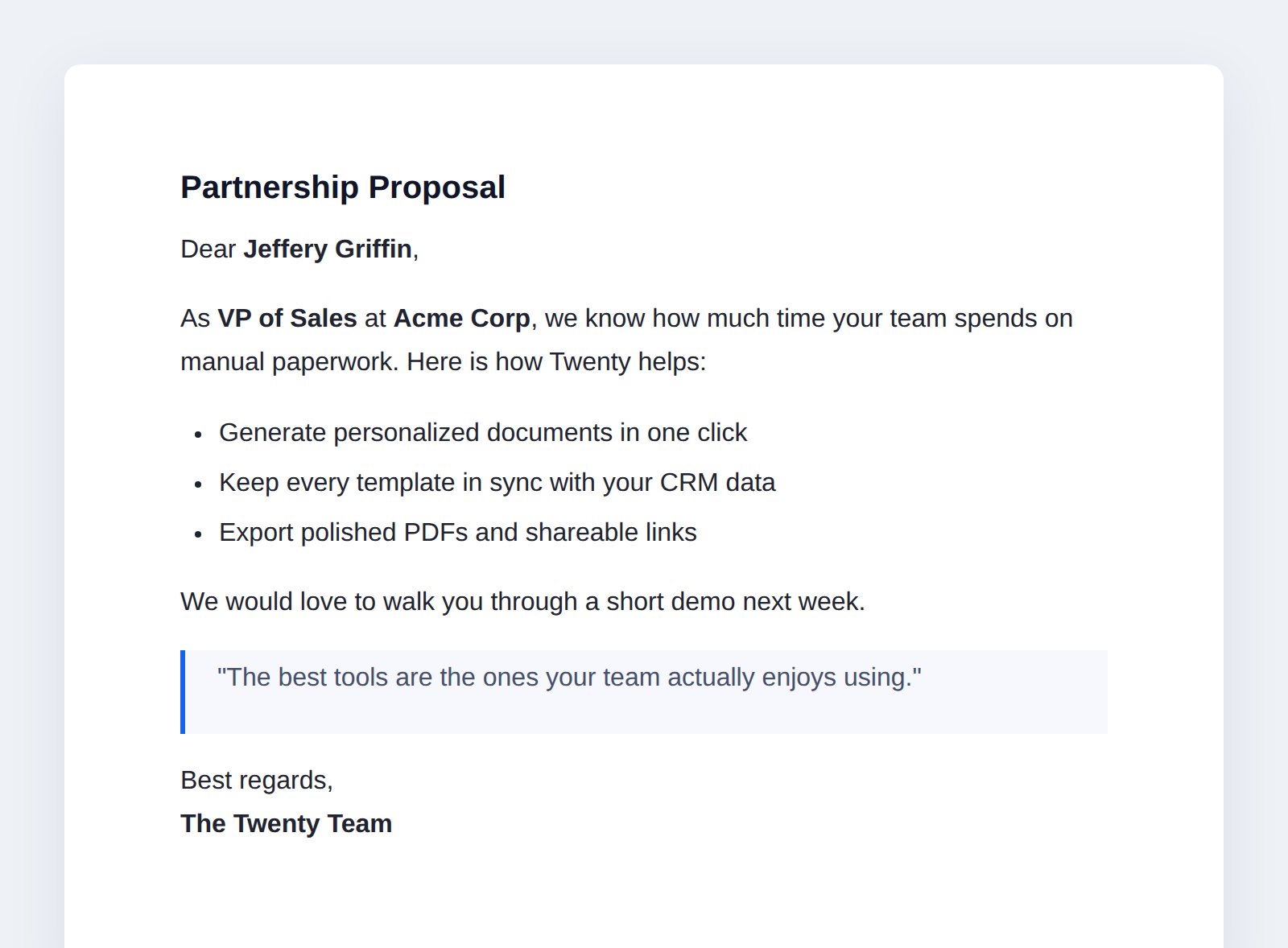
In this tutorial you'll build **Document Generator** — an app that turns reusable
templates into personalized documents using the data already in your CRM.
Write a template once with `{{placeholders}}`, then generate a filled-in
document for any Person or Company in one click — from the command menu, from an
AI agent, or from a workflow.
 ## What you'll learn
Each chapter adds one capability. By the end you'll have touched most of the SDK.
| Chapter | Capability | Reference |
| ---------------------------------------------------------------------------------------------------- | ------------------------------------------------------------------------------------------------------- | ------------------------------------------------------------------ |
| [1. Data model](/developers/extend/apps/tutorials/document-generator/data-model) | Objects, fields, and a relation | [Data](/developers/extend/apps/data/overview) |
| [2. Generating documents](/developers/extend/apps/tutorials/document-generator/generating-documents) | A logic function (AI tool + workflow action) that fills a Markdown template and attaches a polished PDF | [Logic functions](/developers/extend/apps/logic/logic-functions) |
| [3. HTTP routes](/developers/extend/apps/tutorials/document-generator/http-routes) | Serving JSON and a shareable HTML page from routes | [Logic functions](/developers/extend/apps/logic/logic-functions) |
| [4. Building the UI](/developers/extend/apps/tutorials/document-generator/building-the-ui) | Views, navigation, command menu, and front components that preview a document and edit a template | [Layout](/developers/extend/apps/layout/overview) |
| [5. An AI agent](/developers/extend/apps/tutorials/document-generator/ai-agent) | Agent + skill | [Skills & agents](/developers/extend/apps/logic/skills-and-agents) |
| [6. Publishing](/developers/extend/apps/tutorials/document-generator/publishing) | Ship it to the marketplace | [Publishing](/developers/extend/apps/operations/publishing) |
## Prerequisites
You should have finished the [Quick Start](/developers/extend/apps/getting-started/quick-start):
a local Twenty server running on port `2020` and the CLI authenticated to it.
If not, scaffold and start one now:
```bash filename="Terminal" theme={null}
npx create-twenty-app@latest document-generator
cd document-generator
yarn twenty dev
```
Prefer to read the finished code? The complete app lives in
[`packages/twenty-apps/examples/document-generator`](https://github.com/twentyhq/twenty/tree/main/packages/twenty-apps/examples/document-generator).
Every snippet below is copied from it.
## How the app fits together
## What you'll learn
Each chapter adds one capability. By the end you'll have touched most of the SDK.
| Chapter | Capability | Reference |
| ---------------------------------------------------------------------------------------------------- | ------------------------------------------------------------------------------------------------------- | ------------------------------------------------------------------ |
| [1. Data model](/developers/extend/apps/tutorials/document-generator/data-model) | Objects, fields, and a relation | [Data](/developers/extend/apps/data/overview) |
| [2. Generating documents](/developers/extend/apps/tutorials/document-generator/generating-documents) | A logic function (AI tool + workflow action) that fills a Markdown template and attaches a polished PDF | [Logic functions](/developers/extend/apps/logic/logic-functions) |
| [3. HTTP routes](/developers/extend/apps/tutorials/document-generator/http-routes) | Serving JSON and a shareable HTML page from routes | [Logic functions](/developers/extend/apps/logic/logic-functions) |
| [4. Building the UI](/developers/extend/apps/tutorials/document-generator/building-the-ui) | Views, navigation, command menu, and front components that preview a document and edit a template | [Layout](/developers/extend/apps/layout/overview) |
| [5. An AI agent](/developers/extend/apps/tutorials/document-generator/ai-agent) | Agent + skill | [Skills & agents](/developers/extend/apps/logic/skills-and-agents) |
| [6. Publishing](/developers/extend/apps/tutorials/document-generator/publishing) | Ship it to the marketplace | [Publishing](/developers/extend/apps/operations/publishing) |
## Prerequisites
You should have finished the [Quick Start](/developers/extend/apps/getting-started/quick-start):
a local Twenty server running on port `2020` and the CLI authenticated to it.
If not, scaffold and start one now:
```bash filename="Terminal" theme={null}
npx create-twenty-app@latest document-generator
cd document-generator
yarn twenty dev
```
Prefer to read the finished code? The complete app lives in
[`packages/twenty-apps/examples/document-generator`](https://github.com/twentyhq/twenty/tree/main/packages/twenty-apps/examples/document-generator).
Every snippet below is copied from it.
## How the app fits together
 You write a **template** once in a rich-text editor, with `{{placeholders}}`. Picking a
template and a CRM record fills the placeholders and stores a polished
**document** (with a PDF file). Everything else — the command menu, the AI agent,
the workflow step, the shareable link — is just a different way to trigger that
one generator.
## Keep this loop running
Leave `yarn twenty dev` running in a terminal for the whole tutorial. Every time
you add or edit a file under `src/`, it re-syncs to your server within a few
seconds, so you can watch each capability appear in the UI as you build it.
Chapter 1: model documents and templates.
You write a **template** once in a rich-text editor, with `{{placeholders}}`. Picking a
template and a CRM record fills the placeholders and stores a polished
**document** (with a PDF file). Everything else — the command menu, the AI agent,
the workflow step, the shareable link — is just a different way to trigger that
one generator.
## Keep this loop running
Leave `yarn twenty dev` running in a terminal for the whole tutorial. Every time
you add or edit a file under `src/`, it re-syncs to your server within a few
seconds, so you can watch each capability appear in the UI as you build it.
Chapter 1: model documents and templates.