> ## Documentation Index
> Fetch the complete documentation index at: https://docs.twenty.com/llms.txt
> Use this file to discover all available pages before exploring further.
# 1. Veri modeli
> Belgeleri ve şablonları nesneler, alanlar ve bir ilişki ile modelleyin.
Uygulamamızın iki özel nesneye ihtiyacı var: **belge şablonları** (ne yazılacağını belirten) ve
**belgeler** (oluşturulan sonuç). Bunları tanımlayalım.
CLI ile her varlık dosyasını iskelet olarak oluşturun — sizin için geçerli bir UUID ve doğru klasörü oluşturur:
```bash filename="Terminal" theme={null}
yarn twenty dev:add object
```
Aşağıda tamamlanmış dosyaları gösteriyoruz.
Her `*_UNIVERSAL_IDENTIFIER` sabiti
`src/constants/universal-identifiers.ts` içinde bulunur ve kullanıldığı yerde içe aktarılır. Aşağıdaki kod parçacıkları
kısalık için bu içe aktarmaları atlar — kendi dosyalarınızda bunları eklemeyi unutmayın.
## Şablon nesnesi
Bir şablonun bir `name` alanı, `{{placeholders}}` içeren bir `body` alanı ve bunun bir Person mı yoksa bir Company için mi yazıldığını belirten bir `target` alanı vardır. `body` bir
`RICH_TEXT` alanıdır, bu nedenle Twenty ona tam özellikli bir zengin metin düzenleyicisi verir.
```ts filename="src/objects/document-template.object.ts" theme={null}
import { defineObject, FieldType } from 'twenty-sdk/define';
export default defineObject({
universalIdentifier: DOCUMENT_TEMPLATE_OBJECT_UNIVERSAL_IDENTIFIER,
nameSingular: 'documentTemplate',
namePlural: 'documentTemplates',
labelSingular: 'Document template',
labelPlural: 'Document templates',
icon: 'IconFileText',
labelIdentifierFieldMetadataUniversalIdentifier:
TEMPLATE_NAME_FIELD_UNIVERSAL_IDENTIFIER,
fields: [
{ universalIdentifier: TEMPLATE_NAME_FIELD_UNIVERSAL_IDENTIFIER,
type: FieldType.TEXT, name: 'name', label: 'Name', icon: 'IconAbc' },
{ universalIdentifier: TEMPLATE_BODY_FIELD_UNIVERSAL_IDENTIFIER,
type: FieldType.RICH_TEXT, name: 'body', label: 'Body', icon: 'IconFileText',
description: 'Use {{placeholders}} like {{name.firstName}} or {{jobTitle}}.' },
{ universalIdentifier: TEMPLATE_TARGET_FIELD_UNIVERSAL_IDENTIFIER,
type: FieldType.SELECT, name: 'target', label: 'Target', icon: 'IconTarget',
defaultValue: `'PERSON'`,
options: [
{ id: TEMPLATE_TARGET_OPTION_PERSON_UNIVERSAL_IDENTIFIER,
value: 'PERSON', label: 'Person', color: 'blue', position: 0 },
{ id: TEMPLATE_TARGET_OPTION_COMPANY_UNIVERSAL_IDENTIFIER,
value: 'COMPANY', label: 'Company', color: 'green', position: 1 },
] },
],
});
```
`SELECT` seçenek **değerleri** `UPPER_CASE` (`PERSON`, `person` değil) olmalıdır ve
`defaultValue` fazladan tırnak içine alınır: `` `'PERSON'` ``. `label`,
kullanıcıların gördüğü şeydir.
## Belge nesnesi
Oluşturulan belge, işlenmiş `content` ve bir `status` saklar. Bunu
yine aynı şekilde tanımlayın; `status` için `DRAFT` / `GENERATED` seçenekli bir select alanı kullanın. Tam dosya:
[`document.object.ts`](https://github.com/twentyhq/twenty/blob/main/packages/twenty-apps/examples/document-generator/src/objects/document.object.ts).
## Bir ilişkiyle bunları birbirine bağlama
Her belge, geldiği şablonu işaret etmelidir. İlişkiler
**çift yönlüdür** — her iki tarafı da tanımlarsınız ve her birini kendi alan dosyasında belirtirsiniz.
```ts filename="src/fields/document-template-relation.field.ts" theme={null}
import { defineField, FieldType, OnDeleteAction, RelationType } from 'twenty-sdk/define';
// The "many" side: each document belongs to one template.
export default defineField({
universalIdentifier: DOCUMENT_TEMPLATE_FIELD_UNIVERSAL_IDENTIFIER,
objectUniversalIdentifier: DOCUMENT_OBJECT_UNIVERSAL_IDENTIFIER,
type: FieldType.RELATION,
name: 'template',
label: 'Template',
relationTargetObjectMetadataUniversalIdentifier:
DOCUMENT_TEMPLATE_OBJECT_UNIVERSAL_IDENTIFIER,
relationTargetFieldMetadataUniversalIdentifier:
TEMPLATE_DOCUMENTS_FIELD_UNIVERSAL_IDENTIFIER,
universalSettings: {
relationType: RelationType.MANY_TO_ONE,
onDelete: OnDeleteAction.SET_NULL,
joinColumnName: 'templateId',
},
});
```
Diğer taraf (`template-documents-relation.field.ts`),
ters yönde işaret eden ve adı `documents` olan bir `RelationType.ONE_TO_MANY` alanıdır.
Tam desen için [Relations](/l/tr/developers/extend/apps/data/relations) bölümüne bakın.
## Bunu Twenty'de görün
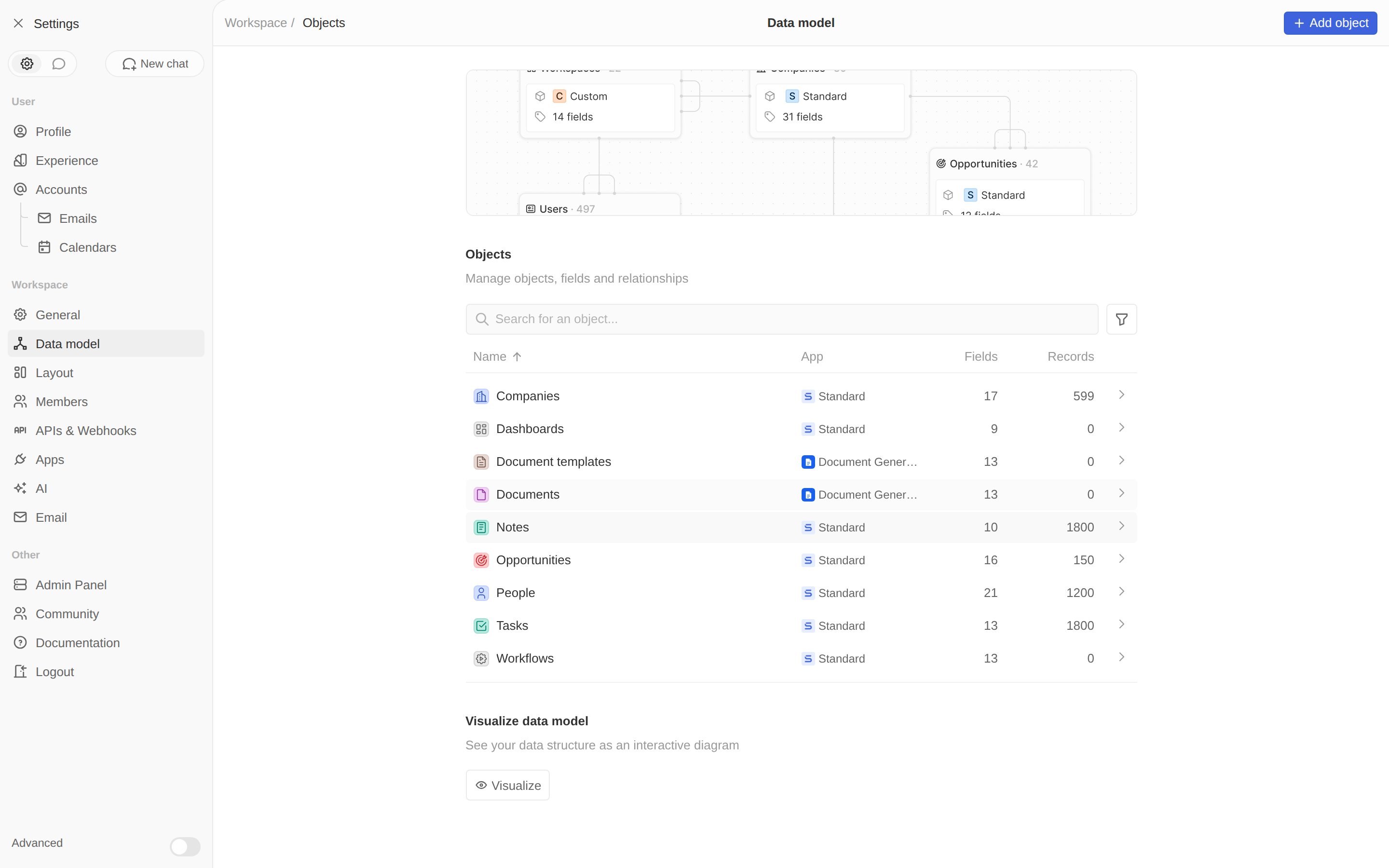
`yarn twenty dev` çalışırken **Settings → Data model** bölümünü açın. Her iki nesne de
uygulamanızla etiketlenmiş olarak görünür.
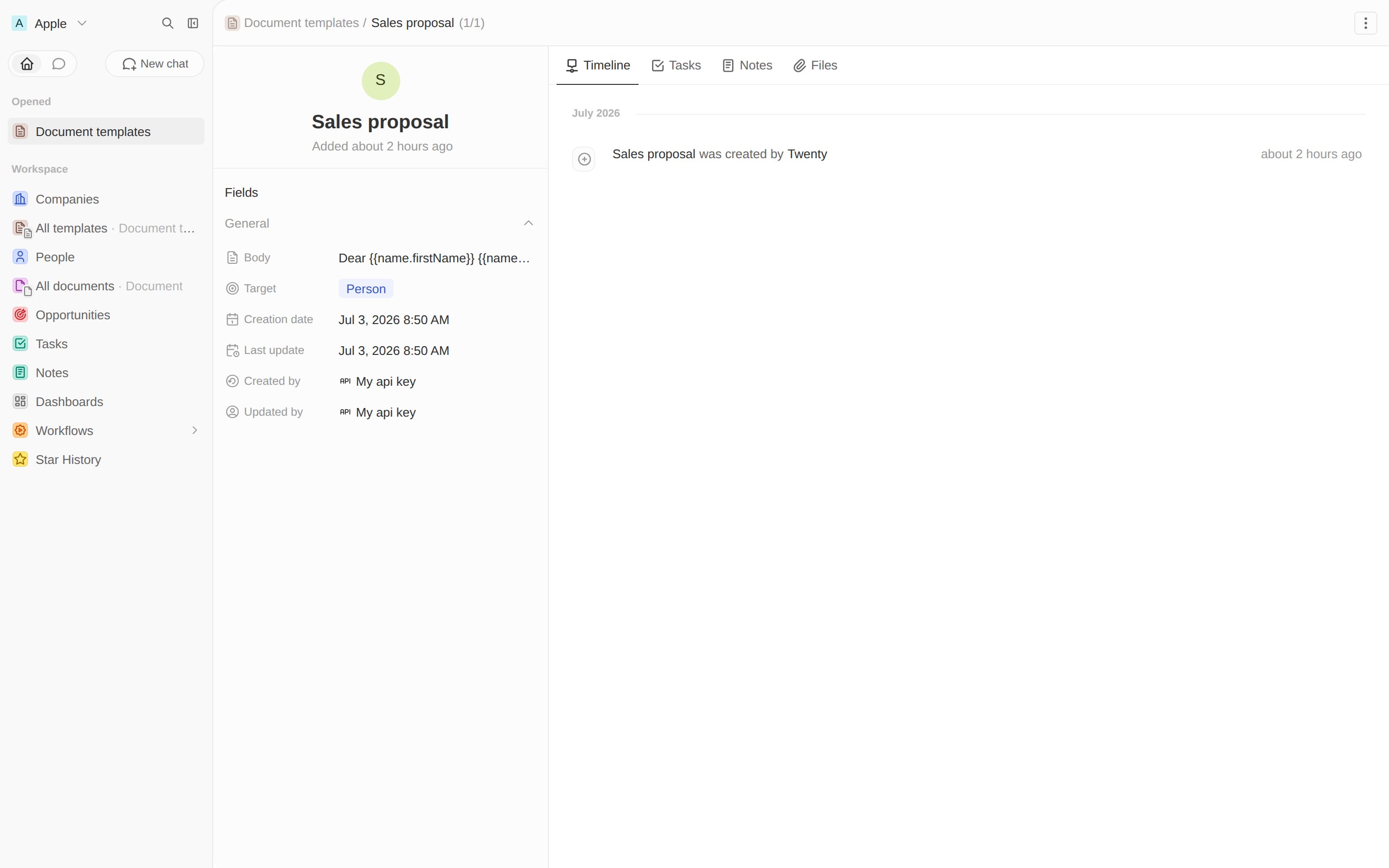
 Test etmek için bir şablon oluşturun — adını *Sales proposal* koyun, **Target** alanını
*Person* olarak ayarlayın ve birkaç yer tutucu içeren bir gövde yapıştırın:
```text theme={null}
Dear {{name.firstName}} {{name.lastName}},
As {{jobTitle}} at {{company.name}}, we think you'll love our product.
Best,
The Team
```
Test etmek için bir şablon oluşturun — adını *Sales proposal* koyun, **Target** alanını
*Person* olarak ayarlayın ve birkaç yer tutucu içeren bir gövde yapıştırın:
```text theme={null}
Dear {{name.firstName}} {{name.lastName}},
As {{jobTitle}} at {{company.name}}, we think you'll love our product.
Best,
The Team
```
 **Bu adımdan sonra:** bir ilişkiyle birbirine bağlı `documentTemplate` ve `document` nesnelerine ve bunlardan belge oluşturmak için bir şablona sahipsiniz. Sırada, onu dolduran mantık var.
Şablonu dolduran mantık fonksiyonunu yazın.
**Bu adımdan sonra:** bir ilişkiyle birbirine bağlı `documentTemplate` ve `document` nesnelerine ve bunlardan belge oluşturmak için bir şablona sahipsiniz. Sırada, onu dolduran mantık var.
Şablonu dolduran mantık fonksiyonunu yazın.