> ## Documentation Index
> Fetch the complete documentation index at: https://docs.twenty.com/llms.txt
> Use this file to discover all available pages before exploring further.
# Ürün Verilerini Twenty'ye Aktarın
> Ürün katalog verilerini bir veri ambarından CRM'inize bir programa göre eşitleyin.
Veri ambarınızdaki ürün verileriyle Twenty'yi senkron tutmak için bu kalıbı kullanın (örn. Snowflake, BigQuery, PostgreSQL).
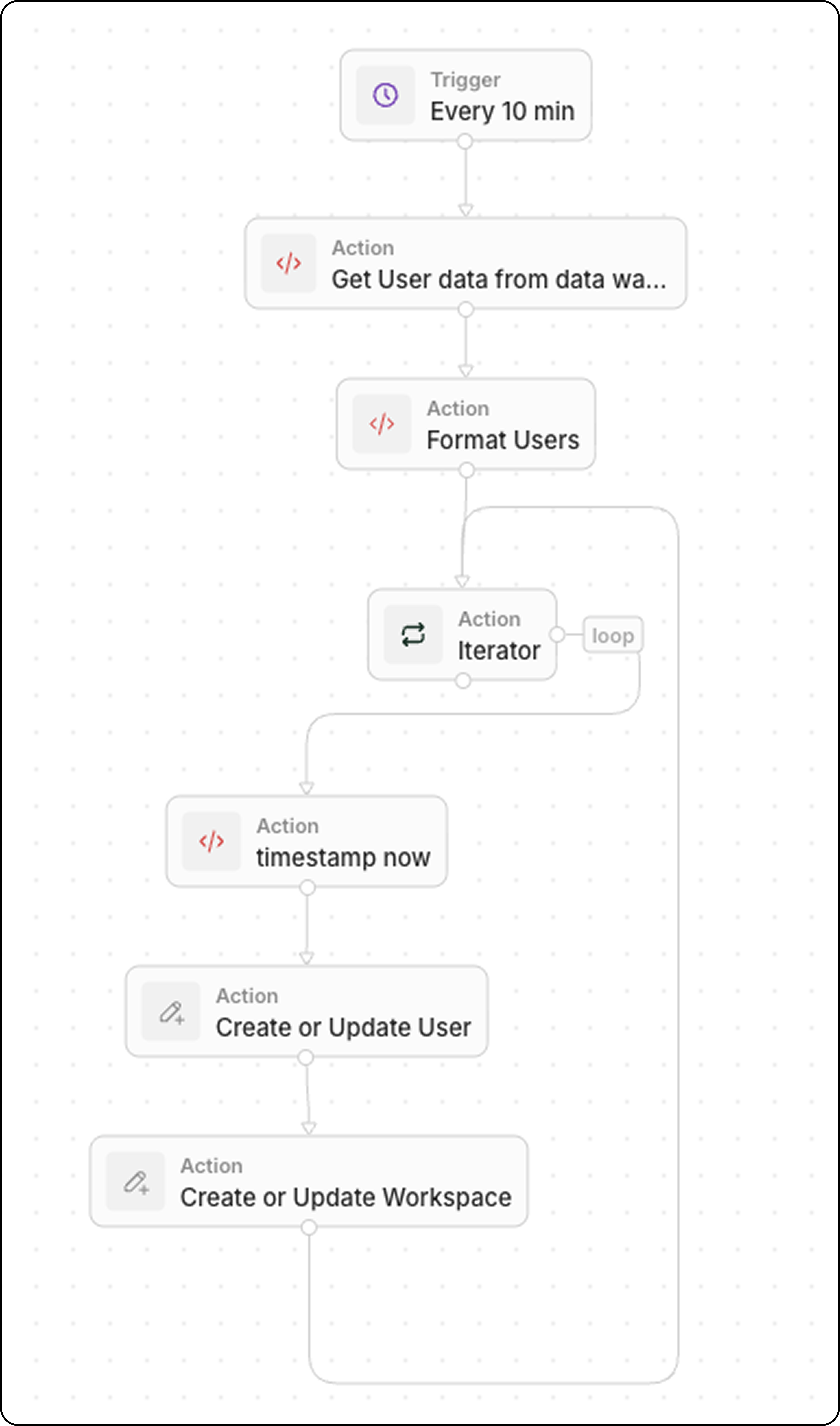
## İş Akışı Yapısı
1. **Tetikleyici**: Zamanlanmış
2. **Kod**: Veri ambarınızı sorgulayın
3. **Kod** (isteğe bağlı): Veriyi dizi olarak biçimlendirin
4. **Yineleyici**: Her ürün üzerinde döngü kurun
5. **Kaydı Ekle/Güncelle**: Twenty'de oluşturun veya güncelleyin
## Adım 1: Tetiklemeyi Zamanlayın
İş akışını, veri tazelik gereksinimlerinize uygun bir sıklıkta çalışacak şekilde ayarlayın:
* Neredeyse gerçek zamanlı eşitleme için her 5 dakikada bir
* Daha az kritik veriler için saatte bir
* Toplu güncellemeler için günlük
## Adım 2: Veri Ambarınızı Sorgulayın
En son verileri almak için bir **Kod** eylemi ekleyin:
```javascript theme={null}
export const main = async () => {
const intervalMinutes = 10; // Match your schedule frequency
const cutoffTime = new Date(Date.now() - intervalMinutes * 60 * 1000).toISOString();
// Replace with your actual data warehouse connection
const response = await fetch("https://your-warehouse-api.com/query", {
method: "POST",
headers: {
"Authorization": "Bearer YOUR_API_KEY",
"Content-Type": "application/json"
},
body: JSON.stringify({
query: `
SELECT id, name, sku, price, stock_quantity, updated_at
FROM products
WHERE updated_at >= '${cutoffTime}'
`
})
});
const data = await response.json();
return { products: data.results };
};
```
`updated_at >= last X minutes` ile filtreleyerek yalnızca yakın zamanda değişen kayıtları alın. Bu, eşitlemeyi verimli tutar.
## Adım 3: Verileri Biçimlendirin (İsteğe Bağlı)
Veri ambarınız dönüştürme gerektiren bir biçimde veri döndürüyorsa, başka bir **Kod** eylemi ekleyin. Yaygın dönüşümler arasında tür dönüştürmeleri, alan yeniden adlandırma ve veri temizleme bulunur.
### Örnek: Boolean ve Durum Alanlarına Sahip Kullanıcı Verileri
```javascript theme={null}
export const main = async (params: {
users: any;
}): Promise
 ## Adım 1: Tetiklemeyi Zamanlayın
İş akışını, veri tazelik gereksinimlerinize uygun bir sıklıkta çalışacak şekilde ayarlayın:
* Neredeyse gerçek zamanlı eşitleme için her 5 dakikada bir
* Daha az kritik veriler için saatte bir
* Toplu güncellemeler için günlük
## Adım 2: Veri Ambarınızı Sorgulayın
En son verileri almak için bir **Kod** eylemi ekleyin:
```javascript theme={null}
export const main = async () => {
const intervalMinutes = 10; // Match your schedule frequency
const cutoffTime = new Date(Date.now() - intervalMinutes * 60 * 1000).toISOString();
// Replace with your actual data warehouse connection
const response = await fetch("https://your-warehouse-api.com/query", {
method: "POST",
headers: {
"Authorization": "Bearer YOUR_API_KEY",
"Content-Type": "application/json"
},
body: JSON.stringify({
query: `
SELECT id, name, sku, price, stock_quantity, updated_at
FROM products
WHERE updated_at >= '${cutoffTime}'
`
})
});
const data = await response.json();
return { products: data.results };
};
```
## Adım 1: Tetiklemeyi Zamanlayın
İş akışını, veri tazelik gereksinimlerinize uygun bir sıklıkta çalışacak şekilde ayarlayın:
* Neredeyse gerçek zamanlı eşitleme için her 5 dakikada bir
* Daha az kritik veriler için saatte bir
* Toplu güncellemeler için günlük
## Adım 2: Veri Ambarınızı Sorgulayın
En son verileri almak için bir **Kod** eylemi ekleyin:
```javascript theme={null}
export const main = async () => {
const intervalMinutes = 10; // Match your schedule frequency
const cutoffTime = new Date(Date.now() - intervalMinutes * 60 * 1000).toISOString();
// Replace with your actual data warehouse connection
const response = await fetch("https://your-warehouse-api.com/query", {
method: "POST",
headers: {
"Authorization": "Bearer YOUR_API_KEY",
"Content-Type": "application/json"
},
body: JSON.stringify({
query: `
SELECT id, name, sku, price, stock_quantity, updated_at
FROM products
WHERE updated_at >= '${cutoffTime}'
`
})
});
const data = await response.json();
return { products: data.results };
};
```