> ## Documentation Index
> Fetch the complete documentation index at: https://docs.twenty.com/llms.txt
> Use this file to discover all available pages before exploring further.

# 将产品数据导入 Twenty

> 按计划将数据仓库中的产品目录数据同步到您的 CRM。

使用此模式，使 Twenty 与您的数据仓库（例如 Snowflake、BigQuery、PostgreSQL）中的产品数据保持同步。

## 工作流结构

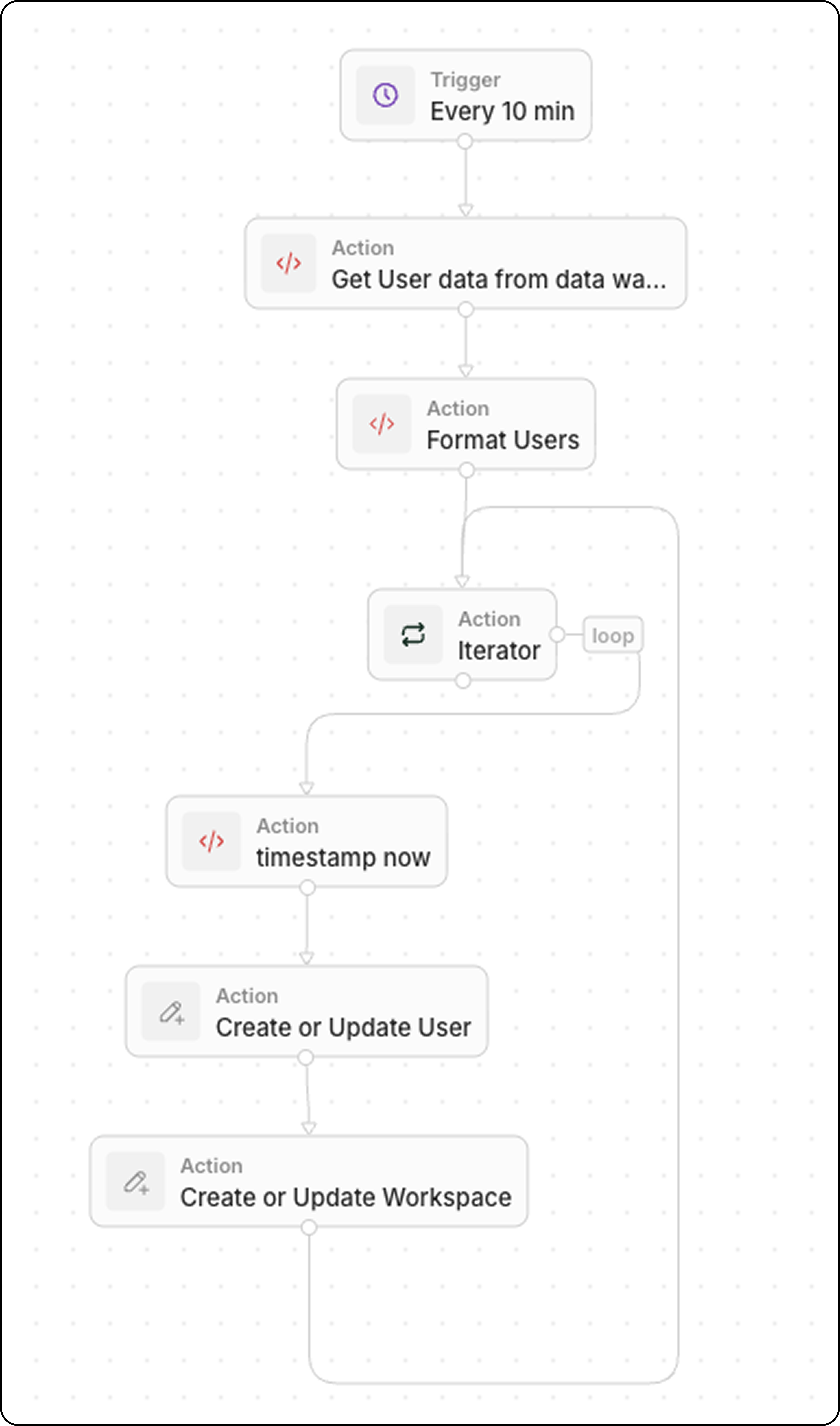
1. **触发器**：按计划
2. **Code**：查询您的数据仓库
3. **Code**（可选）：将数据格式化为数组
4. **Iterator**：遍历每个产品
5. **Upsert Record**：在 Twenty 中创建或更新

<img src="https://mintcdn.com/twenty/ZVHVYG6uDKpO6cME/images/user-guide/workflows/create_users_workflow.png?fit=max&auto=format&n=ZVHVYG6uDKpO6cME&q=85&s=8542bb62659bb0e7d1de08c6f36d83d5" style={{width:'100%'}} width="4550" height="7720" data-path="images/user-guide/workflows/create_users_workflow.png" />

## 步骤 1：为触发器设定计划

将工作流设置为按满足数据新鲜度需求的频率运行：

* 每 5 分钟一次，用于近实时同步
* 每小时一次，适用于不太关键的数据
* 每天一次，适用于批量更新

## 步骤 2：查询您的数据仓库

添加一个 **Code** 操作以获取最新数据：

```javascript theme={null}
export const main = async () => {
  const intervalMinutes = 10; // Match your schedule frequency
  const cutoffTime = new Date(Date.now() - intervalMinutes * 60 * 1000).toISOString();

  // Replace with your actual data warehouse connection
  const response = await fetch("https://your-warehouse-api.com/query", {
    method: "POST",
    headers: {
      "Authorization": "Bearer YOUR_API_KEY",
      "Content-Type": "application/json"
    },
    body: JSON.stringify({
      query: `
        SELECT id, name, sku, price, stock_quantity, updated_at
        FROM products
        WHERE updated_at >= '${cutoffTime}'
      `
    })
  });

  const data = await response.json();
  return { products: data.results };
};
```

<Tip>
  通过 `updated_at >= last X minutes` 进行筛选，仅检索最近更改的记录。 这样可以保持同步的高效性。
</Tip>

## 步骤 3：格式化数据（可选）

如果数据仓库返回的数据格式需要转换，请再添加一个 **Code** 操作。 常见的转换包括类型转换、字段重命名和数据清理。

### 示例：包含布尔值和状态字段的用户数据

```javascript theme={null}
export const main = async (params: {
  users: any;
}): Promise<object> => {
  const { users } = params;
  const usersFormatted = typeof users === "string" ? JSON.parse(users) : users;

  // Convert string "true"/"false" to actual booleans
  const toBool = (v: any) => v === true || v === "true";

  return {
    users: usersFormatted.map((user) => ({
      ...user,
      activityStatus: String(user.activityStatus).toUpperCase(),
      isActiveLast30d: toBool(user.isActiveLast30d),
      isActiveLast7d: toBool(user.isActiveLast7d),
      isActiveLast24h: toBool(user.isActiveLast24h),
      isTwenty: toBool(user.isTwenty),
    })),
  };
};
```

### 示例：产品数据的类型转换

```javascript theme={null}
export const main = async (params: { products: any }) => {
  const products = typeof params.products === "string"
    ? JSON.parse(params.products)
    : params.products;

  return {
    products: products.map(product => ({
      externalId: product.id,
      name: product.name,
      sku: product.sku,
      price: parseFloat(product.price),        // String → Number
      stockQuantity: parseInt(product.stock_quantity),
      isActive: product.status === "active"    // String → Boolean
    }))
  };
};
```

### 示例：日期与货币格式化

```javascript theme={null}
export const main = async (params: { deals: any }) => {
  const deals = typeof params.deals === "string"
    ? JSON.parse(params.deals)
    : params.deals;

  return {
    deals: deals.map(deal => ({
      ...deal,
      // Convert Unix timestamp to ISO date
      closedAt: deal.closed_timestamp
        ? new Date(deal.closed_timestamp * 1000).toISOString()
        : null,
      // Ensure amount is a number (remove currency symbols)
      amount: parseFloat(String(deal.amount).replace(/[^0-9.-]/g, "")),
      // Normalize stage names
      stage: deal.stage?.toLowerCase().replace(/_/g, " ")
    }))
  };
};
```

### 常见转换

| 源格式                  | 目标格式             | 代码                                       |    |                |
| -------------------- | ---------------- | ---------------------------------------- | -- | -------------- |
| `"true"` / `"false"` | `true` / `false` | \`v === true \\                          | \\ | v === "true"\` |
| `"123.45"`           | `123.45`         | `parseFloat(value)`                      |    |                |
| `"active"`           | `"ACTIVE"`       | `value.toUpperCase()`                    |    |                |
| `1704067200` (Unix)  | ISO 日期           | `new Date(v * 1000).toISOString()`       |    |                |
| `"$1,234.56"`        | `1234.56`        | `parseFloat(v.replace(/[^0-9.-]/g, ""))` |    |                |
| `null` / `undefined` | `""`             | \`value \\                               | \\ | ""\`           |

## 步骤 4：遍历产品

添加 **Iterator** 操作：

* 输入：`{{code.products}}`

这将遍历数组中的每个产品。

## 步骤 5：插入或更新每条记录

在迭代器内，添加一个 **Upsert Record** 操作：

| 设置        | 值                         |
| --------- | ------------------------- |
| **对象**    | 您自定义的 Product 对象          |
| **匹配方式**  | 外部 ID 或 SKU（唯一标识符）        |
| **Name**  | `{{iterator.item.name}}`  |
| **SKU**   | `{{iterator.item.sku}}`   |
| **Price** | `{{iterator.item.price}}` |

<Tip>
  使用 **Upsert**（更新或创建），而不是为“创建”和“更新”分别构建分支。 这样构建更快，也更易于调试。
</Tip>

## 示例用例

| 来源         | 数据          |
| ---------- | ----------- |
| **ERP 系统** | 产品目录、定价、库存  |
| **电商平台**   | 订单、客户、产品更新  |
| **数据仓库**   | 汇总指标、丰富后的数据 |
| **库存系统**   | 库存水平、补货警报   |

## 相关内容

* [工作流触发器](/l/zh/user-guide/workflows/capabilities/workflow-triggers)
* [工作流操作](/l/zh/user-guide/workflows/capabilities/workflow-actions)
* [在 Code 操作中处理数组](/l/zh/user-guide/workflows/how-tos/advanced-configurations/handle-arrays-in-code-actions)