> ## Documentation Index
> Fetch the complete documentation index at: https://docs.twenty.com/llms.txt
> Use this file to discover all available pages before exploring further.
# Use AI for Sales Campaigns
> Use AI and workflows to build focused sales lists and draft the campaign.
AI is useful when you have a sales goal but do not want to start with a blank list or blank email. Tell it what you are trying to do. It can look through your CRM, build a focused list, and draft one campaign for that list. You review the work, send a test, then decide whether to send it.
AI can prepare a campaign, but it cannot send one. Sending is always your
decision.
Campaigns are one-to-many. AI creates one draft with one subject and one email
body for the selected list; it does not write a separate draft for each lead.
## What AI can help with
| Task | Example |
| ---------------------- | --------------------------------------------------------------------------------------------- |
| **Find people** | "Find decision makers at software companies in Germany with a Head or VP title." |
| **Build a list** | "Create a list for open opportunities in the healthcare industry." |
| **Draft the campaign** | Write the subject, copy, call to action, and personalization for the sales play. |
| **Personalize** | Add variables such as `{{name.firstName}}` so the campaign includes that value when it sends. |
| **Improve a draft** | "Make this more direct", "Add a demo CTA", or "Give me three subject lines." |
The AI follows your permissions. It can only see and change records your role can access.
## Pair AI with workflows
AI helps you decide what to say and who to say it to. Workflows keep the data and lists ready for the next campaign.
Lists and List Members are records in Twenty. A workflow can create or update them as your CRM changes. This gives you a repeatable way to build sales segments instead of starting from scratch each time.
| Sales play | What the workflow does | Where AI helps |
| ------------------------- | ------------------------------------------------------------------------------------- | ----------------------------------------------------- |
| **New ICP leads** | When a new lead matches your criteria, add them to an outbound list. | Draft one campaign for that segment. |
| **Stalled opportunities** | Find deals that have been idle for a set time and build a follow-up list. | Draft one campaign for the selected follow-up list. |
| **Account expansion** | Add contacts when an account reaches a renewal date, plan change, or other milestone. | Draft one campaign for the renewal or expansion list. |
Workflows prepare or refresh the list. AI can research the CRM data and draft one campaign for that list. You still review the audience and choose when to send.
See [Workflows](/user-guide/workflows/overview) to build the automation behind a sales play.
## Part 1: Open the AI
Press `@` anywhere in Twenty, or press `Cmd+K` (`Ctrl+K` on Windows) and choose **Ask AI**.
## Part 2: Build your audience
Tell the AI who should receive the email. Use the fields in your workspace, just as you would when speaking to a teammate.
> Create a list called "Q4 product update" with everyone at companies that have more than 50 employees and are in the healthcare industry.
The AI searches your records, creates the list, and adds the people it finds. Open the list and check the members before you send.
Only add people who agreed to receive your emails. Your CRM can include people
you have only exchanged emails with. See
[Email campaign best
practices](/user-guide/email-campaigns/how-tos/email-campaign-best-practices).
## Part 3: Write the campaign
Tell the AI the goal, key points, tone, and call to action you need.
> Write a follow-up for people at open opportunities in the healthcare industry. Keep the subject under 50 characters. Start with a short, friendly intro that greets each person by first name, name three reasons the reporting dashboard can help their team, and end with a "Book a demo" button linking to [https://example.com/demo](https://example.com/demo).
The AI creates a draft with a name, subject, and email body. Open it from **Campaigns** to review it in the editor.
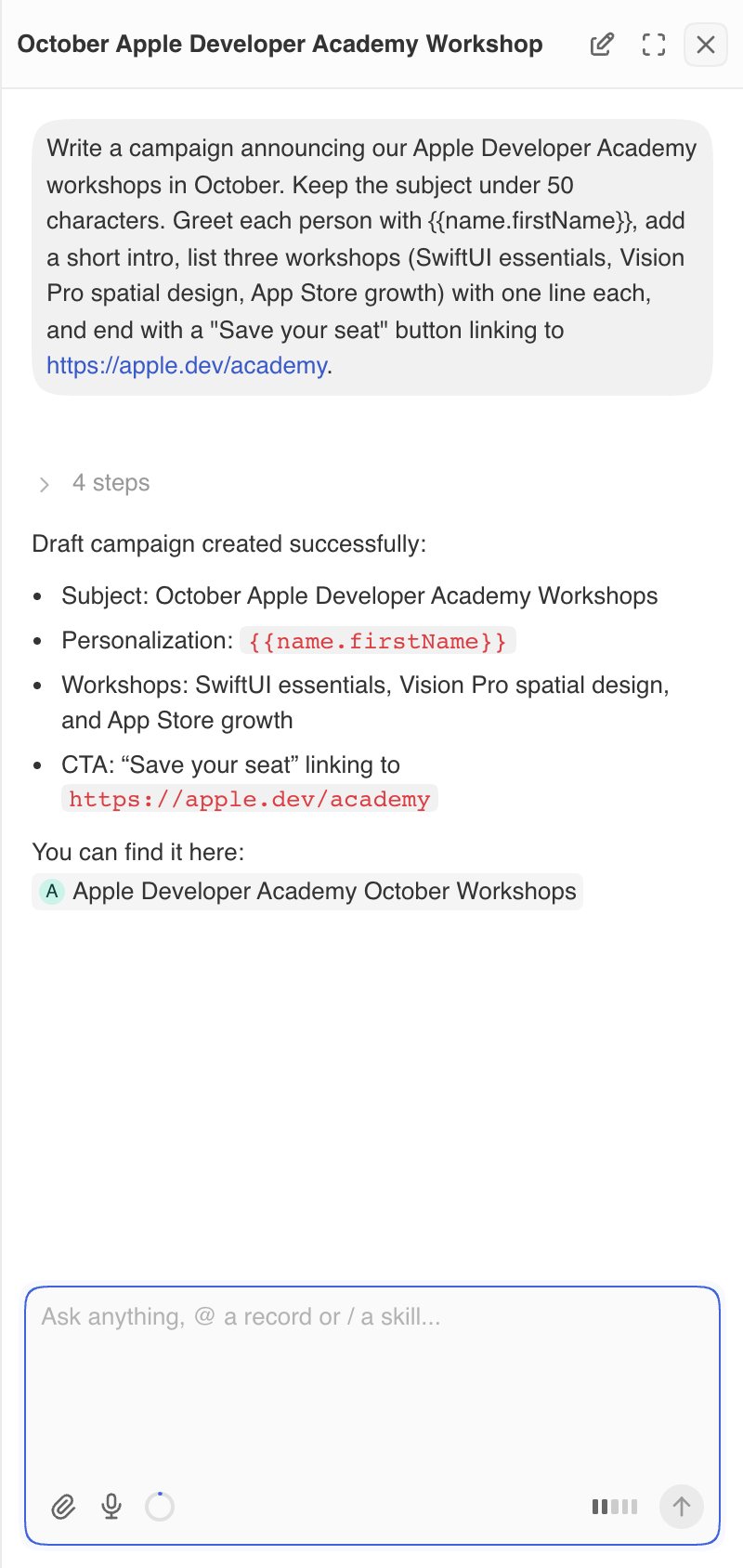 To make changes, keep chatting. Open the campaign first so the AI knows which one you mean:
* "Make the tone more direct."
* "Shorten the intro to two sentences."
* "Replace the button text with Book a demo."
* "Suggest three other subject lines."
You can edit the draft yourself at any time.
## Part 4: Review and send
To make changes, keep chatting. Open the campaign first so the AI knows which one you mean:
* "Make the tone more direct."
* "Shorten the intro to two sentences."
* "Replace the button text with Book a demo."
* "Suggest three other subject lines."
You can edit the draft yourself at any time.
## Part 4: Review and send
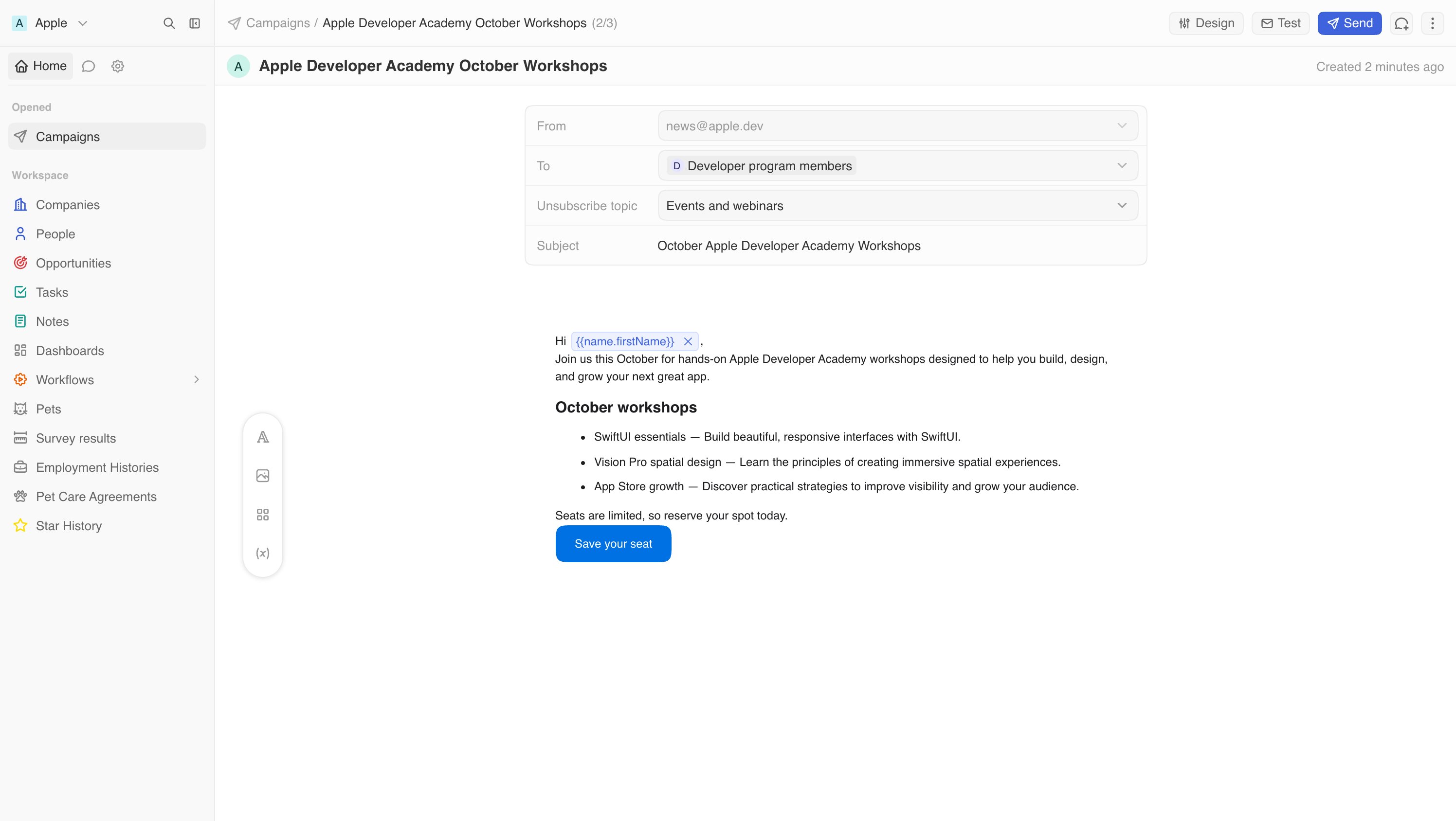 AI writes the draft. You choose the sender, audience, and send time:
1. Open the campaign's **Email** tab.
2. Choose the **From** address, the list under **To** and, optionally, an **Unsubscribe topic**.
3. Read the email. Check the facts, links, and prices.
4. Click **Test** and send yourself a copy.
5. Click **Send**, then choose **Send now** or **Send later**.
Each step is covered in detail in [Send your first campaign](/user-guide/email-campaigns/how-tos/send-your-first-campaign).
## Tips for good prompts
* **Use the field name.** "People at companies in the healthcare industry" is clearer than "healthcare leads."
* **Give it the facts.** It does not know your offer, price, or sales motion unless you tell it or the information is in your CRM.
* **Give it a job.** Say who this is for, what you want them to do, and why it matters to them.
* **Ask for options.** Try three subject lines or two versions of the same message for different segments.
* **Check the list size.** Ask "How many people are in the Q4 product update list?" before you send.
## Limitations
* The AI can only edit campaigns that are still **Draft**.
* Unsubscribe topics and the unsubscribe list are managed in **Settings**, not through the AI. See [Manage unsubscribes and topics](/user-guide/email-campaigns/how-tos/manage-unsubscribes-and-topics).
* AI can get facts wrong. Always read the email before you send it.
See [AI Chatbot](/user-guide/ai/capabilities/ai-chatbot) for more on what the AI can do across your workspace.
AI writes the draft. You choose the sender, audience, and send time:
1. Open the campaign's **Email** tab.
2. Choose the **From** address, the list under **To** and, optionally, an **Unsubscribe topic**.
3. Read the email. Check the facts, links, and prices.
4. Click **Test** and send yourself a copy.
5. Click **Send**, then choose **Send now** or **Send later**.
Each step is covered in detail in [Send your first campaign](/user-guide/email-campaigns/how-tos/send-your-first-campaign).
## Tips for good prompts
* **Use the field name.** "People at companies in the healthcare industry" is clearer than "healthcare leads."
* **Give it the facts.** It does not know your offer, price, or sales motion unless you tell it or the information is in your CRM.
* **Give it a job.** Say who this is for, what you want them to do, and why it matters to them.
* **Ask for options.** Try three subject lines or two versions of the same message for different segments.
* **Check the list size.** Ask "How many people are in the Q4 product update list?" before you send.
## Limitations
* The AI can only edit campaigns that are still **Draft**.
* Unsubscribe topics and the unsubscribe list are managed in **Settings**, not through the AI. See [Manage unsubscribes and topics](/user-guide/email-campaigns/how-tos/manage-unsubscribes-and-topics).
* AI can get facts wrong. Always read the email before you send it.
See [AI Chatbot](/user-guide/ai/capabilities/ai-chatbot) for more on what the AI can do across your workspace.