> ## Documentation Index
> Fetch the complete documentation index at: https://docs.twenty.com/llms.txt
> Use this file to discover all available pages before exploring further.
# Bring Product Data into Twenty
> Sync product catalog data from a data warehouse into your CRM on a schedule.
Use this pattern to keep Twenty in sync with product data from your data warehouse (e.g., Snowflake, BigQuery, PostgreSQL).
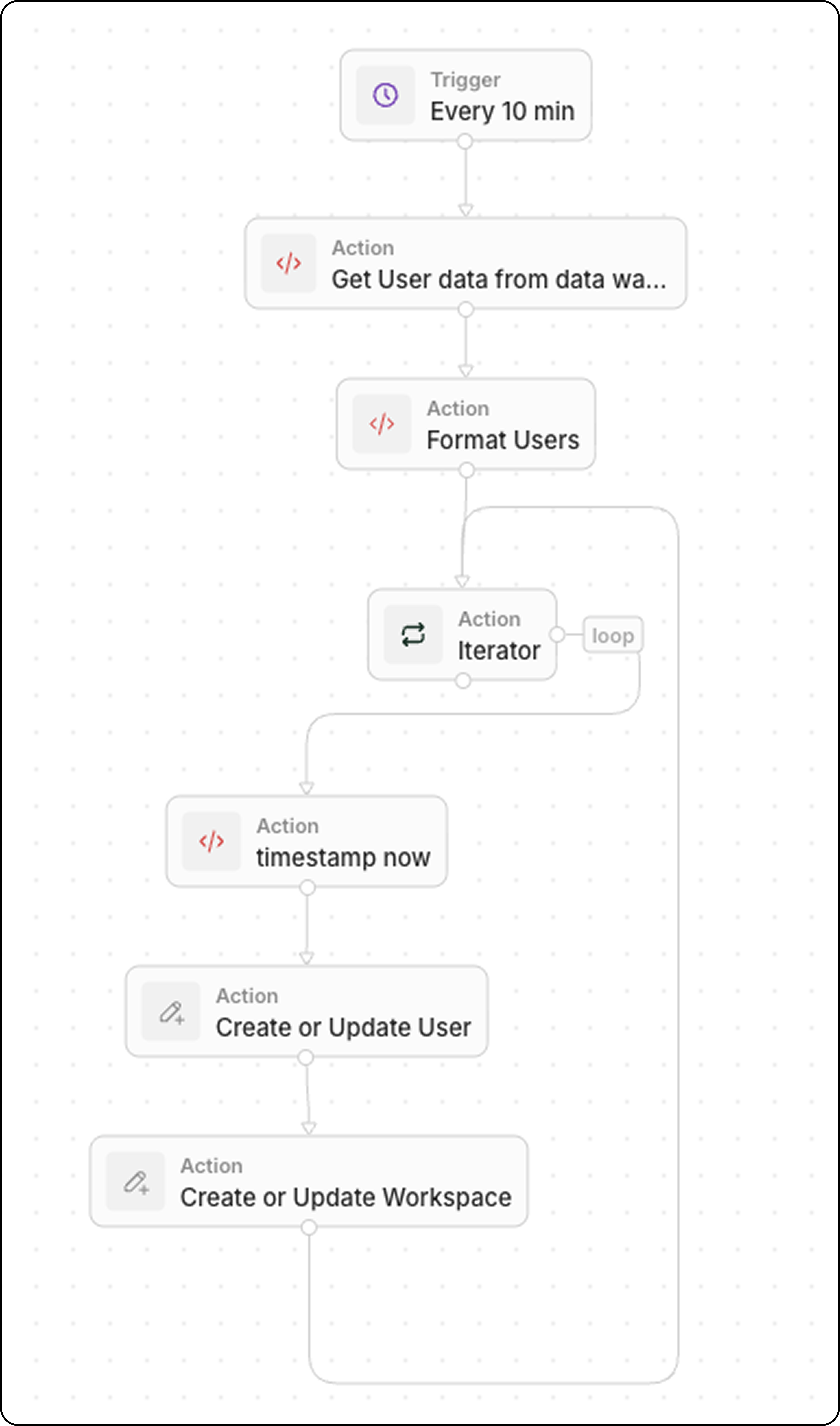
## Workflow Structure
1. **Trigger**: On a Schedule
2. **Code**: Query your data warehouse
3. **Code** (optional): Format data as array
4. **Iterator**: Loop through each product
5. **Upsert Record**: Create or update in Twenty
## Step 1: Schedule the Trigger
Set the workflow to run at a frequency matching your data freshness needs:
* Every 5 minutes for near real-time sync
* Every hour for less critical data
* Daily for batch updates
## Step 2: Query Your Data Warehouse
Add a **Code** action to fetch recent data:
```javascript theme={null}
export const main = async () => {
const intervalMinutes = 10; // Match your schedule frequency
const cutoffTime = new Date(Date.now() - intervalMinutes * 60 * 1000).toISOString();
// Replace with your actual data warehouse connection
const response = await fetch("https://your-warehouse-api.com/query", {
method: "POST",
headers: {
"Authorization": "Bearer YOUR_API_KEY",
"Content-Type": "application/json"
},
body: JSON.stringify({
query: `
SELECT id, name, sku, price, stock_quantity, updated_at
FROM products
WHERE updated_at >= '${cutoffTime}'
`
})
});
const data = await response.json();
return { products: data.results };
};
```
Filter by `updated_at >= last X minutes` to retrieve only recently changed records. This keeps the sync efficient.
## Step 3: Format Data (Optional)
If your warehouse returns data in a format that needs transformation, add another **Code** action. Common transformations include type conversions, field renaming, and data cleanup.
### Example: User Data with Boolean and Status Fields
```javascript theme={null}
export const main = async (params: {
users: any;
}): Promise
 ## Step 1: Schedule the Trigger
Set the workflow to run at a frequency matching your data freshness needs:
* Every 5 minutes for near real-time sync
* Every hour for less critical data
* Daily for batch updates
## Step 2: Query Your Data Warehouse
Add a **Code** action to fetch recent data:
```javascript theme={null}
export const main = async () => {
const intervalMinutes = 10; // Match your schedule frequency
const cutoffTime = new Date(Date.now() - intervalMinutes * 60 * 1000).toISOString();
// Replace with your actual data warehouse connection
const response = await fetch("https://your-warehouse-api.com/query", {
method: "POST",
headers: {
"Authorization": "Bearer YOUR_API_KEY",
"Content-Type": "application/json"
},
body: JSON.stringify({
query: `
SELECT id, name, sku, price, stock_quantity, updated_at
FROM products
WHERE updated_at >= '${cutoffTime}'
`
})
});
const data = await response.json();
return { products: data.results };
};
```
## Step 1: Schedule the Trigger
Set the workflow to run at a frequency matching your data freshness needs:
* Every 5 minutes for near real-time sync
* Every hour for less critical data
* Daily for batch updates
## Step 2: Query Your Data Warehouse
Add a **Code** action to fetch recent data:
```javascript theme={null}
export const main = async () => {
const intervalMinutes = 10; // Match your schedule frequency
const cutoffTime = new Date(Date.now() - intervalMinutes * 60 * 1000).toISOString();
// Replace with your actual data warehouse connection
const response = await fetch("https://your-warehouse-api.com/query", {
method: "POST",
headers: {
"Authorization": "Bearer YOUR_API_KEY",
"Content-Type": "application/json"
},
body: JSON.stringify({
query: `
SELECT id, name, sku, price, stock_quantity, updated_at
FROM products
WHERE updated_at >= '${cutoffTime}'
`
})
});
const data = await response.json();
return { products: data.results };
};
```