> ## Documentation Index
> Fetch the complete documentation index at: https://docs.twenty.com/llms.txt
> Use this file to discover all available pages before exploring further.
# Send Email Alerts with Tasks Due
> Automatically notify team members about their upcoming or overdue tasks.
export const VimeoEmbed = ({videoId, title = 'Video'}) =>
;
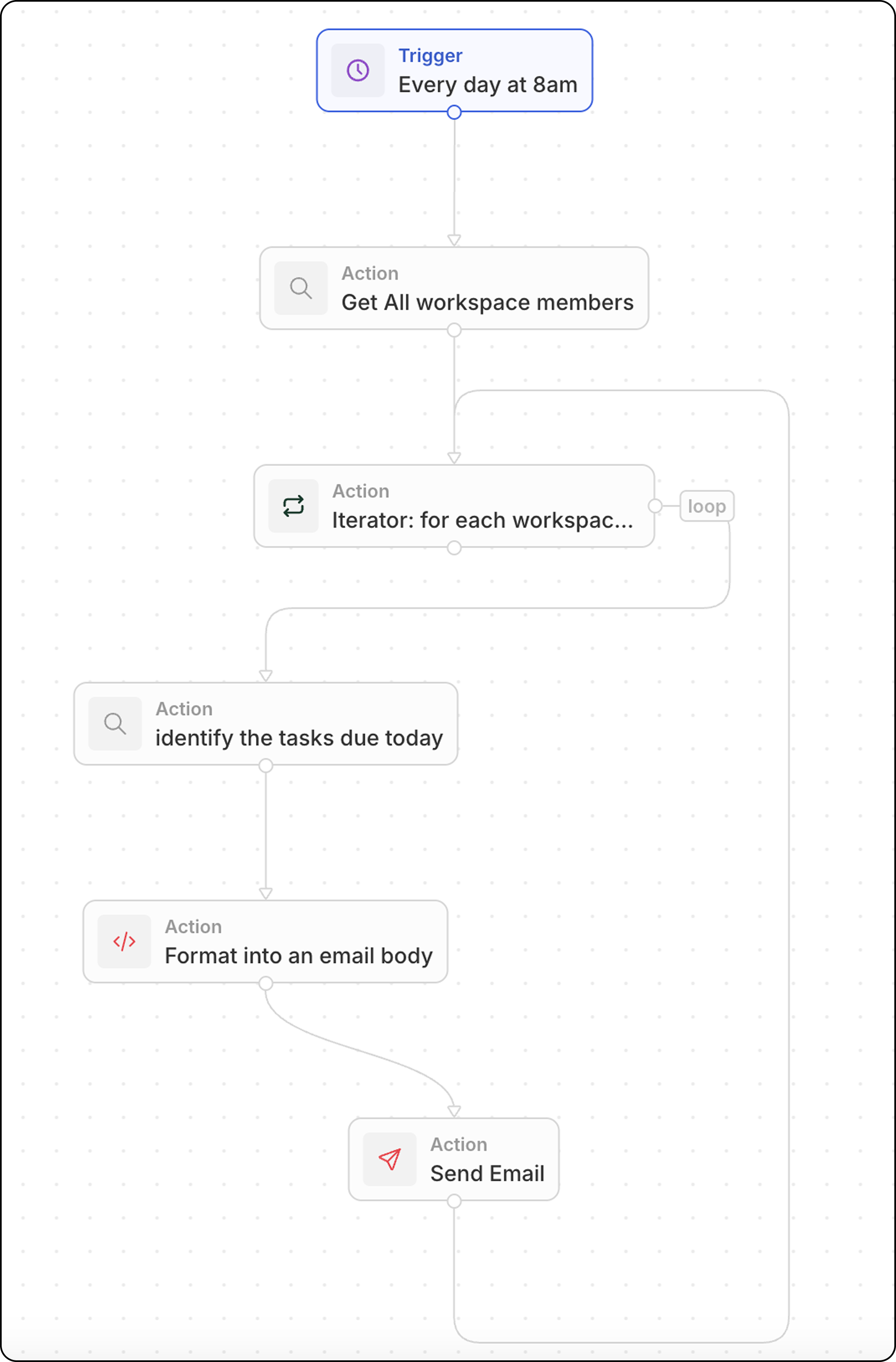 Send daily email reminders to each team member about their tasks due today.
## Overview
This workflow runs on a schedule and:
1. Fetches all workspace members
2. Loops through each member
3. Finds their tasks due today
4. Formats and sends a personalized email
## Step-by-Step Setup
### Step 1: Configure the Trigger
1. Go to **Settings → Workflows** and create a new workflow
2. Select **On a Schedule** as the trigger
3. Use a cron expression for daily at 8:00 AM: `0 8 * * *`
### Step 2: Search for All Workspace Members
1. Add a **Search Records** action
2. Select **Workspace Members** (under advanced objects)
3. No filters needed — this returns all members
### Step 3: Add an Iterator
1. Add an **Iterator** action
2. Set the input array to the workspace members from the previous step
3. All actions inside the iterator will run once per member
### Step 4: Search for Tasks Due Today (Inside Iterator)
1. Inside the iterator, add a **Search Records** action
2. Select **Tasks** as the object
3. Add filters:
* **Assignee** = current workspace member (from the iterator)
* **Due Date** = today
### Step 5: Format Tasks into Email Body (Inside Iterator)
Add a **Code** action to format the tasks into a readable list with links:
```javascript theme={null}
export const main = async (params: {
tasksDue?: Array<{ id: string; title: string }> | null | string;
}) => {
const tasksDue =
typeof params.tasksDue === "string"
? JSON.parse(params.tasksDue)
: params.tasksDue;
if (!Array.isArray(tasksDue) || tasksDue.length === 0) {
return {
formattedTasks: "No tasks due today."
};
}
const formattedTasks = tasksDue
.map(
t =>
`${t.title}\nhttps://yourSubDomain.twenty.com/object/task/${t.id}`
)
.join("\n\n");
return { formattedTasks };
};
```
Replace `yourSubDomain` with your actual Twenty workspace subdomain.
### Step 6: Send Email (Inside Iterator)
1. Add a **Send Email** action (still inside the iterator)
2. Configure:
| Field | Value |
| ----------- | --------------------------------------------------------------- |
| **To** | `{{iterator.currentItem.userEmail}}` (workspace member's email) |
| **Subject** | Your Tasks Due Today |
| **Body** | `{{code.formattedTasks}}` |
### Step 7: Test and Activate
1. Click **Test** to run the workflow manually
2. Check inboxes for the emails
3. Activate the workflow
## Related
* [Workflow Actions](/user-guide/workflows/capabilities/workflow-actions)
* [Send Emails from Workflows](/user-guide/workflows/capabilities/send-emails-from-workflows)
* [Handle Arrays in Code Actions](/user-guide/workflows/how-tos/advanced-configurations/handle-arrays-in-code-actions)
Send daily email reminders to each team member about their tasks due today.
## Overview
This workflow runs on a schedule and:
1. Fetches all workspace members
2. Loops through each member
3. Finds their tasks due today
4. Formats and sends a personalized email
## Step-by-Step Setup
### Step 1: Configure the Trigger
1. Go to **Settings → Workflows** and create a new workflow
2. Select **On a Schedule** as the trigger
3. Use a cron expression for daily at 8:00 AM: `0 8 * * *`
### Step 2: Search for All Workspace Members
1. Add a **Search Records** action
2. Select **Workspace Members** (under advanced objects)
3. No filters needed — this returns all members
### Step 3: Add an Iterator
1. Add an **Iterator** action
2. Set the input array to the workspace members from the previous step
3. All actions inside the iterator will run once per member
### Step 4: Search for Tasks Due Today (Inside Iterator)
1. Inside the iterator, add a **Search Records** action
2. Select **Tasks** as the object
3. Add filters:
* **Assignee** = current workspace member (from the iterator)
* **Due Date** = today
### Step 5: Format Tasks into Email Body (Inside Iterator)
Add a **Code** action to format the tasks into a readable list with links:
```javascript theme={null}
export const main = async (params: {
tasksDue?: Array<{ id: string; title: string }> | null | string;
}) => {
const tasksDue =
typeof params.tasksDue === "string"
? JSON.parse(params.tasksDue)
: params.tasksDue;
if (!Array.isArray(tasksDue) || tasksDue.length === 0) {
return {
formattedTasks: "No tasks due today."
};
}
const formattedTasks = tasksDue
.map(
t =>
`${t.title}\nhttps://yourSubDomain.twenty.com/object/task/${t.id}`
)
.join("\n\n");
return { formattedTasks };
};
```
Replace `yourSubDomain` with your actual Twenty workspace subdomain.
### Step 6: Send Email (Inside Iterator)
1. Add a **Send Email** action (still inside the iterator)
2. Configure:
| Field | Value |
| ----------- | --------------------------------------------------------------- |
| **To** | `{{iterator.currentItem.userEmail}}` (workspace member's email) |
| **Subject** | Your Tasks Due Today |
| **Body** | `{{code.formattedTasks}}` |
### Step 7: Test and Activate
1. Click **Test** to run the workflow manually
2. Check inboxes for the emails
3. Activate the workflow
## Related
* [Workflow Actions](/user-guide/workflows/capabilities/workflow-actions)
* [Send Emails from Workflows](/user-guide/workflows/capabilities/send-emails-from-workflows)
* [Handle Arrays in Code Actions](/user-guide/workflows/how-tos/advanced-configurations/handle-arrays-in-code-actions)