
フロントコンポーネントを使用できる場所
フロントコンポーネントは、Twenty 内の3つの場所でレンダリングできます:- サイドパネル — ヘッドレスでないフロントコンポーネントは、右側のサイドパネルで開きます。 フロントコンポーネントがコマンドメニューからトリガーされた場合のデフォルトの動作です。
- ウィジェット(ダッシュボードとレコードページ) — フロントコンポーネントは、ページレイアウト内にウィジェットとして埋め込めます。 ダッシュボードやレコードページのレイアウトを設定する際、ユーザーはフロントコンポーネントのウィジェットを追加できます。
- App settings —
defineSettingsFrontComponent()で定義されたフロントコンポーネントは、アプリの Settings タブ内のセクションとして、デフォルトの変数設定 UI の代わりにレンダリングされます。
- コマンドメニュー項目とペアにする — コマンドメニュー(Cmd+K)に登録し、必要に応じてピン留めされたクイックアクションとして登録します。
- ページレイアウト内のウィジェットとして埋め込む — レコードの詳細ページまたはダッシュボード上に配置します。
defineSettingsFrontComponent()で定義する — アプリの Settings タブ内のセクションとして、デフォルトの変数設定 UI の代わりにレンダリングされます。
基本的な例
フロントコンポーネントの動作を手早く確認するには、defineCommandMenuItemとペアにして、ページ右上隅にクイックアクションボタンとして表示させるのが最も簡単です。
src/front-components/hello-world.tsx
src/command-menu-items/hello-world.command-menu-item.ts
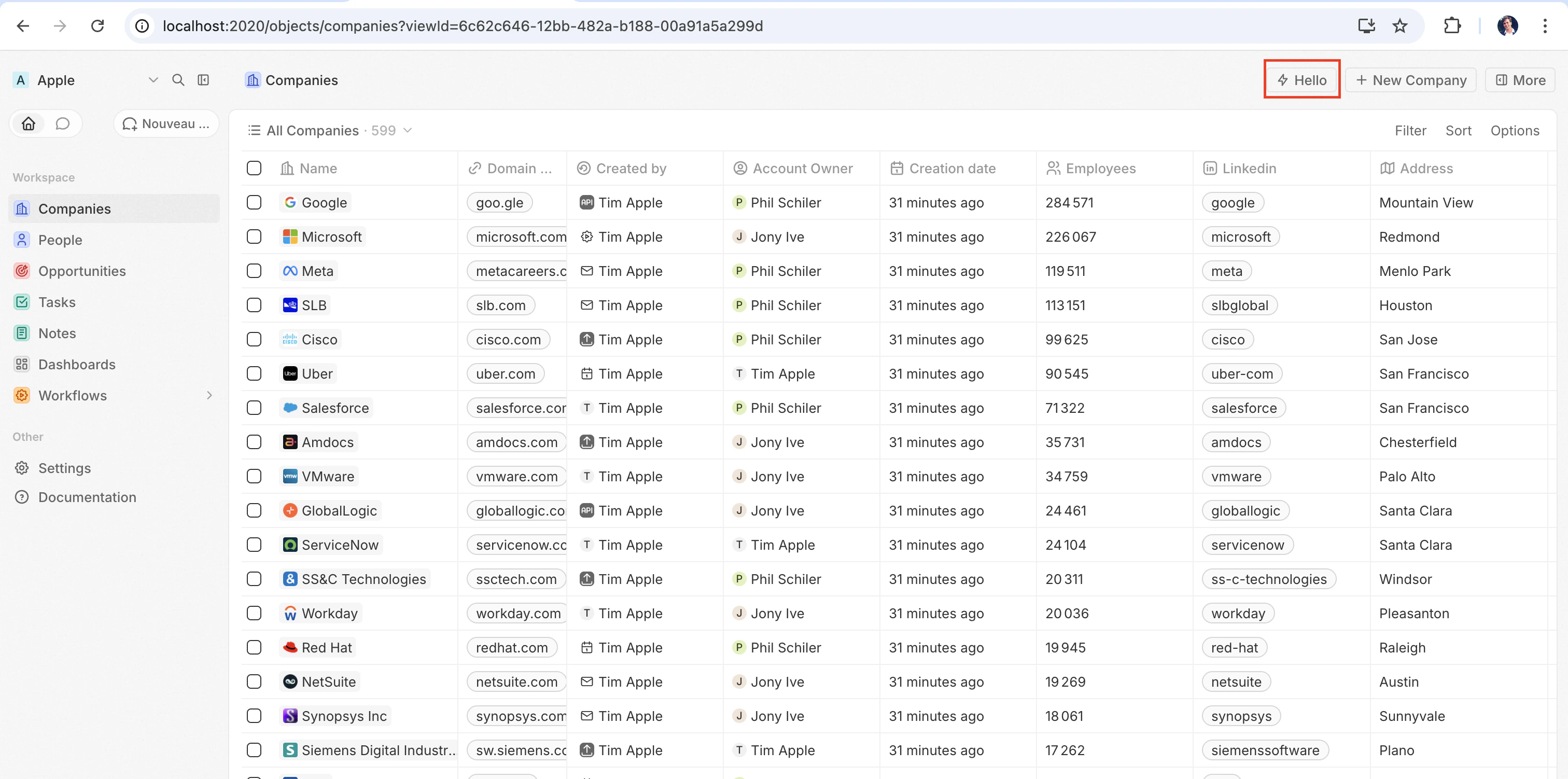
yarn twenty dev で同期するか(または 1 回限りで yarn twenty apply を実行すると)、ページ右上にクイックアクションが表示されます:
設定フィールド
フロントコンポーネントをページに配置する
コマンド以外にも、ページレイアウトでウィジェットとして追加することで、フロントコンポーネントをレコードページに直接埋め込めます。 詳しくはページレイアウトを参照してください。カスタム設定コンポーネント
アプリの Settings タブ内の自動生成された変数設定 UI を独自のコンポーネントに置き換えるには、defineFrontComponent ではなく defineSettingsFrontComponent で定義します。 このコンポーネントは、同じconfiguration fields(ただし、設定コンポーネントは常に可視の UI をレンダーするため、受け付けられない isHeadless を除く)を受け取り、さらにこのコンポーネントをアプリの設定 UI としてマークします。
このコンポーネントは、Settings タブ全体を置き換えるのではなく、そのタブの内部のセクションとしてレンダリングされます。 Twenty のシステム管理セクション(自動アップグレード、App URL、接続)は常にその上にレンダーされ、アプリ側で上書きすることはできません。
src/front-components/app-settings.tsx
ヘッドレスと非ヘッドレス
フロントコンポーネントには、isHeadless オプションで制御される2つのレンダリングモードがあります:
非ヘッドレス(デフォルト) — コンポーネントは可視のUIをレンダリングします。 コマンドメニューからトリガーされた場合、サイドパネルで開きます。 isHeadless が false または省略された場合のデフォルトの動作です。
ヘッドレス (isHeadless: true) — コンポーネントはバックグラウンドで不可視のままマウントされます。 サイドパネルは開きません。 ヘッドレスコンポーネントは、ロジックを実行して自動的にアンマウントするアクション向けに設計されています。例えば、非同期タスクの実行、ページへのナビゲーション、確認モーダルの表示などです。 以下で説明する SDK の Command コンポーネントと自然に組み合わせて使用できます。
src/front-components/sync-tracker.tsx
null を返すため、Twenty はそのためのコンテナのレンダリングをスキップします—レイアウトに空白は発生しません。 コンポーネントは引き続き、すべてのフックとホスト通信 API にアクセスできます。
SDK の Command コンポーネント
twenty-sdk パッケージは、ヘッドレスのフロントコンポーネント向けに設計された4つの Command ヘルパーコンポーネントを提供します。 各コンポーネントは、マウント時にアクションを実行し、エラーをスナックバー通知で処理し、完了時にフロントコンポーネントを自動的にアンマウントします。
twenty-sdk/front-component からインポートします:
Command—executeプロップ経由で非同期コールバックを実行します。CommandLink— アプリのパスにナビゲートします。 Props:to,params,queryParams,options.CommandModal— 確認モーダルを開きます。 ユーザーが確認すると、executeコールバックを実行します。 Props:title,subtitle,execute,confirmButtonText,confirmButtonAccent.CommandOpenSidePanelPage— サイドパネルページを開きます。 Props はpageに依存します。たとえば、ViewRecordはrecordIdとobjectNameSingular(さらに任意で、特定のタブでレコードを開くためのtabid)を受け取り、他のページはpageTitleとpageIconを受け取ります。
Command を使用してコマンドメニューからアクションを実行するヘッドレスのフロントコンポーネントの完全な例です:
src/front-components/run-action.tsx
src/command-menu-items/run-action.command-menu-item.ts
CommandModal を使用する例です:
src/front-components/delete-draft.tsx
CommandOpenSidePanelPage を使用して、現在のレコードを特定のタブのサイドパネルで開く例です。 tab はページレイアウトのタブ id です(デフォルトのレイアウトでは company-tab-emails や company-tab-timeline のような id を使用し、カスタムレイアウトではタブ自身の id を使用します)。 その id がレコードのレイアウト内に存在しない場合は、代わりにデフォルトのタブが開きます。
src/front-components/open-company-emails.tsx
ロジック関数の呼び出し
フロントコンポーネントは不透明なオリジンの iframe 内にサンドボックス化された Web Worker 内でブラウザーサイドで実行され、一方でロジック関数はサーバーサイドで実行されます。 両者の間にプロセス内での直接呼び出しはありません。その代わり、フロントコンポーネントは HTTP 経由でロジック関数にアクセスします。httpRouteTriggerSettings で宣言されたロジック関数は、そのルートパスで HTTP 経由でアクセスできます。 RestApiClient は、/s/ で始まるパスをアプリのルートとして扱い、それらをあなたの関数が提供されている URL に解決し、TWENTY_APP_ACCESS_TOKEN で認証します。
Twenty Cloud では、HTTP トリガーのロジック関数はワークスペースごとの専用ドメインで提供されます。https://\<your-workspace-subdomain>.withtwenty.com\<path> で提供されます。 外部から呼び出す場合は、関数の HTTP trigger 設定、もしくはアプリケーションの Settings タブから、正確な URL をコピーしてください。
ヘッドレスフロントコンポーネントは、Command コンポーネント経由でマウント時に呼び出しを実行し、その後自動的にアンマウントできます。
src/front-components/sync-prs.tsx
RestApiClient に渡されるパスは、ロジック関数の httpRouteTriggerSettings.path に /s を付加したものです。 isAuthRequired: true のままにしておいてください。コンポーネント用に Twenty が発行する TWENTY_APP_ACCESS_TOKEN によってリクエストが認証されます。
src/logic-functions/fetch-prs.logic-function.ts
TWENTY_APP_ACCESS_TOKEN は自動的に挿入されます。詳しくは Application variables を参照してください。 秘匿アプリケーション変数はフロントコンポーネントに公開されることがないため、API キーやその他の機密性の高いロジックはフロントコンポーネントではなく、ロジック関数側に保持してください。Twenty REST API の呼び出し
アプリの HTTP ルートを呼び出したり、フロントコンポーネントから Twenty のレコードを読み書きしたりするには、twenty-client-sdk/rest の RestApiClient を使用します。 これは、/s/... のパスをワークスペースの関数のベース URL に送り、/rest/... を含むそれ以外のすべてのパスを TWENTY_API_URL に送信します。
options には、headers、query(クエリ文字列パラメーターのレコード。null 相当の値はスキップされます)、および signal 経由の AbortSignal を指定できます。 FormData ではないオブジェクト body は、自動的に JSON シリアル化されます。 401 が発生した場合、クライアントはホスト経由で一度だけアクセス トークンを更新し、そのリクエストを再試行します。
ベース URL とトークンは、デフォルトで環境から解決されます。 必要に応じてコンストラクターに上書き設定を渡します — たとえばテスト時などです:
RestApiClientError をスローし、status、statusText、url、および解析済みの body を公開します:
ランタイムコンテキストへのアクセス
コンポーネント内で、SDK のフックを使用して現在のユーザー、レコード、コンポーネントインスタンスにアクセスします:src/front-components/record-info.tsx
アプリケーション変数
isSecret: false が設定された defineApplication() 内で定義されたアプリケーション変数は、getApplicationVariable ユーティリティを通じてフロントコンポーネント内で利用できます。
src/front-components/greeting.tsx
getApplicationVariable は、変数に宣言されている type に関係なく、常に string(または undefined)を返します。 文字列は型に応じて一貫した方法でシリアライズされます(boolean は "true" / "false"、number は 10 進数の文字列、配列 / オブジェクトは JSON)。これはロジック関数の process.env で使用されているのと同じ形式です。各自でパースしてください(Number(...)、JSON.parse(...)、=== 'true' など)。 Variable types を参照してください。
次のシステム変数は、常に process.env 経由で利用できます。
TWENTY_FUNCTIONS_URL
Twenty はまた、TWENTY_FUNCTIONS_URL をフロントコンポーネントとロジック関数に挿入します。これは、アプリの HTTP トリガーのロジック関数が提供されるベース URL です。
この変数が存在するのは、その URL が必ずしも Twenty サーバー自体とは限らないためです。 Twenty Cloud では、アプリのルートはワークスペースごとの専用ドメイン(https://\<your-workspace-subdomain>.withtwenty.com、または設定されている場合はアプリケーションのプライマリ公開ドメイン)で提供されます。これにより、アプリで作成されたレスポンスが Twenty アプリのオリジンではなく分離されたオリジン上で実行されます。 セルフホストおよびローカルインスタンスでは、アプリのルートはサーバー自体の /s プレフィックスの下で提供され、この変数がまったく設定されない場合もあります。 ベース URL はワークスペースやインスタンスごとに異なるため、コードでハードコードすることはできません。サーバーが実行時に正しい値を挿入します。
この変数を直接読む必要があることはほとんどありません。 /s/ プレフィックス付きのパスで RestApiClient を通じてルートを呼び出すと、クライアントが URL を解決します。/s プレフィックスを取り除き、TWENTY_FUNCTIONS_URL をターゲットにし、この変数が設定されていない場合は \<TWENTY_API_URL>/s をフォールバックとして使用します。 リクエストを送信せずに絶対 URL を取得するには、resolveUrl('/s/\<path>') を使用します(リンクなどの用途)。 URL を手作業で組み立てる場合にのみ、この変数を直接読み取ってください。
ホスト通信 API
フロントコンポーネントは、twenty-sdk の関数を使用してナビゲーション、モーダル、通知をトリガーできます:
アクション完了後にホスト API を使用してスナックバーを表示し、サイドパネルを閉じる例です:
src/front-components/archive-record.tsx
複数のレコードを扱う
複数の選択されたレコードを処理するにはuseSelectedRecordIds() を使用してください。 これは一括操作に役立ちます:
src/front-components/bulk-export.tsx
src/command-menu-items/bulk-export.command-menu-item.ts
公開アセット
フロントコンポーネントは、getPublicAssetUrl を使用してアプリの public/ ディレクトリ内のファイルにアクセスできます:
フロントコンポーネント間で依存関係を共有することについて
デフォルトでは、各フロントコンポーネントはインポートするライブラリのコピーをそれぞれ同梱するため、5つのコンポーネントを持つアプリでは、React が5回配信されます。 共有する依存関係をアプリのpackage.json に宣言すると、それらのライブラリを一度だけビルドし、アプリ内のすべてのコンポーネントが単一のキャッシュ済みファイルから読み込むようにできます:
package.json
src/front-components/counter.tsx
- アプリごとに1つの共有依存関係バンドル。 バンドルはアプリ自身の依存関係からビルドされるため、配信するバージョンを完全にコントロールできます。
- インポートする正確な指定子を列挙してください。
twenty-ui/inputとtwenty-ui/displayは 2 つのエントリです。パッケージ名だけでは、そのサブパスは対象になりません。reactを列挙すると、自動的にreact/jsx-runtimeも対象になります。 reactと一緒にreact-dom/clientを共有してください。 すべてのコンポーネントはcreateRootを通じてレンダーされるため、これを含めない場合、各コンポーネントは引き続き React DOM を同梱することになります。- バンドルはキャッシュされます。 バンドルは長期間有効な不変キャッシュ付きのコンテンツハッシュ URL で提供されるため、一度ダウンロードされると、その依存関係のいずれかが変更されるまでアプリのすべてのコンポーネントで再利用されます。
- 共有パッケージを一切インポートしないコンポーネントは、バンドルをダウンロードすることはありません。
スタイリング
フロントコンポーネントは複数のスタイリング手法をサポートしています。 次のものを使用できます:- インラインスタイル —
style={{ color: 'red' }} - Twenty UI コンポーネント — Twenty 独自のコンポーネントライブラリです。以下の Using Twenty UI components を参照してください
- Emotion —
@emotion/reactによる CSS-in-JS - styled-components —
styled.divパターン - Tailwind CSS — ユーティリティクラス
- React と互換性のある任意の CSS-in-JS ライブラリ
Twenty UI コンポーネントの使用
Twenty はコンポーネントライブラリをtwenty-ui パッケージとして提供しています。 フロントエンドコンポーネントでは、ボタン、タグ、ステータスピル、チップ、アバター、アイコン、タイポグラフィ、そしてワークスペースのライト/ダークテーマに自動で合わせてくれるテーマトークンなどに利用できます。
インストール
Twenty インスタンスに同梱されているバージョンに固定して、そのパッケージをアプリに追加します。twenty-ui はビルド時にフロントエンドコンポーネントへバンドルされるため、アプリの依存関係に追加するだけで済み、実行時に設定することは何もありません。
コンポーネントのインポート
パッケージのルートではなく、対応するサブパスからインポートすることで、使用しているコンポーネントだけがバンドルに含まれるようにします。アイコン
twenty-ui/icon から個別のアイコンをインポートします:
IconsProvider、useIcons、iconsState の使用は避けてください。これらは Tabler アイコンセット全体(数 MB)を読み込みます。
テーマ設定とテーマトークン
Twenty UI コンポーネントはワークスペースのライト/ダークテーマに自動的に追従します。レンダラーがホスト上のアクティブなカラースキームを適用し、コンポーネントはそれに基づいて色を決定します。 独自のインラインスタイルでも同じデザイントークンを使うには、useTheme() フックを呼び出します。 これにより、アクティブなテーマに紐づいた Twenty のテーマトークン(スペーシング、カラー、角丸、フォント)が返されます。コンポーネント側で ThemeProvider をセットアップする必要はありません。
useTheme() はフックなので、コンポーネント本体の中でトークンを読み取り、値が常に現在のテーマを反映するようにできます。 同じトークンマップは themeCssVariables 定数としてもエクスポートされていますが、フロントエンドコンポーネントでは useTheme() を優先してください。アプリのマニフェストを抽出している間は、themeCssVariables を参照するモジュールレベルの定数が未定義になる可能性があります。
アクティブなスキームを明示的に分岐させるには、twenty-sdk/front-component の useColorScheme() を使って取得します。このフックは 'light' または 'dark' を返します。
現在の制限
Front components は現在も積極的に開発が進められています。 レンダリング、スタイリング、イベント処理は問題なく動作します。 レンダリングを越えた処理(要素の計測、ref に対する DOM メソッドの呼び出し、ツリーの外へのポータル、ブラウザー ストレージへのアクセス)については、現在は未実装または不完全であり、そのほとんどは例外も出さずに黙って失敗します。スキャフォールドがフルなブラウザー DOM を前提に型付けされているため、TypeScript エラーも発生しません。 これらのいずれかが原因でブロックされている場合は、issue を作成して、優先度を上げてもらってください。レイアウトと計測
まだ自分自身を計測できるものはありません。
そのため、recharts の
ResponsiveContainer、Floating UI / Popper、リストの仮想化、およびドラッグによるサイズ変更はまだ動作しません。 代わりに CSS でレイアウトしてください。スタイルシートは実際のページに適用されるので、flexbox、grid、aspect-ratio、clamp()、@container はすべて通常どおり動作します。
requestAnimationFrame, fetch, setTimeout, queueMicrotask は、window. プレフィックスなしで動作します。 window.requestAnimationFrame(...) などを使った場合だけ例外が投げられます。DOM アクセス
ref が返すのは HTMLElement ではなくサンドボックス要素です。
このポータルのギャップが原因で、Radix、Headless UI、MUI、react-select のポップオーバーはデフォルトでは何もレンダリングしません。 ほとんどのライブラリは container プロップを受け付けるので、自分がレンダリングした要素を指定してください。
イベント
マウス、ポインター、タッチ、ドラッグ、キーボード、フォーカス、input/change/submit、scroll/wheel/contextmenu、そして animationend/transitionend はホストへ渡されます。さらに、要素ごとにいくつかのイベントも渡されます:<img> の load/error、<input>/\<textarea> のクリップボードおよびコンポジション、\<video>/\<audio> のメディア、\<details>/\<dialog> の toggle などです。 それ以外(onAuxClick、onSelect、onInvalid、onReset、onAnimationStart、pointer capture、<img> の onLoad)は、警告なしに破棄されます。
document.addEventListener() と window.addEventListener() はエラーなく登録されますが、一度も発火しません。そのため、ドラッグは開始した要素からポインターが離れた瞬間に止まります。 event.preventDefault() も渡されません。フォーム送信、dragover/drop、およびリンクのクリックは、すでに保護されています。
属性とスタイリング
各要素は自分自身のプロパティをホスト DOM にフォワードします(\<a> の href、<img> の src/alt、<input> の value/placeholder/disabled など)。さらに、すべての要素に共通のプロパティセットもフォワードされます:id、className、style、title、tabIndex、role、draggable、および任意の aria-* / data-* 属性(ハイフン区切りのため、ariaLabel は破棄されます)。 それ以外のものはすべて暗黙的に破棄されるため、カスタム状態は data-* として表現してください。
コンポーネントの CSS(import './styles.css'、CSS-in-JS、または \<style> 要素のいずれであっても)は、ホストページの \<head> に スコープなし(unscoped) で挿入されます。 そのため、クラス名が Twenty 独自のクラス名と衝突します(プレフィックスを付け、決して素の div { ... } セレクタは書かないでください)。また、@media はウィジェットではなくブラウザウィンドウに対してマッチします(独自の container-type を指定した @container を使用してください)。 インラインの style props には影響しません。
ストレージとネットワーク
localStorage、sessionStorage、IndexedDB、Cookie、Cache API、および BroadcastChannel はすべて利用できません。コンポーネントはオペークなオリジンの worker 内で実行されるためです。 状態を永続化するには、ロジック関数を呼び出し、そのキー・バリュー ストアを使用してください。
fetch は動作しますが、いくつか注意点があります。
- Twenty API への呼び出しやアプリのルートへの呼び出しはホストによってプロキシされるため、
RestApiClientを優先して使用してください。 プロキシされた呼び出しでは、AbortSignalなどのRequestInitオプションは破棄され、stringとURLSearchParamsのボディのみがサポートされます。 - その他のオリジンからのリクエストは、
Origin: nullを付けてサンドボックスの外へ送信されるため、サードパーティ API はAccess-Control-Allow-Origin: *を返す場合にのみ応答します。 代わりにロジック関数から呼び出してください。 fetch('/rest/people')は、サンドボックスに相対パスを解決するためのページ URL がないため、Twenty API には決してマッチしません。
その他のギャップ
- ファイル内容。
<input type="file">は、ハンドラーにファイルのメタデータのみを渡し、バイト列は渡さないため、FileReaderやアップロードはまだ利用できません。 - ドラッグ&ドロップのペイロード。 ドラッグイベントは発火しますが、
event.dataTransferはundefinedです。 - Node 組み込みモジュール。
fs、path、node:cryptoはビルドに失敗するため、その処理は ロジック関数 に移動してください。 Web Crypto、fetch、TextEncoder、およびURLは利用可能です。 \<iframe>は常にallow-same-originなしで再サンドボックス化されるため、独自のセッションに依存する埋め込みは、ログアウト状態としてレンダリングされます。 また、onLoadもありません。