
프런트 컴포넌트를 사용할 수 있는 위치
프런트 컴포넌트는 Twenty 내에서 세 위치에 렌더링될 수 있습니다:- 사이드 패널 — 비헤드리스 프런트 컴포넌트는 오른쪽 사이드 패널에서 열립니다. 이는 명령 메뉴에서 프런트 컴포넌트를 트리거할 때의 기본 동작입니다.
- 위젯(대시보드 및 레코드 페이지) — 프런트 컴포넌트를 페이지 레이아웃 내 위젯으로 삽입할 수 있습니다. 대시보드 또는 레코드 페이지 레이아웃을 구성할 때 사용자는 프런트 컴포넌트 위젯을 추가할 수 있습니다.
- App settings —
defineSettingsFrontComponent()으로 정의되며, 이 프런트 컴포넌트는 기본 변수 구성 UI 대신 앱의 Settings 탭 내부 섹션으로 렌더링됩니다.
- 명령 메뉴 항목과 연결 — 명령 메뉴(Cmd+K)에 등록하고, 선택적으로 고정된 빠른 작업으로 등록합니다.
- 페이지 레이아웃에 위젯으로 포함 — 레코드 상세 페이지 또는 대시보드에 배치합니다.
defineSettingsFrontComponent()로 정의 — 기본 변수 구성 UI 대신 앱의 Settings 탭 내부 섹션으로 렌더링합니다.
기본 예제
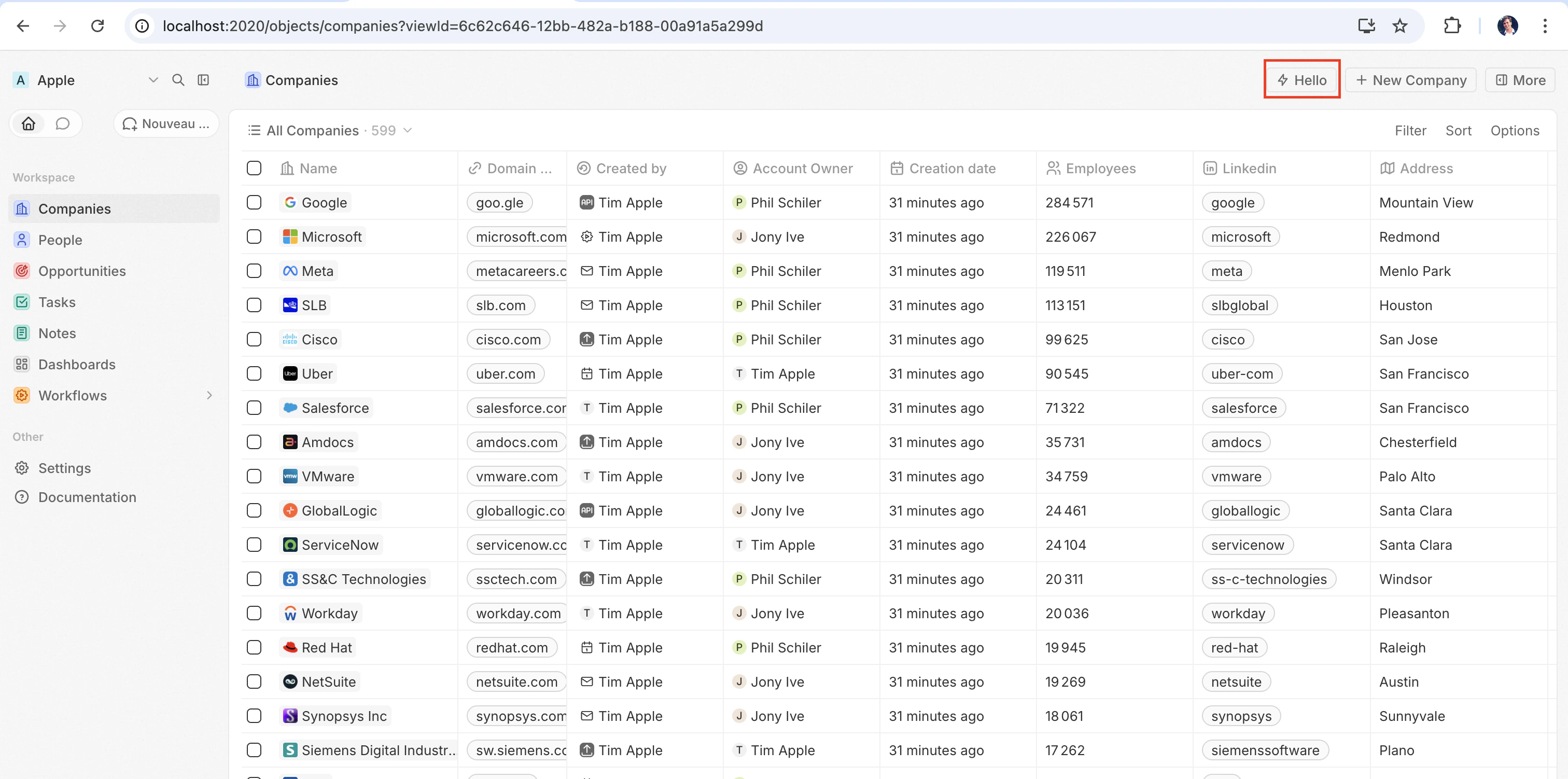
프런트 컴포넌트가 실제로 동작하는 모습을 가장 빨리 확인하는 방법은defineCommandMenuItem과 연결하여 페이지 오른쪽 상단에 빠른 작업 버튼으로 표시되게 하는 것입니다.
src/front-components/hello-world.tsx
src/command-menu-items/hello-world.command-menu-item.ts
yarn twenty dev로 동기화한 후(또는 일회성으로 yarn twenty apply를 실행한 경우), 페이지 우측 상단에 빠른 작업이 표시됩니다:
구성 필드
프런트 컴포넌트를 페이지에 배치하기
명령 외에도, 페이지 레이아웃에 위젯으로 추가하여 레코드 페이지에 프런트 컴포넌트를 직접 임베드할 수 있습니다. 자세한 내용은 페이지 레이아웃을 참조하세요.사용자 정의 설정 컴포넌트
앱의 Settings 탭에서 자동 생성되는 변수 구성 UI를 사용자 정의 컴포넌트로 대체하려면,defineFrontComponent 대신 defineSettingsFrontComponent로 정의하세요. 이 설정 컴포넌트는 항상 눈에 보이는 UI를 렌더링하므로 허용되지 않는 isHeadless를 제외하고, 동일한 구성 필드를 사용하며, 추가로 이 컴포넌트를 앱의 설정 UI로 표시합니다.
이 컴포넌트는 전체 탭을 대체하는 것이 아니라, Settings 탭 내부의 섹션으로 렌더링됩니다. Twenty의 시스템 관리 섹션(자동 업그레이드, App URL, 연결)은 항상 이 컴포넌트 위에 렌더링되며, 앱에서 이를 재정의할 수 없습니다.
src/front-components/app-settings.tsx
헤드리스 vs 비헤드리스
프런트 컴포넌트는isHeadless 옵션으로 제어되는 두 가지 렌더링 모드를 제공합니다:
비헤드리스(기본값) — 컴포넌트가 가시적인 UI를 렌더링합니다. 명령 메뉴에서 트리거되면 사이드 패널에서 열립니다. isHeadless가 false이거나 생략된 경우의 기본 동작입니다.
헤드리스 (isHeadless: true) — 컴포넌트가 백그라운드에서 보이지 않게 마운트됩니다. 사이드 패널을 열지 않습니다. 헤드리스 컴포넌트는 로직을 실행한 뒤 스스로 언마운트하는 작업에 맞게 설계되었습니다 — 예: 비동기 작업 실행, 페이지로 이동, 확인 모달 표시. 아래에 설명된 SDK Command 컴포넌트와 자연스럽게 짝을 이룹니다.
src/front-components/sync-tracker.tsx
null을 반환하기 때문에, Twenty는 해당 컴포넌트에 대한 컨테이너 렌더링을 생략합니다 — 레이아웃에 빈 공간이 생기지 않습니다. 컴포넌트는 여전히 모든 훅과 호스트 통신 API에 접근할 수 있습니다.
SDK Command 컴포넌트
twenty-sdk 패키지는 헤드리스 프런트 컴포넌트를 위해 설계된 네 가지 Command 헬퍼 컴포넌트를 제공합니다. 각 컴포넌트는 마운트 시 동작을 실행하고, 스낵바 알림을 표시하여 오류를 처리하며, 완료되면 프런트 컴포넌트를 자동으로 언마운트합니다.
twenty-sdk/front-component에서 임포트하세요:
Command—executeprop을 통해 비동기 콜백을 실행합니다.CommandLink— 앱 경로로 이동합니다. Props:to,params,queryParams,options.CommandModal— 확인 모달을 엽니다. 사용자가 확인하면execute콜백을 실행합니다. Props:title,subtitle,execute,confirmButtonText,confirmButtonAccent.CommandOpenSidePanelPage— 사이드 패널 페이지를 엽니다. Props는page에 따라 달라집니다. 예를 들어ViewRecord는recordId와objectNameSingular를 받고, 선택적으로 특정 탭에서 레코드를 열기 위한tabid도 받을 수 있습니다. 다른 페이지는pageTitle과pageIcon을 받습니다.
Command를 사용해 명령 메뉴에서 동작을 실행하는 헤드리스 프런트 컴포넌트의 전체 예시는 다음과 같습니다:
src/front-components/run-action.tsx
src/command-menu-items/run-action.command-menu-item.ts
CommandModal을 사용하는 예시는 다음과 같습니다:
src/front-components/delete-draft.tsx
CommandOpenSidePanelPage를 사용하여 현재 레코드를 사이드 패널의 특정 탭에서 여는 예시는 다음과 같습니다. tab은 페이지 레이아웃 탭 id입니다(기본 레이아웃은 company-tab-emails 또는 company-tab-timeline과 같은 id를 사용하고, 사용자 지정 레이아웃은 탭 고유의 id를 사용합니다). 해당 id가 레코드의 레이아웃에 존재하지 않으면, 대신 기본 탭이 열립니다:
src/front-components/open-company-emails.tsx
로직 함수 호출하기
Front 컴포넌트는 opaque-origin iframe 내부에 샌드박스된 Web Worker 안에서 브라우저 측에서 실행되고, logic functions는 서버 측에서 실행됩니다. 두 요소 사이에는 프로세스 내에서의 직접 호출이 없습니다. 대신, Front 컴포넌트는 HTTP를 통해 로직 함수에 접근합니다.httpRouteTriggerSettings로 선언된 로직 함수는 HTTP를 통해 해당 라우트 경로에서 액세스할 수 있습니다. RestApiClient는 /s/로 시작하는 경로를 앱 라우트로 처리하고, 해당 경로를 함수가 제공되는 URL로 해석한 뒤 TWENTY_APP_ACCESS_TOKEN으로 인증합니다.
Twenty Cloud에서 HTTP로 트리거되는 로직 함수는 작업공간별 전용 도메인에서 제공됩니다: https://\<your-workspace-subdomain>.withtwenty.com\<path>. 외부 호출자의 경우, 함수의 HTTP trigger 설정 또는 애플리케이션의 Settings 탭에서 정확한 URL을 복사하세요.
헤드리스 Front 컴포넌트는 Command 컴포넌트를 통해 마운트 시점에 호출을 실행한 뒤, 자동으로 언마운트될 수 있습니다:
src/front-components/sync-prs.tsx
RestApiClient에 전달되는 경로는 로직 함수의 httpRouteTriggerSettings.path 앞에 /s가 접두사로 붙은 값입니다. isAuthRequired: true로 유지하세요. 컴포넌트를 위해 Twenty가 발급하는 TWENTY_APP_ACCESS_TOKEN이 요청을 인증합니다:
src/logic-functions/fetch-prs.logic-function.ts
TWENTY_APP_ACCESS_TOKEN은 자동으로 주입됩니다. 자세한 내용은 Application variables을 참고하세요. 비밀 애플리케이션 변수는 Front 컴포넌트에 절대 노출되지 않으므로, API 키 및 기타 민감한 로직은 Front 컴포넌트가 아니라 로직 함수 안에 유지해야 합니다.Twenty REST API 호출하기
앱 HTTP 라우트를 호출하거나 프론트 컴포넌트에서 Twenty 레코드를 읽고 쓰려면twenty-client-sdk/rest의 RestApiClient를 사용하세요. 이 클라이언트는 /s/... 경로를 작업공간의 함수 base URL로 전송하고, /rest/...를 포함한 그 외 모든 경로는 TWENTY_API_URL로 전송합니다.
항상 페이지를 보는 사람으로 작동합니다. runAs: 'application'은 로직 함수 전용 옵션입니다. 구성 요소는 애플리케이션 자체 토큰을 절대 받지 않으므로, 여기에서 이를 요청하면 오류가 발생합니다. 앱 자체 액세스가 필요한 작업은 로직 함수 뒤에 두고 대신 이를 호출하세요.
options는 headers, query(쿼리 문자열 파라미터의 레코드이며, nullish 값은 건너뜁니다), 그리고 signal을 통한 AbortSignal을 받습니다. FormData가 아닌 객체 body는 자동으로 JSON 직렬화됩니다. 401이 발생하면 클라이언트는 호스트를 통해 한 번 액세스 토큰을 갱신한 뒤 요청을 재시도합니다.
기본 URL과 토큰은 기본적으로 환경에서 자동으로 결정됩니다. 테스트 등에서 필요할 때는 생성자에 override를 전달하세요. 예를 들면 다음과 같습니다:
status, statusText, url, 파싱된 body를 노출하는 RestApiClientError를 throw합니다:
런타임 컨텍스트에 접근하기
컴포넌트 내부에서, 현재 사용자, 레코드, 컴포넌트 인스턴스에 접근하려면 SDK 훅을 사용하세요:src/front-components/record-info.tsx
애플리케이션 변수
defineApplication()에서 isSecret: false로 정의된 애플리케이션 변수는 getApplicationVariable 유틸리티를 통해 프론트 컴포넌트 안에서 사용할 수 있습니다:
src/front-components/greeting.tsx
getApplicationVariable은(는) 변수에 선언된 type과 관계없이 항상 문자열(또는 undefined)을 반환합니다. 문자열은 타입에 따라 일관되게 직렬화됩니다(불리언은 "true" / "false", 숫자는 10진수 문자열, 배열/객체는 JSON). 이는 로직 함수 process.env에 사용되는 것과 동일한 형식이므로, 직접 파싱해야 합니다(Number(...), JSON.parse(...), === 'true'). 변수 타입을(를) 참조하세요.
다음 시스템 변수는 항상 process.env를 통해 사용할 수 있습니다:
TWENTY_FUNCTIONS_URL
Twenty는 또한 프론트 컴포넌트와 로직 함수에 TWENTY_FUNCTIONS_URL을 주입합니다. 이는 앱의 HTTP로 트리거되는 로직 함수가 제공되는 base URL입니다.
이 URL이 항상 Twenty 서버 자체를 가리키는 것은 아니기 때문에 이 변수가 존재합니다. Twenty Cloud에서는 앱 라우트가 작업공간별 전용 도메인(https://\<your-workspace-subdomain>.withtwenty.com, 또는 구성된 경우 애플리케이션의 기본 public 도메인)에서 제공되므로, 앱이 작성한 응답이 Twenty 앱 origin이 아니라 분리된 origin에서 실행됩니다. 셀프 호스팅 및 로컬 인스턴스에서는 앱 라우트가 서버 자체의 /s 접두사 아래에서 제공되며, 이 변수가 전혀 설정되지 않을 수 있습니다. base URL은 작업공간과 인스턴스마다 다르므로 코드에서 이를 하드코딩할 수 없으며, 서버가 런타임에 올바른 값을 주입합니다.
이 변수를 직접 읽어야 하는 경우는 드뭅니다. RestApiClient를 통해 /s/ 접두사가 붙은 경로로 라우트를 호출하면, 클라이언트가 URL을 대신 해석합니다. /s 접두사를 제거하고 TWENTY_FUNCTIONS_URL을 대상으로 하며, 변수가 설정되어 있지 않은 경우 \<TWENTY_API_URL>/s를 사용합니다. 요청을 보내지 않고 절대 URL이 필요할 때(예: 링크용) resolveUrl('/s/\<path>')를 사용하세요. 직접 URL을 구성해야 할 때만 이 변수를 직접 읽으세요:
호스트 통신 API
프런트 컴포넌트는twenty-sdk의 함수를 사용해 내비게이션, 모달, 알림을 트리거할 수 있습니다:
호스트 API를 사용하여 동작이 완료된 후 스낵바를 표시하고 사이드 패널을 닫는 예시는 다음과 같습니다:
src/front-components/archive-record.tsx
저장소
localStorage와 sessionStorage는 일반 페이지에서와 동일하게, 표준 동기식 API로 동작합니다. 키는 앱 설치와 로그인한 사용자 범위로만 한정됩니다. 다른 어떤 앱도 이 키를 읽을 수 없으며, 같은 브라우저에 다른 사용자가 로그인하면 비어 있는 저장소에서 시작합니다. localStorage에 기록된 값은 새로고침 후에도 기기에 그대로 남아 있고, sessionStorage는 브라우저 세션 동안만 유지됩니다.
src/front-components/note-draft.tsx
QuotaExceededError를 발생시킵니다.
여러 기록과의 작업
여러 개의 선택된 기록을 처리하려면useSelectedRecordIds()를 사용하세요. 이는 일괄 작업에 유용합니다:
src/front-components/bulk-export.tsx
src/command-menu-items/bulk-export.command-menu-item.ts
퍼블릭 에셋
프런트 컴포넌트는getPublicAssetUrl을 사용해 앱의 public/ 디렉터리의 파일에 접근할 수 있습니다:
프론트 컴포넌트 간의 의존성 공유하기
기본적으로 각 프론트 컴포넌트는 가져온 라이브러리의 사본을 자체적으로 번들링하므로, 컴포넌트가 다섯 개인 앱은 React를 다섯 번 제공하게 됩니다. 앱의package.json에서 공유 의존성을 선언해 해당 라이브러리들을 한 번만 빌드하고, 앱의 모든 컴포넌트가 단일 캐시 파일에서 이를 불러오도록 할 수 있습니다:
package.json
src/front-components/counter.tsx
- 앱당 하나의 공유 의존성 번들. 번들은 앱 자체의 의존성으로부터 빌드되므로, 배포하는 버전에 대한 완전한 통제권을 유지할 수 있습니다.
- 가져오는 정확한 specifier를 나열하세요.
twenty-ui/input과twenty-ui/display는 두 개의 항목이며, 패키지 이름만으로는 그 하위 경로가 포함되지 않습니다.react를 나열하면react/jsx-runtime이 자동으로 포함됩니다. react와 함께react-dom/client도 공유하세요. 모든 컴포넌트는createRoot를 통해 렌더링되므로, 이를 제외하면 각 컴포넌트가 여전히 React DOM을 번들링하게 됩니다.- 번들은 캐시됩니다. 이 번들은 장기 불변 캐시가 적용된 content-hash URL로 제공되므로, 한 번만 다운로드된 뒤 의존성 중 하나가 변경될 때까지 앱의 모든 컴포넌트에서 재사용됩니다.
- 공유 패키지를 전혀 import하지 않는 컴포넌트는 이 번들을 다운로드하지 않습니다.
스타일링
프런트 컴포넌트는 여러 스타일링 방식을 지원합니다. 다음과 같은 방식을 사용할 수 있습니다:- 인라인 스타일 —
style={{ color: 'red' }} - Twenty UI 컴포넌트 — Twenty의 자체 컴포넌트 라이브러리입니다. 아래의 Twenty UI 컴포넌트 사용하기를 참조하세요.
- Emotion —
@emotion/react를 사용하는 CSS-in-JS - Styled-components —
styled.div패턴 - Tailwind CSS — 유틸리티 클래스
- React와 호환되는 모든 CSS-in-JS 라이브러리
Twenty UI 컴포넌트 사용하기
Twenty는 컴포넌트 라이브러리를twenty-ui 패키지로 제공합니다. 프론트 컴포넌트에서는 버튼, 태그, 상태 배지, 칩, 아바타, 아이콘, 타이포그래피, 그리고 워크스페이스의 라이트 및 다크 테마에 자동으로 맞춰지는 테마 토큰 등에 사용할 수 있습니다.
설치
앱에 패키지를 추가하되, Twenty 인스턴스에서 제공되는 버전에 고정(pinned)하여 사용하세요:twenty-ui 는 빌드 시점에 프론트 컴포넌트에 번들되므로, 앱의 의존성으로만 추가하면 됩니다. 런타임에 따로 설정할 내용은 없습니다.
컴포넌트 가져오기
패키지 루트가 아니라 일치하는 서브패스에서 import 해서, 사용하는 컴포넌트만 번들에 포함되도록 하세요:아이콘
twenty-ui/icon 에서 개별 아이콘을 import 하세요:
IconsProvider, useIcons, iconsState 는 사용을 피하세요. 전체 Tabler 아이콘 세트(수 MB)를 모두 가져오기 때문입니다.
테마 및 테마 토큰
Twenty UI 컴포넌트는 워크스페이스의 라이트 및 다크 테마와 자동으로 일치합니다. 렌더러가 호스트에서 활성 색 구성표를 적용하고, 컴포넌트는 그에 맞춰 자신의 색상을 결정합니다. 자신의 인라인 스타일에서 동일한 디자인 토큰을 사용하려면useTheme() 훅을 호출하세요. 이 훅은 활성 테마에 연결된 Twenty의 테마 토큰(여백, 색상, 모서리 반경, 폰트)을 반환하며, 컴포넌트에서 별도의 ThemeProvider 설정이 필요하지 않습니다:
useTheme() 는 훅이므로, 컴포넌트 본문 안에서 토큰을 읽게 되어 값이 항상 실제 활성 테마를 반영합니다. 동일한 토큰 맵은 themeCssVariables 상수로도 export 되지만, 프론트 컴포넌트에서는 useTheme() 를 우선적으로 사용하세요. themeCssVariables 를 역참조하는 모듈 레벨 상수는 앱 매니페스트가 추출되는 동안에는 정의되지 않았을 수 있습니다.
활성 스킴에 따라 분기해야 할 경우, twenty-sdk/front-component 의 useColorScheme() 으로 값을 읽으세요. 이 훅은 'light' 또는 'dark' 를 반환합니다.
현재 제한 사항
Front 컴포넌트는 활발히 개발 중입니다. 렌더링, 스타일링, 이벤트 처리, 요소 측정 및 브라우저 스토리지는 잘 동작합니다. 그 범위를 넘어서는 모든 작업(ref에 대해 DOM 메서드를 호출하거나, 요소 크기 변경을 관찰하거나, 트리 바깥으로 포털링하는 등)은 현재 누락되었거나 불완전하며, 대부분 조용히 실패합니다. 예외도 발생하지 않고, 스캐폴드가 전체 브라우저 DOM을 기준으로 타입이 지정되어 있기 때문에 TypeScript 오류도 발생하지 않습니다. 이 중 하나가 개발을 가로막는다면, 우선순위를 높일 수 있도록 issue를 열어 주세요.레이아웃과 측정
요소는 스스로를 측정할 수 있습니다. 호스트는 기하 정보를 샌드박스로 미러링하므로, 읽기는 로컬에서 처리되지만 최대 한 프레임까지 오래된 값일 수 있으며, 한 번도 측정되지 않은 요소를 처음 읽으면 0을 반환합니다. 값을 쓴 다음에는requestAnimationFrame 콜백이나 effect에서 다시 읽으세요.
getBoundingClientRect를 통한 포지셔닝은 이제 동작하지만, ResizeObserver를 통해 크기 변화를 감시하는(recharts의 ResponsiveContainer, Floating UI의 autoUpdate 등) 기능은 여전히 동작하지 않습니다. 레이아웃은 가능하면 CSS로 작성하는 편이 좋습니다. 스타일시트가 실제 페이지에 적용되므로 flexbox, grid, aspect-ratio, clamp() 및 @container는 지연 없이 정상적으로 동작합니다.
requestAnimationFrame, fetch, setTimeout 및 queueMicrotask는 window. 접두사 없이 동작합니다. window.requestAnimationFrame(...) 등만 예외를 발생시킵니다.DOM 액세스
ref는 HTMLElement가 아니라 샌드박스 요소를 반환합니다.
이 포털 간극 때문에 Radix, Headless UI, MUI, react-select의 팝오버는 기본적으로 아무것도 렌더링하지 않습니다. 대부분 컨테이너 prop을 받으므로, 직접 렌더링한 요소를 가리키도록 설정하세요.
이벤트
마우스, 포인터, 터치, 드래그, 키보드, 포커스,input/change/submit, scroll/wheel/contextmenu 그리고 animationend/transitionend 이벤트는 호스트로 전달되며, 여기에 요소별로 몇 가지가 더해집니다: img의 load/error, input/textarea의 클립보드 및 조합(composition), video/audio의 미디어, details/dialog의 toggle 등입니다. 그 밖의 것들(onAuxClick, onSelect, onInvalid, onReset, onAnimationStart, 포인터 캡처, img의 onLoad 등)은 경고 없이 모두 무시됩니다.
document.addEventListener()와 window.addEventListener()는 오류 없이 등록되지만 절대 실행되지 않으며, 이 때문에 드래그는 시작한 요소를 벗어나는 순간 중지됩니다. event.preventDefault() 역시 전달되지 않습니다. 폼 제출, dragover/drop 및 링크 클릭은 이미 보호되어 있습니다.
속성과 스타일링
각 요소는 자신의 속성을 호스트 DOM으로 전달합니다(a의 href, img의 src/alt, input의 value/placeholder/disabled 등). 또한 모든 요소에 공통으로 id, className, style, title, tabIndex, role, draggable, 그리고 하이픈이 포함된 모든 aria-* / data-* 속성(따라서 ariaLabel은 무시됨)을 전달합니다. 그 외의 속성은 조용히 폐기되므로, 사용자 정의 상태는 data-*로 표현하세요.
컴포넌트 CSS는 import './styles.css', CSS-in-JS 또는 style 요소에서 오든, 호스트 페이지의 head에 범위 없이(unscoped) 주입됩니다. 따라서 클래스 이름이 Twenty 자체 것과 충돌합니다(접두사를 붙이고, div { ... } 선택자를 직접 작성하지 마세요). 그리고 @media는 위젯이 아니라 브라우저 창을 기준으로 매칭됩니다(직접 지정한 container-type과 함께 @container를 사용하세요). 인라인 style prop은 영향을 받지 않습니다.
스토리지와 네트워크
localStorage와 sessionStorage는 브라우저가 아니라 Twenty에서 제공합니다. 컴포넌트는 불투명 출처의 워커에서 실행되므로, 호스트가 앱을 대신해 값을 저장합니다. 범위와 한도에 대해서는 storage를 참조하세요. IndexedDB, 쿠키, Cache API 및 BroadcastChannel은 여전히 사용할 수 없습니다. 디바이스 간에 상태를 영속화하려면 logic function을 호출하고 해당 key-value store를 사용하세요.
fetch는 동작하지만, 몇 가지 주의사항이 있습니다:
- Twenty API와 앱의 라우트로 가는 호출은 호스트에서 프록시되므로,
RestApiClient를 사용하는 것이 좋습니다. 프록시되는 호출에서는AbortSignal및 기타RequestInit옵션이 제거되며,string과URLSearchParams타입의 body만 지원됩니다. - 다른 오리진으로 나가는 요청은
Origin: null을 가진 채 샌드박스를 벗어나므로, 서드파티 API는Access-Control-Allow-Origin: *를 보내는 경우에만 응답합니다. 대신 logic function에서 호출하세요. - 샌드박스에는 상대 경로를 해석할 페이지 URL이 없으므로,
fetch('/rest/people')은 Twenty API와 절대 매칭되지 않습니다.
미디어 캡처
navigator.mediaDevices.getUserMedia()와 MediaRecorder는 샌드박스 폴리필을 통해 front 컴포넌트 내부에서 동작하므로, 표준 녹화 코드는 변경 없이 실행되며 MediaRecorder.isTypeSupported는 일반적인 컨테이너/코덱 조합에 대해 응답합니다. 상세한 getUserMedia 제약 조건 객체는 허용되지만 전달되지는 않습니다. 호스트가 요청된 종류에 대해 기본값으로 캡처하며, 애플리케이션 전체에서 한 번에 하나의 캡처만 활성 상태일 수 있습니다. 기록된 Blob을 uploadFile 호스트 함수로 저장합니다.
기타 제약 사항
- 파일 내용.
file타입의input은 핸들러에 바이트가 아닌 파일 메타데이터만 제공하므로FileReader는 사용할 수 없습니다.MediaRecorder가 생성한 것처럼 코드에서 이미 가지고 있는Blob을 업로드하려면uploadFile호스트 함수를 사용하세요. - 드래그 앤 드롭 페이로드. 드래그 이벤트는 발생하지만,
event.dataTransfer는undefined입니다. - Node 내장 모듈.
fs,path및node:crypto는 빌드에 실패하므로, 해당 작업은 logic function으로 옮기세요. Web Crypto,fetch,TextEncoder및URL은 사용할 수 있습니다. - **
iframe**은 항상allow-same-origin없이 다시 샌드박싱되므로, 자체 세션에 의존하는 임베드는 로그아웃된 상태로 렌더링됩니다. 또한onLoad도 지원되지 않습니다.