Ana içeriğe atla
Aynı işleyici HTTP isteklerine de yanıt verebilir. İki rota ekleyeceğiz:
  • belge oluşturmak için arayüzün çağırdığı bir POST uç noktası ve
  • belgeyi yazdırılabilir bir web sayfası olarak oluşturan herkese açık bir GET uç noktası.
Her ikisi de httpRouteTriggerSettings kullanır. Uygulama rotaları Twenty sunucunuzda /s altında sunulur (ör. http://localhost:2020/s/documents/generate).

POST rotası — istek üzerine oluşturma

Bu, generateDocumentHandler’ı yeniden kullanır, bu nedenle tekrarlanacak bir mantık yoktur — yalnızca istek gövdesini okuyan ince bir adaptör vardır.
import { defineLogicFunction, type RoutePayload } from 'twenty-sdk/define';
import { Response } from 'twenty-sdk/logic-function';
import { generateDocumentHandler } from 'src/logic-functions/handlers/generate-document-handler';

const handler = async (event: RoutePayload): Promise<Response> => {
  const body = event.body as Record<string, unknown> | null;

  const result = await generateDocumentHandler({
    templateId: (body?.templateId as string) ?? '',
    recordId: (body?.recordId as string) ?? '',
  });

  // Map the handler's failure reason onto a real HTTP status (400/404/500)
  // instead of always returning 200.
  return new Response(JSON.stringify(result), {
    status: result.success ? 200 : (result.status ?? 400),
    headers: { 'Content-Type': 'application/json' },
  });
};

export default defineLogicFunction({
  universalIdentifier: GENERATE_DOCUMENT_ROUTE_UNIVERSAL_IDENTIFIER,
  name: 'generate-document-route',
  timeoutSeconds: 30,
  handler,
  httpRouteTriggerSettings: {
    path: '/documents/generate',
    httpMethod: 'POST',
    isAuthRequired: true,
  },
});
Paylaşılan işleyici, hata durumunda önerilen bir status döndürür; böylece rota uygun bir 4xx/5xx koduyla yanıt verebilir. isAuthRequired: true, çağıranın geçerli bir belirteç sunması gerektiği anlamına gelir — bir sonraki bölümdeki ön uç bileşeni, kullanıcının erişim belirtecini otomatik olarak iletir.

GET rotası — web sayfası olarak oluşturma

JSON yerine HTML döndürmek için gövdeyi Content-Type başlığıyla birlikte bir Response içine alın. Bu rota herkese açıktır (isAuthRequired: false), böylece oluşturulan bir belge bağlantı olarak paylaşılabilir.
import { defineLogicFunction, type RoutePayload } from 'twenty-sdk/define';
import { Response } from 'twenty-sdk/logic-function';
import { CoreApiClient } from 'twenty-client-sdk/core';
import { documentHtmlPage } from 'src/utils/render-document';

const htmlResponse = (html: string, status = 200): Response =>
  new Response(html, { status, headers: { 'Content-Type': 'text/html; charset=utf-8' } });

const handler = async (event: RoutePayload): Promise<Response> => {
  const documentId = event.queryStringParameters?.id;

  if (!documentId) {
    return htmlResponse(documentHtmlPage('Missing document id', 'Provide ?id=<documentId>.'), 400);
  }

  // Filtered list query so an unknown id renders a clean 404 page instead of throwing.
  const { documents } = await new CoreApiClient().query({
    documents: {
      __args: { filter: { id: { eq: documentId } }, first: 1 },
      edges: { node: { id: true, name: true, content: true } },
    },
  });

  const document = documents?.edges?.[0]?.node;
  if (!document?.id) {
    return htmlResponse(documentHtmlPage('Document not found', `No document with id ${documentId}.`), 404);
  }

  return htmlResponse(documentHtmlPage(document.name ?? 'Document', document.content ?? ''));
};

export default defineLogicFunction({
  universalIdentifier: VIEW_DOCUMENT_ROUTE_UNIVERSAL_IDENTIFIER,
  name: 'view-document',
  timeoutSeconds: 15,
  handler,
  httpRouteTriggerSettings: {
    path: '/documents/view',
    httpMethod: 'GET',
    isAuthRequired: false,
  },
});
documentHtmlPage, Markdown gövdesini HTML’ye dönüştürür (marked ile, temizlenmiş) ve onu yalnızca şablon içeriğini gösteren, temiz, yazdırılabilir bir sayfaya yerleştirir — PDF ve uygulama içi önizleme ile aynı görünüme sahiptir. Yardımcıyı inceleyin.

Deneyin

Çalışma alanınızda bir şablon ve bir Kişi ile rotayı çağırın (Ayarlar → API’ler ve Web kancaları bölümünden bir belirteç alın):
curl -X POST http://localhost:2020/s/documents/generate \
  -H "Authorization: Bearer $TOKEN" -H "Content-Type: application/json" \
  -d '{"templateId":"<templateId>","recordId":"<personId>"}'
# → {"success":true,"documentId":"...","content":"Dear Jeffery Griffin, ..."}
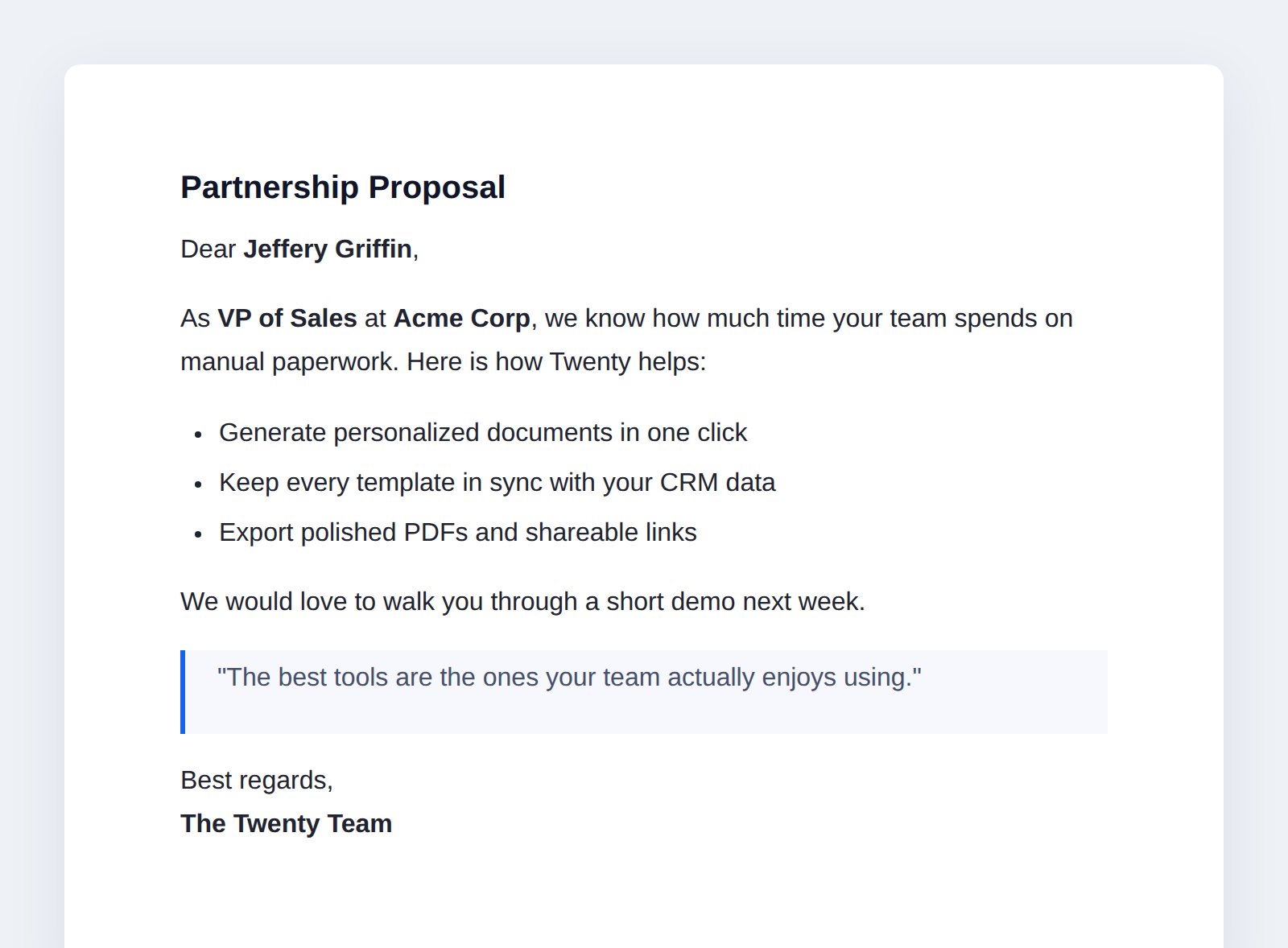
Döndürülen belgeyi tarayıcınızda açın:
http://localhost:2020/s/documents/view?id=<documentId>
Oluşturulan bir belgenin web sayfası
Ayrıca test ederken bir işlevin günlüklerini yarn twenty dev:function:logs ile gerçek zamanlı izleyebilir veya yarn twenty dev:function:exec ile doğrudan çağırabilirsiniz.
Bu adımdan sonra: uygulama HTTP üzerinden belgeler oluşturabilir ve bunları web sayfaları olarak sunabilir. Şimdi bunu curl olmadan kullanılabilir hale getirelim.

Sıradaki: arayüzü oluşturma →

Görünümler, gezinme, bir komut ve bir ön uç bileşeni.