Vai al contenuto principale
Lo stesso gestore può anche rispondere alle richieste HTTP. Aggiungeremo due percorsi:
  • un endpoint POST per generare un documento, e
  • un endpoint pubblico GET che rende un documento come una pagina web stampabile.
Entrambi usano httpRouteTriggerSettings. Gli itinerari delle app sono serviti sotto /s sul tuo server Twenty (es. http://localhost:2020/s/documents/generate).

Percorso POST — generare su richiesta

Questo riutilizza generateDocumentHandler, quindi non c’è alcuna logica da ripetere — solo un sottile adattatore che legge il corpo della richiesta.
import { defineLogicFunction, type RoutePayload } from 'twenty-sdk/define';
import { Response } from 'twenty-sdk/logic-function';
import { generateDocumentHandler } from 'src/logic-functions/handlers/generate-document-handler';

const handler = async (event: RoutePayload): Promise<Response> => {
  const body = event.body as Record<string, unknown> | null;

  const result = await generateDocumentHandler({
    templateId: (body?.templateId as string) ?? '',
    recordId: (body?.recordId as string) ?? '',
  });

  // Map the handler's failure reason onto a real HTTP status (400/404/500)
  // instead of always returning 200.
  return new Response(JSON.stringify(result), {
    status: result.success ? 200 : (result.status ?? 400),
    headers: { 'Content-Type': 'application/json' },
  });
};

export default defineLogicFunction({
  universalIdentifier: GENERATE_DOCUMENT_ROUTE_UNIVERSAL_IDENTIFIER,
  name: 'generate-document-route',
  timeoutSeconds: 30,
  handler,
  httpRouteTriggerSettings: {
    path: '/documents/generate',
    httpMethod: 'POST',
    isAuthRequired: true,
  },
});
Il gestore condiviso restituisce un suggerito status al fallimento, quindi il percorso può rispondere con un corretto codice 4xx/5xx. isAuthRequired: true significa che il chiamante deve presentare un token valido — il componente anteriore nel capitolo successivo passa automaticamente il token di accesso dell’utente .

OTTIENI il percorso — renderizza come pagina web

Per restituire HTML invece di JSON, avvolgi il corpo in un Response con un’intestazione Content-Type. Questo percorso è pubblico (isAuthRequired: false) così un documento generato può essere condiviso come link.
import { defineLogicFunction, type RoutePayload } from 'twenty-sdk/define';
import { Response } from 'twenty-sdk/logic-function';
import { CoreApiClient } from 'twenty-client-sdk/core';
import { documentHtmlPage } from 'src/utils/render-document';

const htmlResponse = (html: string, status = 200): Response =>
  new Response(html, { status, headers: { 'Content-Type': 'text/html; charset=utf-8' } });

const handler = async (event: RoutePayload): Promise<Response> => {
  const documentId = event.queryStringParameters?.id;

  if (!documentId) {
    return htmlResponse(documentHtmlPage('Missing document id', 'Provide ?id=<documentId>.'), 400);
  }

  // Filtered list query so an unknown id renders a clean 404 page instead of throwing.
  const { documents } = await new CoreApiClient().query({
    documents: {
      __args: { filter: { id: { eq: documentId } }, first: 1 },
      edges: { node: { id: true, name: true, content: true } },
    },
  });

  const document = documents?.edges?.[0]?.node;
  if (!document?.id) {
    return htmlResponse(documentHtmlPage('Document not found', `No document with id ${documentId}.`), 404);
  }

  return htmlResponse(documentHtmlPage(document.name ?? 'Document', document.content ?? ''));
};

export default defineLogicFunction({
  universalIdentifier: VIEW_DOCUMENT_ROUTE_UNIVERSAL_IDENTIFIER,
  name: 'view-document',
  timeoutSeconds: 15,
  handler,
  httpRouteTriggerSettings: {
    path: '/documents/view',
    httpMethod: 'GET',
    isAuthRequired: false,
  },
});
documentHtmlPage rende il corpo Markdown in HTML (con marked, sanitizzato) e lo lascia in un pulito, pagina stampabile che mostra solo il contenuto del template — lo stesso aspetto del PDF e l’anteprima in-app. Vedi l’helper.

Provalo

Con un modello e una persona nel tuo workspace, chiama il percorso (prendi un token da Impostazioni → API & Webhooks):
curl -X POST http://localhost:2020/s/documents/generate \
  -H "Authorization: Bearer $TOKEN" -H "Content-Type: application/json" \
  -d '{"templateId":"<templateId>","recordId":"<personId>"}'
# → {"success":true,"documentId":"...","content":"Dear Jeffery Griffin, ..."}
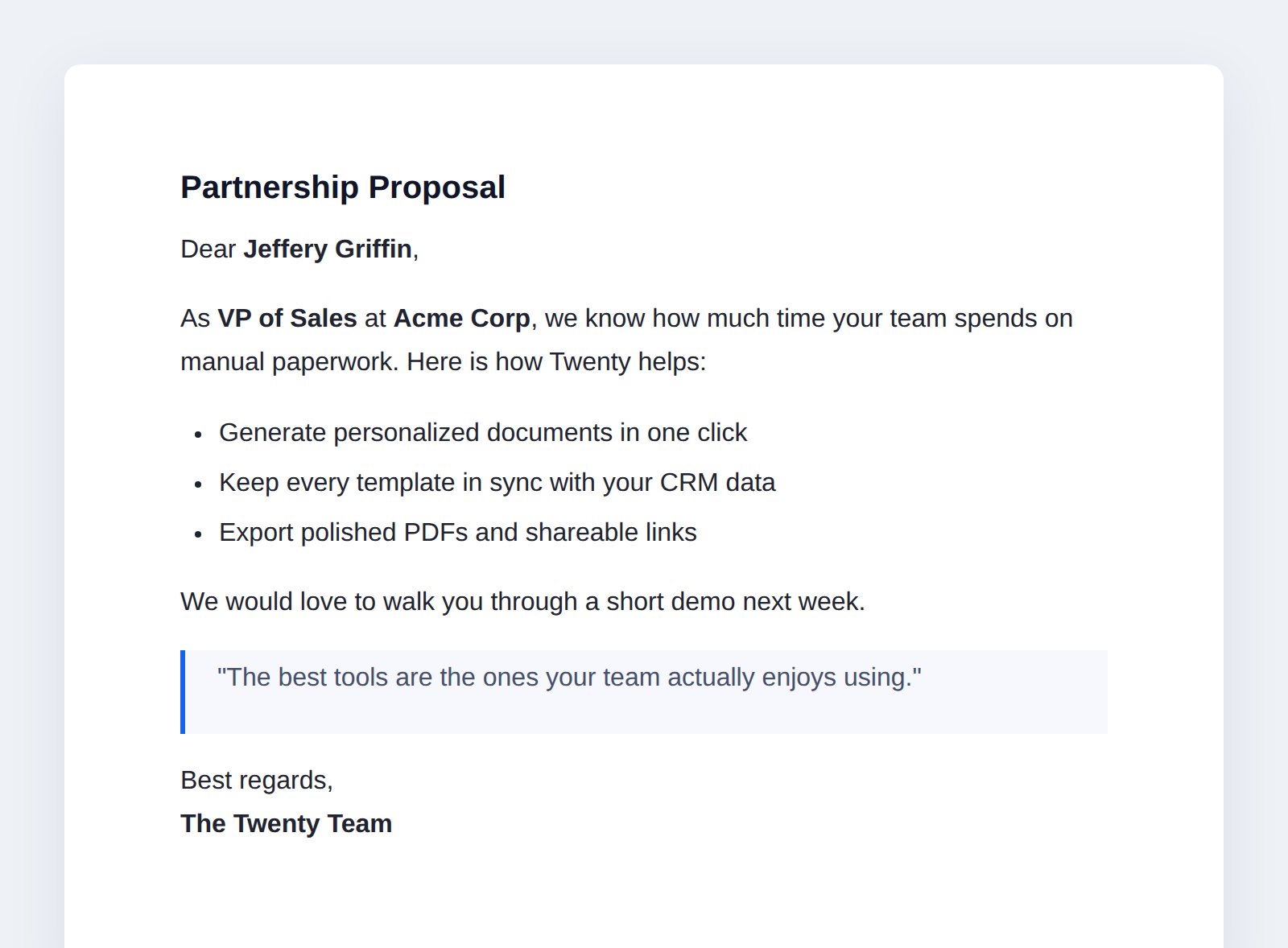
Apri il documento restituito nel tuo browser:
http://localhost:2020/s/documents/view?id=<documentId>
Una pagina web di documento renderizzato
Puoi anche trasmettere i log di una funzione durante il test con yarn venti dev:function:logs, o invocarlo direttamente con yarn venti dev:function:exec.
Dopo questo passaggio: l’app può generare documenti su HTTP e servirli come pagine web . Ora rendiamo utilizzabile senza curl.

Il prossimo: costruire l'interfaccia utente →

Viste, navigazione, un comando e un componente anteriore.