
حول الإجراءات
تحدد الإجراءات ما يحدث بعد تنفيذ الزناد. يمكنك تسلسل عدة إجراءات معًا لبناء عمليات أتمتة معقدة.إجراءات السجل
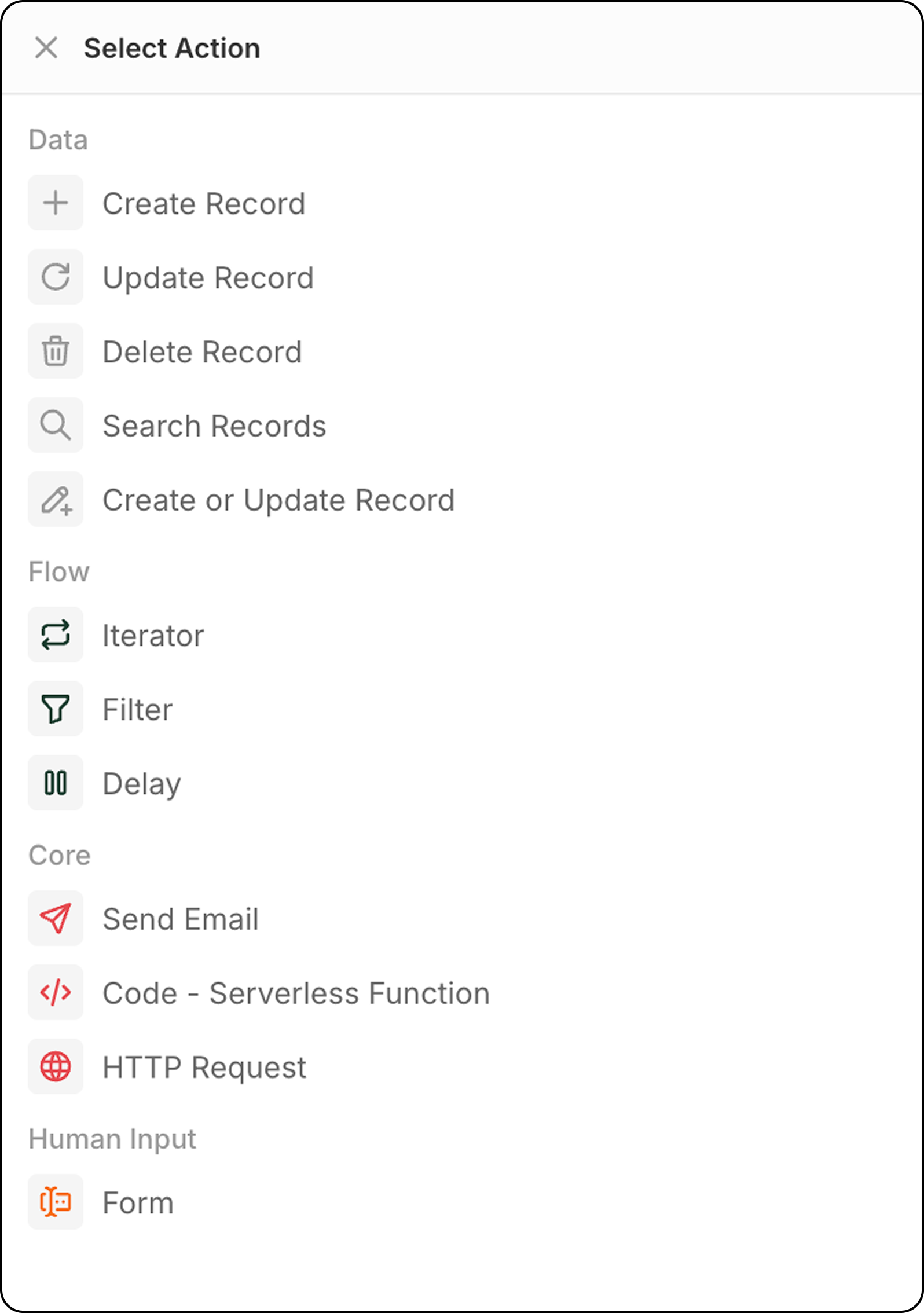
إنشاء سجل
يضيف سجل جديد إلى كائن محدد. الإعداد:- اختر الكائن المستهدف
- املأ الحقول الضرورية والاختيارية
- استخدم البيانات من الخطوات السابقة أو أدخِل القيم يدويًا لملء الحقول
تحديث السجل
يقوم بتعديل سجل موجود في كائن محدد.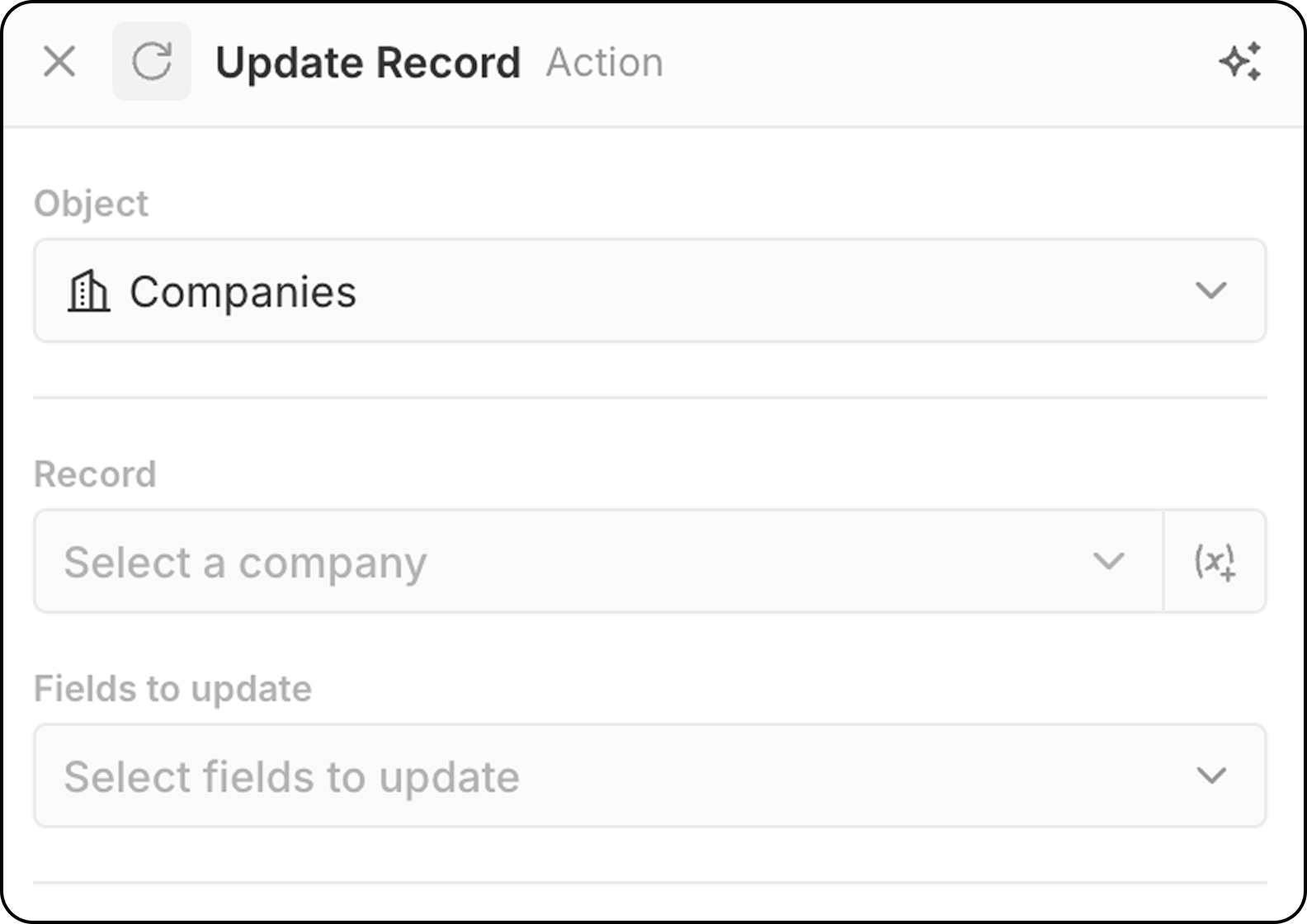
- اختر الكائن المستهدف
- اختر السجل المحدد لتحديثه.
- يمكنك إما اختيار سجل ثابت، باستخدام القائمة المنسدلة التي تعرض جميع السجلات المتاحة.
- أو يمكنك اختيار السجل ديناميكيًا بتحديد سجل تم العثور عليه في خطوة سابقة، باستخدام
(x+). لا يمكنك البحث عن السجل بناءً على معايير مختلفة في هذه المرحلة. إذا لم تكن قد حدّدت السجل بعد، فأضِف خطوةSearch Recordقبل خطوةUpdate Record.
- اختر الحقول لتعديل القيم وأدخل القيم الجديدة
حذف السجل
يزيل سجلاً من كائن محدد. التكوين:- اختر الكائن المستهدف
- اختر السجل المحدد لحذفه
البحث في السجلات
يجد السجلات داخل كائن معين باستخدام شروط التصفية. التكوين:- اختر الكائن للبحث
- حدد معايير التصفية لتضييق النتائج
- قم بتكوين الفرز والقيود
الحد: تعيد Search Records بحد أقصى 200 سجل. إذا كنت بحاجة إلى معالجة المزيد، فأضِف عوامل تصفية محددة لتقليل النتائج أو استخدم عمليات سير عمل مجدولة للمعالجة على دفعات.
إدراج أو تحديث سجل
ينشئ سجلًا جديدًا أو يحدّث سجلًا موجودًا استنادًا إلى معايير المطابقة. يكون هذا مفيدًا عندما لا تكون متأكدًا مما إذا كان السجل موجودًا بالفعل.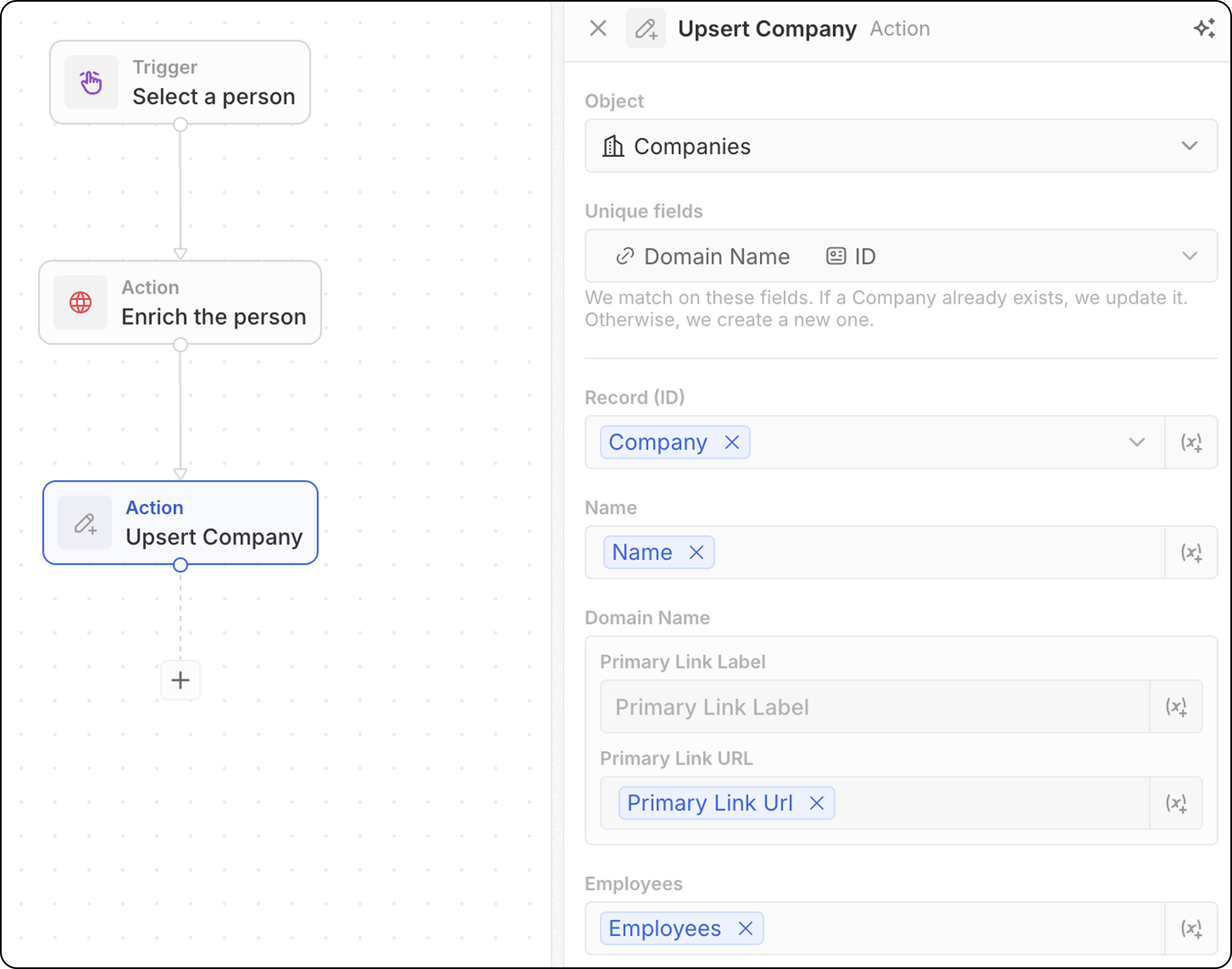
- اختر الكائن المستهدف
- لاحظ الحقول التي يمكن استخدامها للمطابقة: email لـ People، وdomain لـ Companies، وID لأي كائن، أو أي حقل مُعلَّم كـ Unique. ستحتاج إلى تعبئة واحد على الأقل من هذه الحقول أدناه.
- املأ قيم الحقول. لا تنسَ تعبئة معرّف فريد واحد على الأقل.
تعمل المطابقة عادةً بشكل أفضل عند إضافة معرّف فريد واحد فقط. على سبيل المثال، ستطابق لقطة الشاشة أدناه الشركات استنادًا إلى domain الخاص بها. لا تكون قيمة ID مطلوبة بالضرورة.
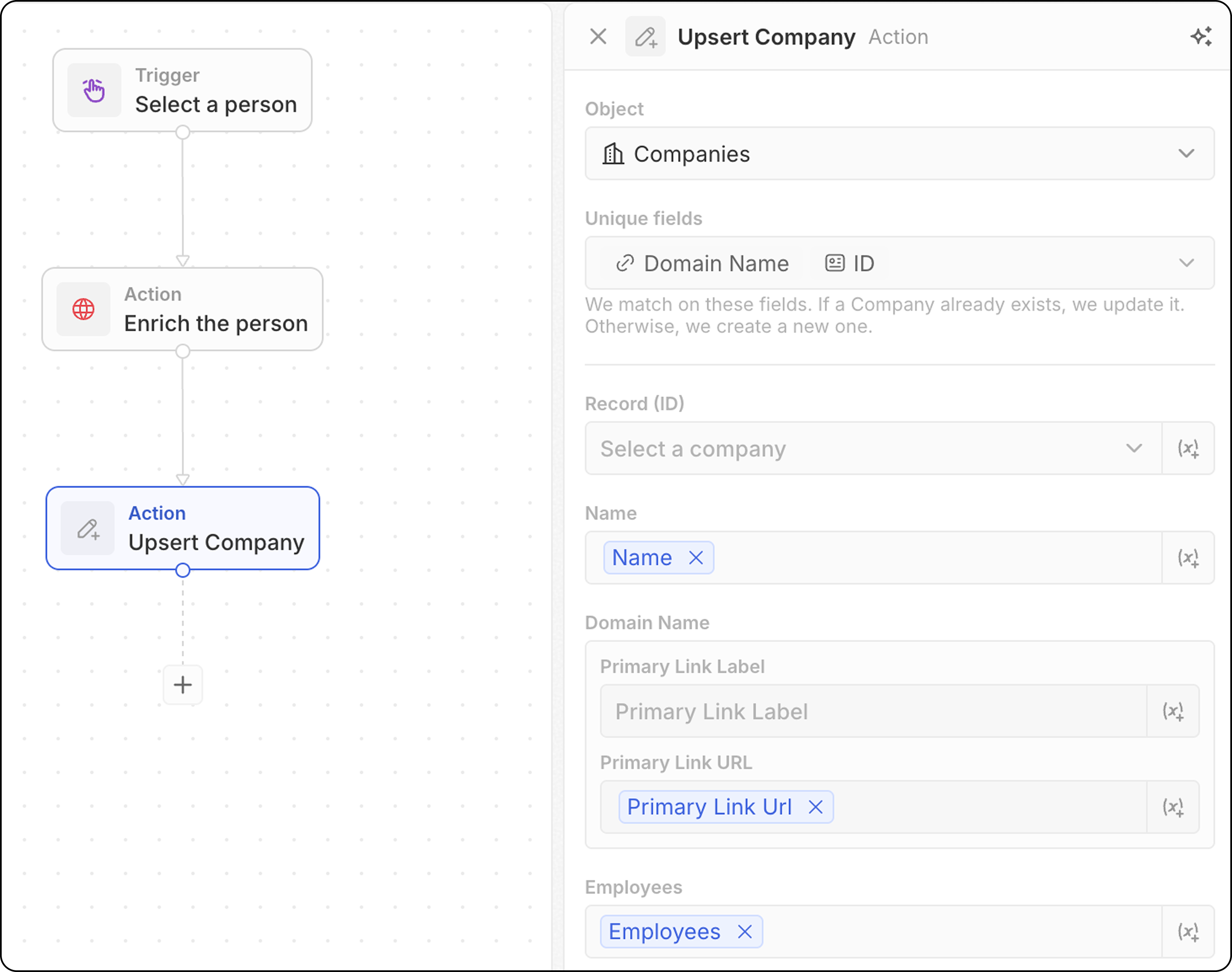
- استخدم البيانات من الخطوات السابقة لملء الحقول
- يبحث عن سجل يطابق معاييرك
- إذا تم العثور عليه → يحدّث السجل الموجود
- إذا لم يُعثر عليه → ينشئ سجلًا جديدًا
إجراءات التدفق
مكرر
يتكرر عبر مصفوفة من السجلات المُعادة من خطوة سابقة، مما يتيح لك تنفيذ إجراءات على كل سجل بشكل فردي. التكوين:- حدد مجموعة من السجلات من خطوة سابقة (على سبيل المثال، النتائج من سجلات البحث، من المشغل اليدوي مع توفر الكبريت، من عقدة البرمجة). عندما تُرجِع خطوة Code أو دالة منطقية مصفوفة من المستوى الأعلى، حدِّد خيار Whole list للتكرار عبر الإخراج بالكامل.
- حدد الإجراءات لتنفيذها على كل سجل في الحلقة.
- يمكنك إضافة عدة إجراءات داخل ترتير.
- عند استخدام الفروع داخل ترتير، تأكد من أن الخطوة الأخيرة من كل فرع تتصل بعودة إلى ترتور لإغلاق الحلقة التكرارية.
- الوصول إلى حقول
Current Item: لاستخدام حقول السجل الجاري معالجته، انقر على خطوة المُكرِّر، ثم اختر العنصر الحالي. ستُعرَض قائمة الحقول المتاحة من ذلك السجل ويمكن اختيارها لاستخدامها في الإجراءات اللاحقة. يمكنك أيضًا تحديد Use the whole item لتمرير العنصر الحالي بالكامل إلى خطوة لاحقة.
تصفية
يقوم بتصفية السجلات بناءً على الشروط المحددة، مما يسمح فقط للسجلات التي تلبي المعايير بالمرور. التكوين:- اختر السجل لتصفيته
- حدد شروط ومعايير التصفية
- قم بتكوين السجلات التي يجب أن تمر إلى الخطوات اللاحقة
- المخرجات: عُقد التصفية لا تُرجِع بيانات — فهي تعمل كبوابات. إذا تم استيفاء الشروط، يتابع سير العمل. وإلا سيتوقف سير العمل عند ذلك الفرع.
- يمكن استخدام العامل
ISمع الحقول الرقمية. يعمل كأنهEQUAL.
التأخير
يُوقف تنفيذ سير العمل لمدة محددة أو حتى تاريخ/وقت معين. أنواع التأخير:
إعدادات المدة:
- تعيين الأيام والساعات والدقائق و/أو الثواني
- دمج وحدات متعددة (مثل يومين و4 ساعات)
- اختر تاريخًا ووقتًا
- يمكن الإشارة إلى حقل تاريخ من خطوة سابقة (مثل المتابعة بعد 3 أيام من اجتماع)
- انتظر 24 ساعة قبل إرسال بريد متابعة إلكتروني
- إيقاف مؤقت حتى تاريخ إغلاق الفرصة
- جدولة الإجراءات ضمن ساعات العمل
لا يمكن أن يكون التاريخ المُجدول في الماضي. إذا استُخدم حقل تاريخ من خطوة سابقة وكان التاريخ قد مضى بالفعل، فسيفشل سير العمل.
- لا يوجد حد أقصى للمدة — يمكنك تعيين تأخيرات بالدقائق أو الأيام أو الأسابيع أو أكثر
- يُستهلَك رصيد واحد عند تنفيذ عقدة التأخير، بغض النظر عن المدة
- لا يُستهلك أي رصيد أثناء الانتظار — تأخير 5 دقائق يكلف مثل تأخير 5 أيام
إجراءات الاتصال
إرسال البريد الإلكتروني
يرسل بريدًا إلكترونيًا من سير العمل الخاص بك. هذا رائع لرسائل البريد الجماعية المعتمدة على قوالب. ستبدو رسائل البريد الإلكتروني مثل تلك التي ترسلها من صندوق بريدك. وهو غير مناسب للنشرات الإخبارية (التي تتطلب تنسيقا أغنى) أو تسلسل البريد الإلكتروني الآلي. المتطلبات الأساسية: أضف حساب بريد إلكتروني في الإعدادات → الحسابات التكوين:- اختر حساب البريد الإلكتروني المُرسل
يمكنك إرسال رسائل البريد الإلكتروني فقط من صناديق بريد متزامنة مع حساب Twenty الخاص بك. إرسال الرسائل من صناديق بريد أعضاء الفريق الآخرين (مثل بريد مالك الحساب) ضمن الخطة المستقبلية.
- ادخل عنوان البريد الإلكتروني المستلم.
حاليًا يمكن اختيار مستلم واحد فقط.
- اضبط سطر الموضوع.
- قم بإنشاء نص الرسالة. يمكنك تنسيق الروابط، وإنشاء قوائم رقمية، وقوائم نقاط الرصاص، وإضافة مرفقات.
إضافة توقيعات HTML غير ممكنة في الوقت الحالي.
نموذج
يعرض نموذجاً أثناء تنفيذ سير العمل لجمع مدخلات المستخدم. يمكن بعد ذلك استخدام الردود في الخطوات اللاحقة لإنشاء سجلات أو إرسال رسائل بريد إلكتروني أو تنفيذ أي إجراء آخر بناءً على المُدخل. التكوين:- قم بتهيئة الحقول التي سيُطلب من المستخدمين تعبئتها. لكل حقل، اختر
- نوعًا من بين: نص، رقم، تاريخ، سجل مُعطى، حقل اختيار. الحقول من جميع الكائنات متاحة للاختيار.
- تسمية
- قيمة افتراضية ضمن
Placeholder(اختياري)
- حرّر عنوان النموذج
- تفعيل سير العمل اليدوي الخاص بك من قائمة الأوامر
Cmd+K - املأ النموذج المعروض في اللوحة الجانبية ثم انقر
Submit.
لا يمكن جعل الحقول إلزامية.
إجراءات التكامل
كود
يشغل جافا سكريبت مخصص ضمن سير العمل الخاص بك. في الخلفية، يستند كل إجراء Code إلى دالة منطقية خاصة به — وهي دالة TypeScript على جانب الخادم تعمل على منصة Twenty. عندما تضيف إجراء Code، يقوم Twenty بإنشاء دالة منطقية مخصَّصة لتلك الخطوة ويُظهِر محرِّرها مضمَّنًا، بحيث يكون الكود الذي تكتبه جزءًا من سير العمل. التكوين:- الوصول إلى المتغيرات من الخطوات السابقة. يمكنك تعديل أسماء المتغيرات بشكل ديناميكي.
- اكتب شيفرة جافا سكريبت في المحرر
- إرجاع المتغيرات للاستخدام في الخطوات اللاحقة
- اختبر الكود مباشرة في الخطوة
إذا كنت بحاجة إلى استخدام مفاتيح API خارجية في كودك، فيجب إدخالها مباشرةً في جسم الدالة. لا يمكنك تكوين مفاتيح API في مكان آخر والإشارة إليها في الدالة المنطقية.
إعادة استخدام دالة منطقية عبر سير عمل متعددة
إجراء Code المضمَّن ممتاز للمنطق لمرة واحدة، لكن الكود الذي يحتويه يخص تلك الخطوة الواحدة فقط. عندما تريد مشاركة المنطق نفسه عبر عدة سير عمل — أو الاحتفاظ به كمصدر مُدار بالإصدارات ضمن تطبيق — عرِّف دالة منطقية قابلة لإعادة الاستخدام بدلًا من نسخ ولصق الكود في كل إجراء Code. يتم تعريف دالة منطقية مرة واحدة في تطبيق (باستخدامdefineLogicFunction في حزمة SDK) وتُتاح في مُنشئ سير العمل عن طريق إضافة workflowActionTriggerSettings. بمجرد تثبيت تطبيقك، تظهر تلك الدالة كإجراء مستقل في مُنشئ سير العمل، جنبًا إلى جنب مع الإجراءات المضمَّنة. يؤدي اختيارها إلى عرض حقول الإدخال التي صرَّحتَ عنها (مع منتقي المتغيّرات، تمامًا مثل الإجراءات الأخرى) وتشغيل الكود المشترك — دون الحاجة إلى JavaScript مضمَّن.
كلاهما يعمل على بيئة تشغيل الدالة المنطقية نفسها، لذا يمكن ترقية إجراء Code الذي جرَّبته مضمَّنًا لاحقًا إلى دالة منطقية قابلة لإعادة الاستخدام مع تغييرات طفيفة.
طلب HTTP
يرسل طلبًا إلى واجهة برمجية خارجية كجزء من سير العمل الخاص بك.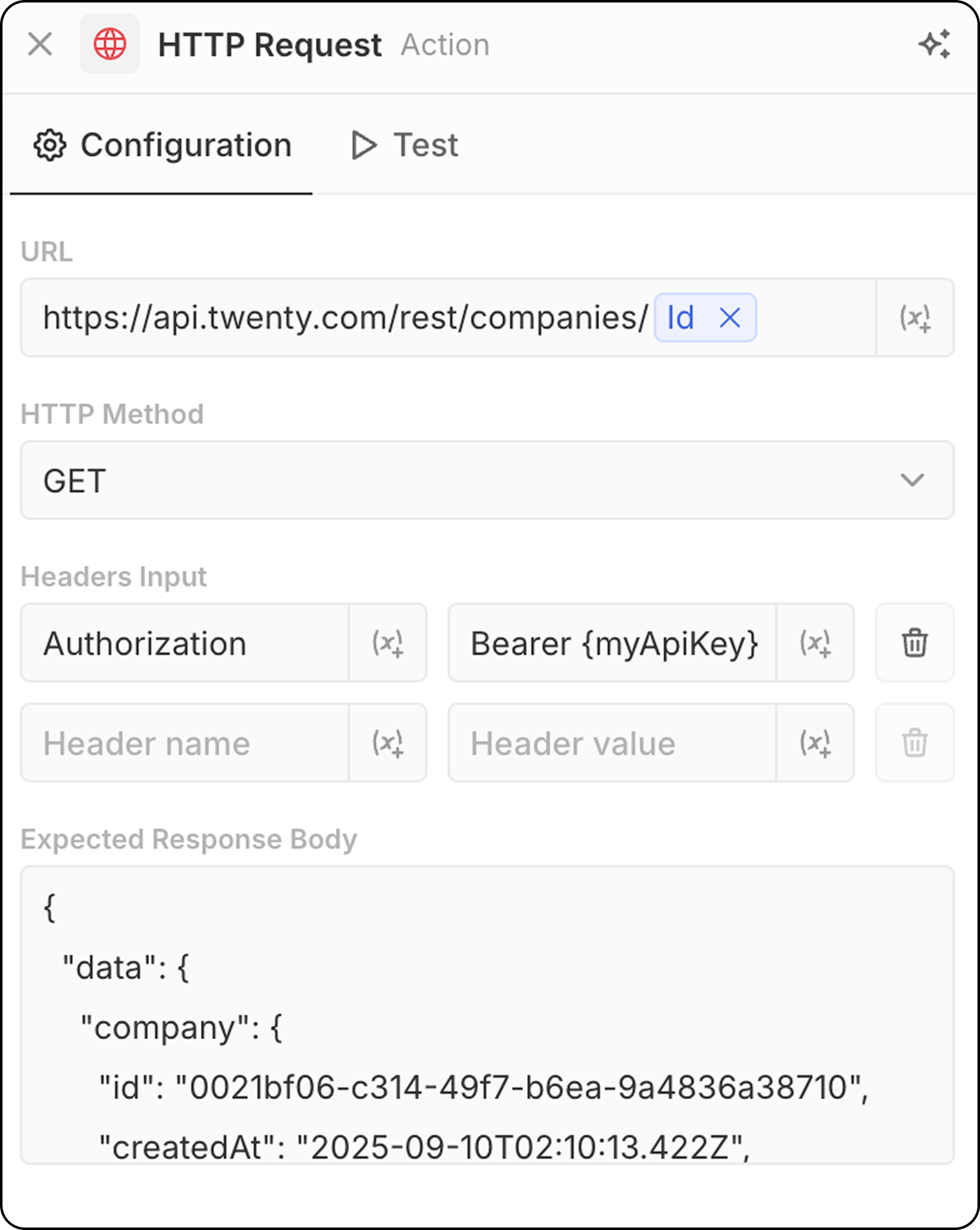
- ادخل عنوان رابط واجهة برمجية. يمكن استخدام معاملات من خطوات سابقة.
- اختر طريقة HTTP (GET, POST, PUT, PATCH, DELETE)
- أضف الرؤوس والقيم المطلوبة
- قدّم مثالًا للمخرجات لمعاينة البنية
إجراءات الذكاء الاصطناعي
وكيل ذكاء اصطناعي - قريبًا
يشغّل وكيل ذكاء اصطناعي داخل سير العمل لديك لتنفيذ مهام ذكية. التكوين:- الوكيل: اختر وكيلاً للذكاء الاصطناعي موجودًا أو استخدم الوكيل الافتراضي
- المطالبة: اكتب التعليمات لوكيل الذكاء الاصطناعي
- ارجع إلى متغيرات من خطوات سابقة داخل المطالبة
- تحليل البيانات وتلخيصها
- تصنيف السجلات أو توزيعها ضمن فئات
- إنشاء محتوى نصي
- اتخاذ قرارات بناءً على البيانات
- التفاعل مع بيانات نظام إدارة علاقات العملاء لديك باستخدام الأدوات
تستهلك إجراءات وكيل الذكاء الاصطناعي أرصدة سير العمل بناءً على نموذج الذكاء الاصطناعي المستخدم. راجع أرصدة سير العمل للحصول على التفاصيل.
يحترم وكلاء الذكاء الاصطناعي الأذونات المستندة إلى الأدوار. يمكنك تعيين أدوار محددة للوكلاء ضمن الإعدادات → الأعضاء → الأدوار للتحكم في البيانات التي يمكنهم الوصول إليها. راجع الأذونات للحصول على التفاصيل.