
Ön uç bileşenlerinin kullanılabileceği yerler
Ön uç bileşenler, Twenty içinde üç konumda işlenebilir:- Yan panel — Headless olmayan ön uç bileşenler, sağ taraftaki yan panelde açılır. Bir ön uç bileşeni komut menüsünden tetiklendiğinde varsayılan davranış budur.
- Widget’lar (panolar ve kayıt sayfaları) — Ön uç bileşenler, sayfa düzenleri içinde widget olarak gömülebilir. Bir pano veya kayıt sayfası düzeni yapılandırılırken kullanıcılar bir ön uç bileşen widget’ı ekleyebilir.
- Uygulama ayarları —
defineSettingsFrontComponent()ile tanımlandığında, ön uç bileşeni, varsayılan değişken yapılandırma kullanıcı arayüzü yerine uygulamanın Settings sekmesi içinde bir bölüm olarak görüntülenir.
- Onu bir komut menüsü öğesi ile eşleştirin — komut menüsüne (Cmd+K) ve isteğe bağlı olarak sabitlenmiş hızlı işlem olarak kaydeder.
- Onu bir sayfa düzeni içinde widget olarak gömün — bir kaydın ayrıntı sayfasına veya panosuna yerleştirir.
- Bunu
defineSettingsFrontComponent()ile tanımlayın — varsayılan değişken yapılandırma kullanıcı arayüzü yerine uygulamanın Settings sekmesi içinde bir bölüm olarak görüntülenir.
Basit örnek
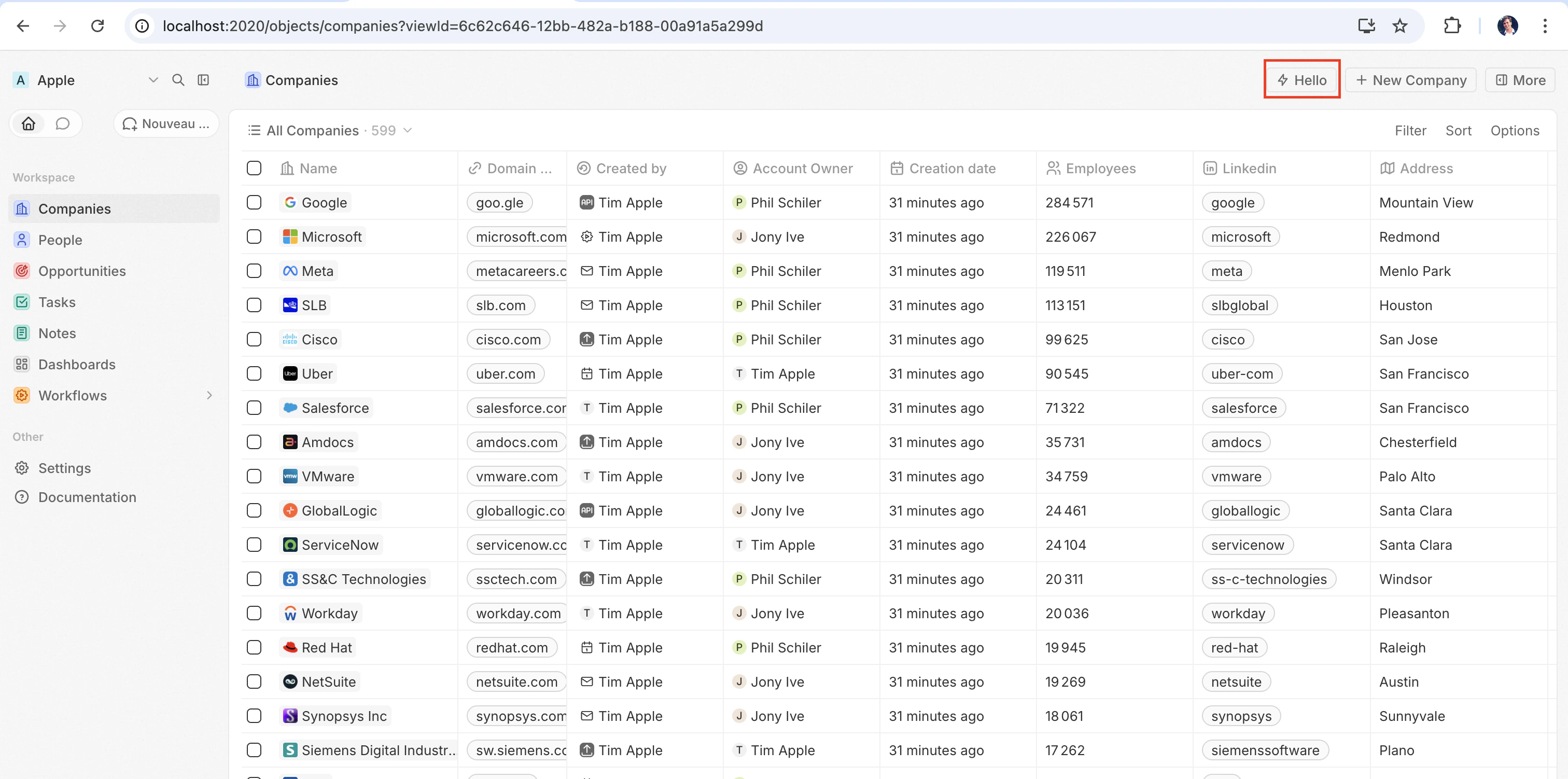
Bir ön uç bileşenini çalışır halde görmenin en hızlı yolu, onudefineCommandMenuItem ile eşleştirmektir; böylece sayfanın sağ üst köşesinde bir hızlı işlem düğmesi olarak görünür:
src/front-components/hello-world.tsx
src/command-menu-items/hello-world.command-menu-item.ts
yarn twenty dev ile senkronize ettikten sonra (veya tek seferlik bir yarn twenty apply çalıştırdıktan sonra), hızlı işlem sayfanın sağ üst köşesinde görünür:
Yapılandırma alanları
Bir ön uç bileşenini bir sayfaya yerleştirme
Komutların ötesinde, bir ön uç bileşenini bir sayfa düzeninde widget olarak ekleyerek doğrudan bir kayıt sayfasına gömebilirsiniz. Ayrıntılar için Sayfa Düzenleri bölümüne bakın.Özel ayarlar bileşeni
Uygulamanızın Settings sekmesindeki otomatik oluşturulan değişken yapılandırma kullanıcı arayüzünü kendi bileşeninizle değiştirmek için,defineFrontComponent yerine defineSettingsFrontComponent ile tanımlayın. Ayarlar bileşeni her zaman görünür bir kullanıcı arayüzü oluşturduğundan, kabul edilmeyen isHeadless dışında, aynı yapılandırma alanlarını alır ve ek olarak bileşeni uygulamanın ayarlar arayüzü olarak işaretler.
Bileşen, tüm sekmenin yerine geçmek yerine, Settings sekmesi içinde bir bölüm olarak görüntülenir. Twenty’nin sistem tarafından yönetilen bölümleri — otomatik yükseltme, App URL ve bağlantılar — her zaman bunun üstünde görüntülenir ve uygulama tarafından geçersiz kılınamaz.
src/front-components/app-settings.tsx
Headless ve headless olmayan
Ön uç bileşenler,isHeadless seçeneğiyle kontrol edilen iki işleme kipiyle gelir:
Headless olmayan (varsayılan) — Bileşen görünür bir kullanıcı arayüzü (UI) oluşturur. Komut menüsünden tetiklendiğinde yan panelde açılır. isHeadless false olduğunda veya belirtilmediğinde bu varsayılan davranıştır.
Headless (isHeadless: true) — Bileşen arka planda görünmez şekilde bağlanır. Yan paneli açmaz. Headless bileşenler, mantığı çalıştırıp ardından kendilerini kaldıran eylemler için tasarlanmıştır — örneğin, bir async görevi çalıştırma, bir sayfaya gitme veya bir onay modalı gösterme. Aşağıda açıklanan SDK Command bileşenleriyle doğal olarak eşleşirler.
src/front-components/sync-tracker.tsx
null döndürdüğü için, Twenty bunun için bir kapsayıcı oluşturmayı atlar — düzende boş alan görünmez. Bileşen yine de tüm hook’lara ve host iletişim API’sine erişime sahiptir.
SDK Command bileşenleri
twenty-sdk paketi, headless ön uç bileşenler için tasarlanmış dört Command yardımcı bileşeni sağlar. Her bileşen bağlandığında bir eylem yürütür, hataları bir snackbar bildirimi göstererek ele alır ve tamamlandığında ön bileşeni otomatik olarak kaldırır.
Bunları twenty-sdk/front-component içinden içe aktarın:
Command—executeprop’u aracılığıyla async bir geri çağrıyı çalıştırır.CommandLink— Bir uygulama yoluna gider. Props:to,params,queryParams,options.CommandModal— Bir onay modalı açar. Kullanıcı onaylarsaexecutegeri çağrısını yürütür. Props:title,subtitle,execute,confirmButtonText,confirmButtonAccent.CommandOpenSidePanelPage— Bir yan panel sayfasını açar. Props,page’e bağlıdır — örneğinViewRecord,recordId+objectNameSingularalır (ayrıca kaydı belirli bir sekmede açmak için isteğe bağlı birtabkimliği alır), diğer sayfalarpageTitle+pageIconalır.
Command kullanarak komut menüsünden bir eylem çalıştıran headless bir ön uç bileşenin tam örneği:
src/front-components/run-action.tsx
src/command-menu-items/run-action.command-menu-item.ts
CommandModal kullanan bir örnek:
src/front-components/delete-draft.tsx
CommandOpenSidePanelPage kullanan bir örnek. tab, bir sayfa düzeni sekme kimliğidir (varsayılan düzenler company-tab-emails veya company-tab-timeline gibi kimlikler kullanır; özel düzenler sekmenin kendi kimliğini kullanır). Kimlik kaydın düzeninde mevcut değilse, bunun yerine varsayılan sekme açılır:
src/front-components/open-company-emails.tsx
Bir mantık işlevini çağırma
Ön bileşenler, tarayıcı tarafında, opak kaynaklı bir iframe içinde yer alan korumalı (sandbox) bir Web Worker içinde çalışırken, mantık işlevleri sunucu tarafında çalışır. İkisi arasında doğrudan, işlem içi bir çağrı yoktur — bunun yerine, bir ön bileşen bir mantık işlevine HTTP üzerinden erişir.httpRouteTriggerSettings ile bildirilen bir mantık işlevi, rota yolunda HTTP üzerinden erişilebilir durumdadır. RestApiClient, /s/ ile başlayan yolları uygulama rotaları olarak ele alır, bunları fonksiyonlarınızın sunulduğu URL’ye çözümler ve TWENTY_APP_ACCESS_TOKEN ile kimlik doğrulaması yapar.
Twenty Cloud üzerinde, HTTP ile tetiklenen mantık işlevleri, çalışma alanı başına ayrılmış özel bir etki alanında https://\<your-workspace-subdomain>.withtwenty.com\<path> adresinde sunulur. Harici çağrıcılar için, tam URL’yi işlevin HTTP trigger ayarlarından veya uygulamanın Settings sekmesinden kopyalayın.
Başsız bir ön bileşen, çağrıyı Command bileşeni aracılığıyla mount sırasında çalıştırabilir ve ardından otomatik olarak unmount olabilir:
src/front-components/sync-prs.tsx
RestApiClient’e iletilen yol, başına /s eklenmiş mantık işlevinin httpRouteTriggerSettings.path değeridir. isAuthRequired: true ayarını koruyun; bileşeniniz için Twenty’nin oluşturduğu TWENTY_APP_ACCESS_TOKEN isteği kimlik doğrular:
src/logic-functions/fetch-prs.logic-function.ts
TWENTY_APP_ACCESS_TOKEN otomatik olarak enjekte edilir — bkz. Uygulama değişkenleri. Gizli uygulama değişkenleri asla ön bileşenlere açığa çıkarılmadığından, API anahtarlarını ve diğer hassas mantığı ön bileşende değil, mantık işlevinin içinde tutun.Twenty REST API’sini çağırma
Uygulama HTTP rotalarını çağırmak veya bir front bileşeninden Twenty kayıtlarını okumak ve yazmak içintwenty-client-sdk/rest paketinden RestApiClient kullanın. /s/... yollarını çalışma alanınızdaki işlevlerin temel URL’sine, /rest/... dahil diğer tüm yolları ise TWENTY_API_URL’ye gönderir.
Her zaman sayfayı görüntüleyen kişi olarak hareket eder. runAs: 'application' yalnızca bir mantık işlevi seçeneğidir: bir bileşen uygulamanızın kendi token’ını asla almaz; dolayısıyla burada bunu istemek hata verir. Uygulamanın kendi erişimini gerektiren işleri bir mantık işlevinin arkasına yerleştirin ve bunun yerine onu çağırın.
options, headers, query (sorgu dizesi parametrelerinin kaydı; null benzeri değerler atlanır) ve signal aracılığıyla bir AbortSignal kabul eder. FormData olmayan bir body nesnesi otomatik olarak JSON’a serileştirilir. 401 durumunda, istemci erişim jetonunu bir kez ana makine (host) üzerinden yeniler ve isteği yeniden dener.
Temel URL ve jeton varsayılan olarak ortamdan çözümlenir. Gerektiğinde — örneğin testlerde — kurucuya (constructor) geçersiz kılmalar (override) iletin:
status, statusText, url ve ayrıştırılmış body değerlerini açığa çıkaran bir RestApiClientError fırlatır:
Çalışma zamanı bağlamına erişme
Bileşeninizin içinde, geçerli kullanıcıya, kayda ve bileşen örneğine erişmek için SDK hook’larını kullanın:src/front-components/record-info.tsx
Uygulama değişkenleri
isSecret: false ile defineApplication() içinde tanımlanan uygulama değişkenleri, getApplicationVariable yardımcı işlevi aracılığıyla ön uç bileşenleri içinde kullanılabilir:
src/front-components/greeting.tsx
getApplicationVariable, değişkenin bildirilen type değerinden bağımsız olarak her zaman bir string (veya undefined) döndürür. String, türe göre tutarlı bir şekilde serileştirilir (boolean değerler "true" / "false", sayılar ondalık dizeler olarak, diziler/nesneler JSON olarak) ve bu, process.env mantık işlevi için kullanılan formatla aynıdır — veriyi kendiniz ayrıştırın (Number(...), JSON.parse(...), === 'true'). Değişken türleri bölümüne bakın.
Aşağıdaki sistem değişkenleri her zaman process.env aracılığıyla kullanılabilir:
TWENTY_FUNCTIONS_URL
Twenty ayrıca TWENTY_FUNCTIONS_URL değişkenini front bileşenlerine ve mantık işlevlerine enjekte eder: bu, uygulamanızın HTTP ile tetiklenen mantık işlevlerinin sunulduğu temel URL’dir.
Bu değişken, bu URL her zaman Twenty sunucusunun kendisi olmadığı için mevcuttur. Twenty Cloud üzerinde, uygulama rotaları, uygulama tarafından yazılmış yanıtların Twenty uygulamasının kaynağı yerine yalıtılmış bir kaynak üzerinde çalışması için, çalışma alanı başına ayrılmış özel bir etki alanında (https://\<your-workspace-subdomain>.withtwenty.com veya yapılandırıldığında uygulamanın birincil genel etki alanında) sunulur. Self-hosted ve yerel örnekler, uygulama rotalarını sunucunun kendisinde /s öneki altında sunar ve değişkeni hiç ayarlamayabilir. Temel URL, çalışma alanına ve örneğe göre değiştiğinden, kodunuz bunu sabit olarak yazamaz — sunucu, çalışma zamanında doğru değeri enjekte eder.
Bu değişkeni doğrudan okumanız nadiren gerekir. Rotalarınızı, yolu /s/ önekiyle birlikte vererek RestApiClient üzerinden çağırın; istemci URL’yi sizin için çözümler: /s önekini kaldırır ve TWENTY_FUNCTIONS_URL’yi hedefler, değişken ayarlı değilse \<TWENTY_API_URL>/s adresine geri döner. Mutlak URL’yi bir istek göndermeden elde etmek için, örneğin bir bağlantı için, resolveUrl('/s/\<path>') kullanın. Değişkeni yalnızca bir URL’yi elle oluştururken doğrudan okuyun:
Host iletişim API’si
Ön uç bileşenleri,twenty-sdk’deki işlevleri kullanarak gezinmeyi, modalları ve bildirimleri tetikleyebilir:
Bir eylem tamamlandıktan sonra bir snackbar göstermek ve yan paneli kapatmak için host API’sini kullanan bir örnek:
src/front-components/archive-record.tsx
Depolama
localStorage ve sessionStorage normal bir sayfada olduğu gibi, standart senkron API ile çalışır. Anahtarlarınız, uygulama kurulumunuza ve oturum açmış kullanıcıya göre kapsamlandırılır: başka hiçbir uygulama bunları okuyamaz ve aynı tarayıcıda oturum açan başka bir kullanıcı, boş bir depoyla başlar. localStorage’a yazılan değerler, yeniden yüklemeler arasında cihazda kalır; sessionStorage ise tarayıcı oturumu süresince geçerlidir.
src/front-components/note-draft.tsx
QuotaExceededError fırlatır.
Birden çok kayıtla çalışma
Birden çok seçili kaydı yönetmek içinuseSelectedRecordIds() kullanın. Bu, toplu işlemler için kullanışlıdır:
src/front-components/bulk-export.tsx
src/command-menu-items/bulk-export.command-menu-item.ts
Genel varlıklar
Ön uç bileşenleri,getPublicAssetUrl kullanarak uygulamanın public/ dizinindeki dosyalara erişebilir:
Ön uç bileşenleri arasında bağımlılıkları paylaşma
Varsayılan olarak, her ön uç bileşeni içe aktardığı her bir kitaplığın kendi kopyasını paketler; bu nedenle beş bileşenli bir uygulama React’i beş kez paketler. Bu kitaplıkları tek seferde derlemek ve uygulamanın her bileşeninin onları tek bir önbelleğe alınmış dosyadan yüklemesini sağlamak için, paylaşılan bağımlılıkları uygulamanızınpackage.json dosyasında belirtin:
package.json
src/front-components/counter.tsx
- Uygulama başına tek bir paylaşılan bağımlılık paketi. Paket, uygulamanızın kendi bağımlılıklarından oluşturulur; böylece dağıttığınız sürümler üzerinde tam denetim sizde olur.
- İçe aktardığınız tam belirteçleri listeleyin.
twenty-ui/inputvetwenty-ui/displayiki ayrı girdidir; yalnızca bir paket adı alt yollarını kapsamaz.reacti listelemek, otomatik olarakreact/jsx-runtimeı da kapsar. reactile birliktereact-dom/clientı paylaşın. Her bileşencreateRootüzerinden oluşturulur; bu yüzden bunu dışarıda bırakmak, her bileşenin yine de React DOM’u paketlemesi anlamına gelir.- Paket önbelleğe alınır. İçerik karma değerine sahip bir URL altında, uzun ömürlü, değişmez bir önbellekle sunulur; bu nedenle bir kez indirilir ve bağımlılıklarından biri değişene kadar uygulamanın tüm bileşenleri arasında yeniden kullanılır.
- Paylaşılan paketlerden hiçbirini içe aktarmayan bileşenler onu asla indirmez.
Stil
Ön uç bileşenleri birden fazla biçimlendirme yaklaşımını destekler. Şunları kullanabilirsiniz:- Satır içi stiller —
style={{ color: 'red' }} - Twenty UI bileşenleri — Twenty’nin kendi bileşen kitaplığı; aşağıda Twenty UI bileşenlerini kullanma bölümüne bakın
- Emotion —
@emotion/reactile CSS-in-JS - Styled-components —
styled.divkalıpları - Tailwind CSS — yardımcı sınıflar
- React ile uyumlu herhangi bir CSS-in-JS kitaplığı
Twenty UI bileşenlerini kullanma
Twenty, bileşen kitaplığınıtwenty-ui paketi olarak sunar. Ön uç bileşenleri bunu, çalışma alanının açık ve koyu temasıyla otomatik olarak eşleşen düğmeler, etiketler, durum rozetleri, çipler, avatarlar, simgeler, tipografi ve tema belirteçleri için kullanabilir.
Kurulum
Paketi, Twenty örneğinizle birlikte gelen sürüme sabitleyerek uygulamanıza ekleyin:twenty-ui, derleme zamanında ön uç bileşeninize paketlenir, bu nedenle yalnızca uygulamanızın bir bağımlılığı olması gerekir — çalışma zamanında yapılandırmanız gereken hiçbir şey yoktur.
Bileşenleri içe aktarma
Kullandığınız bileşenlerin yalnızca paketinizde yer alması için, paket kökü yerine eşleşen alt yoldan içe aktarın:İkonlar
Tek tek simgeleritwenty-ui/icon içinden içe aktarın:
IconsProvider, useIcons ve iconsState kullanmaktan kaçının — bunlar, birkaç MB’lık Tabler simge setinin tamamını içeri çeker.
Temalandırma ve tema belirteçleri
Twenty UI bileşenleri, çalışma alanının açık ve koyu temasıyla otomatik olarak eşleşir — oluşturucu etkin renk şemasını barındırıcıda uygular ve bileşenler renklerini buna göre belirler. Kendi satır içi stillerinizde aynı tasarım belirteçlerini kullanmak içinuseTheme() kancasını çağırın. Bu kanca, etkin temaya bağlı Twenty tema belirteçlerini (boşluklandırma, renkler, köşe yarıçapları, yazı tipleri) döndürür; bileşeninizde ThemeProvider kurulumuna gerek yoktur:
useTheme() bir kanca olduğundan, belirteçleri bileşen gövdesinin içinde okursunuz; böylece değerler her zaman etkin temayı yansıtır. Aynı belirteç haritası, themeCssVariables sabiti olarak da dışa aktarılır; ancak ön uç bileşenlerinde useTheme() kullanmayı tercih edin — themeCssVariables öğesini dolaylı olarak kullanan modül düzeyinde bir sabit, uygulama manifesti çıkarılırken tanımsız olabilir.
Etkin şemaya açıkça dallanmak için, twenty-sdk/front-component içindeki useColorScheme() ile okuyun; bu kanca 'light' veya 'dark' döndürür.
Mevcut sınırlamalar
Front bileşenleri aktif geliştirme aşamasındadır. Oluşturma, stillendirme, olayları işleme, öğeleri ölçme ve tarayıcı depolaması iyi çalışır. Bu sınırların ötesine geçen her şey (bir ref üzerinde bir DOM yöntemi çağırmak, öğe yeniden boyutlandırmalarını gözlemlemek, ağacınızın dışına portal oluşturmak) bugün eksik ya da tamamlanmamış durumda ve çoğu sessizce başarısız oluyor: ne bir istisna fırlatılıyor ne de TypeScript hatası görülüyor; çünkü iskeletin türleri tam tarayıcı DOM’una göre tanımlanmıştır. Bunlardan biri sizi engelliyorsa, önceliklendirilmesi için bir issue açın.Yerleşim ve ölçüm
Öğeler kendilerini ölçebilir: ana bilgisayar geometriyi sandbox’a yansıtır; bu nedenle okumalar yerel olarak yanıtlanır ancak bir kareye kadar eski olabilir ve hiç ölçülmemiş bir öğenin ilk okunması sıfırlar döndürür. Yazdıktan sonra,requestAnimationFrame geri çağrısında veya bir effect içinde yeniden okuyun.
getBoundingClientRect ile konumlandırma artık çalışıyor, ancak boyut değişikliklerini ResizeObserver aracılığıyla izleyen her şey (recharts ResponsiveContainer, Floating UI’nin autoUpdate) hâlâ çalışmıyor. Yerleşim için yine de CSS’i tercih edin: stil sayfanız gerçek sayfaya erişir, bu nedenle flexbox, grid, aspect-ratio, clamp() ve @container gecikme olmadan normal şekilde davranır.
requestAnimationFrame, fetch, setTimeout ve queueMicrotask window. öneki olmadan çalışır. Yalnızca window.requestAnimationFrame(...) ve benzerleri fırlatır.DOM erişimi
Birref size bir HTMLElement değil, bir sandbox öğesi verir.
Portal boşluğu, Radix, Headless UI, MUI ve react-select popover’larının varsayılan olarak hiçbir şey render etmemesinin nedenidir. Çoğu bir container prop kabul eder; onu render ettiğiniz bir öğeye yönlendirin.
Etkinlikler
Mouse, pointer, touch, sürükleme, klavye, odak,input/change/submit, scroll/wheel/contextmenu ve animationend/transitionend host’a iletilir, ayrıca öğe başına birkaç tane daha vardır: img üzerinde load/error, input/textarea üzerinde pano ve bileşim olayları, video/audio üzerinde medya, details/dialog üzerinde toggle. Bunun dışındaki her şey (onAuxClick, onSelect, onInvalid, onReset, onAnimationStart, pointer capture, img üzerinde onLoad) uyarı verilmeden kaldırılır.
document.addEventListener() ve window.addEventListener() hatasız olarak kaydolur ancak asla tetiklenmez; bu yüzden bir sürükleme, işaretçi başladığı öğeden ayrılır ayrılmaz durur. event.preventDefault() da geçmez; form gönderimi, dragover/drop ve bağlantı tıklamaları zaten sizin için korunmuştur.
Öznitelikler ve stillendirme
Her öğe, kendi özelliklerini host DOM’a iletir (a üzerinde href, img üzerinde src/alt, input üzerinde value/placeholder/disabled vb.), ayrıca her öğede ortak bir küme vardır: id, className, style, title, tabIndex, role, draggable ve tireli olan tüm aria-* / data-* öznitelikleri (bu yüzden ariaLabel düşürülür). Bunun dışındaki her şey sessizce atılır, bu yüzden özel durumu data-* olarak ifade edin.
Bileşen CSS’i, ister import './styles.css' ile, ister CSS-in-JS ile ya da bir style öğesinden gelsin, host sayfanın head kısmına scope’suz olarak enjekte edilir. Bu nedenle sınıf adları Twenty’nin kendi sınıf adlarıyla çakışır (onlara önek ekleyin ve asla çıplak div { ... } seçicileri yazmayın) ve @media, sizin bileşeniniz yerine tarayıcı penceresini hedefler (kendi container-type değerinizle @container kullanın). Satır içi style prop’ları etkilenmez.
Depolama ve ağ
localStorage ve sessionStorage tarayıcı yerine Twenty tarafından sağlanır: bileşen, opak bir origin’de bir worker içinde çalışır, bu nedenle ana makine değerleri uygulamanız adına depolar. Kapsamları ve sınırları için storage bölümüne bakın. IndexedDB, çerezler, Cache API ve BroadcastChannel hâlâ kullanılamaz. Durumu cihazlar arasında kalıcı hale getirmek için bir mantık fonksiyonu çağırın ve onun anahtar-değer deposunu kullanın.
fetch çalışır, bazı sınırlamalarla:
- Twenty API’sine ve uygulamanızın rotalarına yapılan çağrılar host tarafından proxy’lenir, bu yüzden
RestApiClientkullanmayı tercih edin. Proxy’lenen çağrılardaAbortSignalve diğerRequestInitseçenekleri kaldırılır ve yalnızcastringveURLSearchParamsgövdeleri desteklenir. - Diğer origin’ler sandbox’tan
Origin: nullile çıkar, bu yüzden üçüncü taraf bir API yalnızcaAccess-Control-Allow-Origin: *gönderirse yanıt verir. Bunun yerine onu bir mantık fonksiyonundan çağırın. fetch('/rest/people')hiçbir zaman Twenty API’siyle eşleştirilmez, çünkü sandbox’un göreli yolu çözecek bir sayfa URL’si yoktur.
Ortam yakalama
navigator.mediaDevices.getUserMedia() ve MediaRecorder, sandbox polyfill’leri aracılığıyla front bileşenleri içinde çalışır; böylece standart kayıt kodu değişmeden çalışır ve MediaRecorder.isTypeSupported, yaygın kapsayıcı/kodek kombinasyonları için yanıt verir. Ayrıntılı getUserMedia kısıtlama nesneleri kabul edilir ancak iletilmez — ana makine, istenen türler için varsayılanlarıyla yakalama yapar — ve uygulamalar genelinde aynı anda yalnızca bir yakalama etkin olabilir. Kaydedilmiş bir Blob’u uploadFile host fonksiyonu ile saklayın.
Diğer eksikler
- Dosya içerikleri.
filetüründe birinput, handler’ınıza yalnızca dosya meta verilerini verir, baytları vermez, bu yüzdenFileReaderkullanılamaz. Kodunuzun zaten elinde bulunan birBlob’u — örneğinMediaRecordertarafından üretilen bir tane — yüklemek içinuploadFilehost fonksiyonunu kullanın. - Sürükle-bırak yükleri. Sürükleme olayları tetiklenir, ancak
event.dataTransferundefineddurumundadır. - Node yerleşikleri.
fs,pathvenode:cryptobuild aşamasında başarısız olur; bu nedenle bu işi bir mantık fonksiyonuna taşıyın. Web Crypto,fetch,TextEncoderveURLkullanılabilir durumdadır. iframeher zamanallow-same-originolmadan yeniden sandbox’a alınır, bu nedenle kendi oturumuna güvenen bir yerleştirme, oturum kapalı olarak işlenir.onLoad’u da yoktur.