
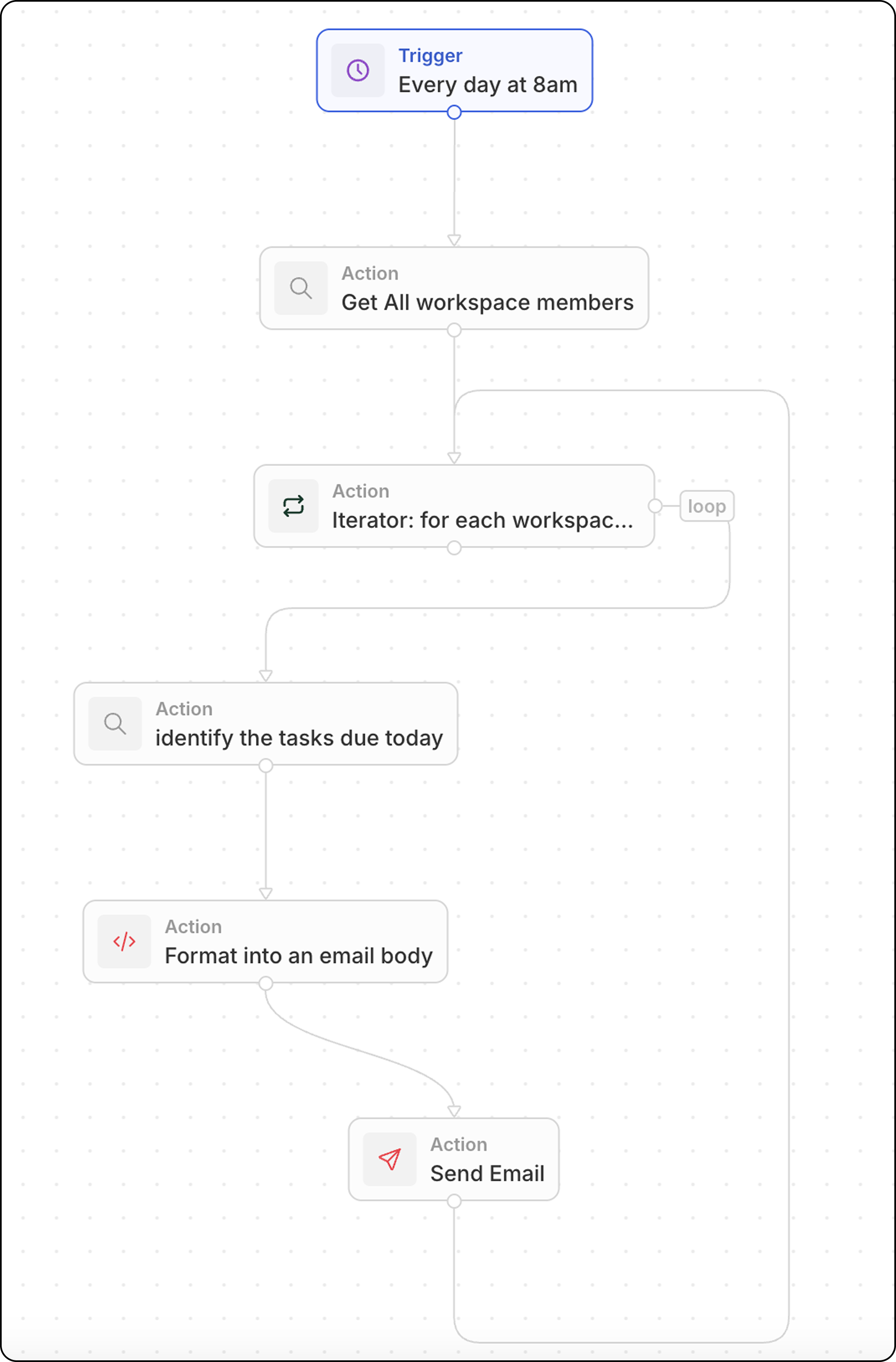
Genel Bakış
Bu iş akışı bir zamanlamaya göre çalışır ve:- Tüm çalışma alanı üyelerini getirir
- Her bir üye üzerinde döner
- Son tarihi bugün olan görevlerini bulur
- Kişiselleştirilmiş bir e-postayı biçimlendirir ve gönderir
Adım adım kurulum
Adım 1: Tetikleyiciyi Yapılandırın
- Ayarlar → İş Akışları’na gidin ve yeni bir iş akışı oluşturun
- Tetikleyici olarak Zamanlanmış Olarak’ı seçin
- Her gün saat 08:00 için bir cron ifadesi kullanın:
0 8 * * *
Adım 2: Tüm Çalışma Alanı Üyelerini Arayın
- Bir Kayıtları Ara eylemi ekleyin
- (Gelişmiş nesneler altında) Çalışma Alanı Üyeleri’ni seçin
- Filtre gerekmez — bu, tüm üyeleri döndürür
Adım 3: Bir Yineleyici Ekleyin
- Bir Iterator eylemi ekleyin
- Girdi dizisini önceki adımdaki çalışma alanı üyelerine ayarlayın
- Yineleyici içindeki tüm eylemler, üye başına bir kez çalışır
Adım 4: Bugün Son Tarihi Olan Görevleri Arayın (Yineleyici İçinde)
- Yineleyici içinde bir Kayıtları Ara eylemi ekleyin
- Nesne olarak Görevler’i seçin
- Filtreler ekleyin:
- Atanan = mevcut çalışma alanı üyesi (yineleyiciden)
- Son Tarih = bugün
Adım 5: Görevleri E-posta Gövdesine Biçimlendirin (Yineleyici İçinde)
Görevleri bağlantılarla okunabilir bir listeye dönüştürmek için bir Kod eylemi ekleyin:yourSubDomain değerini, gerçek Twenty çalışma alanı alt alan adınızla değiştirin.Adım 6: E-posta Gönderin (Yineleyici İçinde)
- Bir E-posta Gönder eylemi ekleyin (halen yineleyici içinde)
- Yapılandırın:
Adım 7: Test Edin ve Etkinleştirin
- İş akışını manuel olarak çalıştırmak için Test’e tıklayın
- E-postalar için gelen kutularını kontrol edin
- İş akışını etkinleştirin