
Обзор
Это руководство проведет вас через процесс импорта ваших компаний в Twenty. Компании следует импортировать в первую очередь, поскольку Люди и Сделки связываются с Компаниями.Перед началом
Контрольный список предварительных требований
Ваш файл в формате CSV, XLSX или XLS
В файле менее 10 000 записей
В вашем файле нет повторяющихся доменов
Все пользовательские поля созданы в Настройки → Модель данных
Нужно импортировать более 10 000 компаний? Разбейте на несколько файлов или используйте импорт через API.
Шаг 1: Подготовьте данные о компаниях
Обязательные и рекомендуемые поля
Формат домена
Столбцы домена:- Domain / Domain Label:
acme.com - Domain / Domain URL:
https://acme.com
Формат адреса
Адрес — это вложенное поле с несколькими столбцами:Пример структуры CSV
Совет профессионала: Нажмите Download sample file во время импорта, чтобы увидеть точные названия столбцов, которые ожидает Twenty.
Шаг 2: Откройте функцию импорта
Вариант 1: Из представления Компании- Перейдите к разделу Компании в левой боковой панели
- Нажмите значок ⋮ в правом верхнем углу
- Выберите Импорт записей
- Нажмите
Cmd + K(Mac) илиCtrl + K(Windows) - Введите “import”
- Выберите Импорт записей
- Выберите Компании
Шаг 3: Загрузите свой файл
- Нажмите Выбрать файл
- Выберите свой файл CSV, XLSX или XLS
- Подождите, пока Twenty проанализирует ваш файл
Шаг 4: Сопоставьте ваши столбцы
Twenty автоматически пытается сопоставить ваши столбцы с полями. Проверьте и при необходимости скорректируйте:- Проверьте автоматические сопоставления — убедитесь, что они верны
- Исправьте неверные сопоставления — нажмите на раскрывающийся список, чтобы выбрать нужное поле
- Пропустите столбцы — выберите Do not map для столбцов, которые вы не хотите импортировать
Важные правила сопоставления
- Домен: сопоставьте с Domain / Domain URL (не с Domain Label)
- Адрес: сопоставьте каждую часть с соответствующим столбцом (City, State и т. д.)
- Поля Select: значения должны соответствовать существующим вариантам (или вы сопоставите их на следующем шаге)
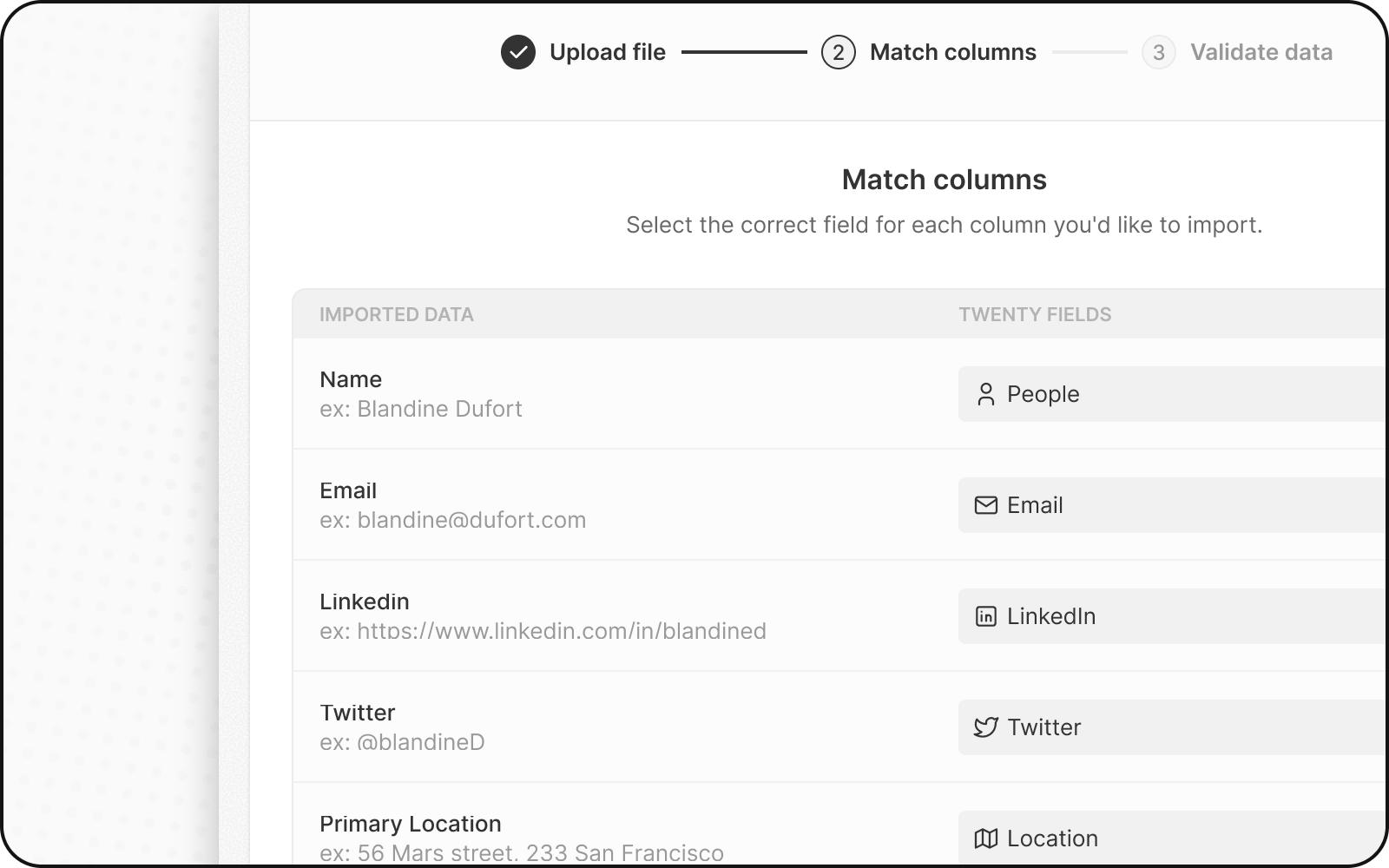
Шаг 5: Сопоставление значений полей Select
Если у вас есть поля Select или Multi-Select:- Twenty показывает ваши значения рядом с существующими вариантами
- Сопоставьте каждое значение в вашем файле с вариантом Twenty
- Или при необходимости создайте новые варианты
Для вариантов Select используются имена API, а не отображаемые метки. Перейдите в Настройки → Модель данных → включите Расширенный режим, чтобы увидеть имена API.
Шаг 6: Проверьте и исправьте ошибки
Перед завершением импорта Twenty проверяет ваши данные:- Нажмите Следующие шаги
- Строки с ошибками выделены желтым
- Исправляйте ошибки напрямую — нажмите на ячейку и отредактируйте значение
- Удалите проблемные строки — нажмите X, чтобы пропустить эту строку
Распространенные ошибки импорта компаний
Шаг 7: Завершите импорт
- Просмотрите сводку импорта
- Нажмите Подтвердить, чтобы импортировать
- Дождитесь завершения импорта
- Проверьте, просмотрев несколько записей
После импорта компаний
Теперь вы можете импортировать записи, которые привязываются к Компаниям:- Импортируйте Людей — привяжите их к Компаниям с помощью домена
- Импортируйте Сделки — свяжите их с Компаниями
- Проверьте импорт — выборочно просмотрите несколько записей, чтобы убедиться в корректности данных
Обновление существующих компаний
Чтобы обновлять компании вместо создания новых:- Добавьте в файл столбец
domainилиid - Twenty сопоставляет записи по этому уникальному идентификатору
- Существующие компании обновляются; новые создаются
Часто задаваемые вопросы
Почему две компании не могут иметь одинаковый домен?
Почему две компании не могут иметь одинаковый домен?
Домен — уникальный идентификатор в Twenty. Это предотвращает дубли компаний и обеспечивает корректную привязку писем к нужной компании при синхронизации электронной почты.
Что делать, если у некоторых компаний нет домена?
Что делать, если у некоторых компаний нет домена?
Вы можете оставить домен пустым. Однако мы рекомендуем по возможности добавлять домены для улучшения качества данных и автоматической привязки писем.
Могу ли я импортировать компании без связанных контактов?
Могу ли я импортировать компании без связанных контактов?
Да! Сначала вы можете импортировать компании, а позже импортировать контакты и связать их с помощью домена компании.
Что произойдет, если я импортирую домен, который уже существует?
Что произойдет, если я импортирую домен, который уже существует?
Если вы укажете уникальный идентификатор (домен или id), который совпадает с существующей компанией, Twenty обновит эту компанию вместо создания дубликата.
Как исправить ошибки 'duplicate domain'?
Как исправить ошибки 'duplicate domain'?
Либо удалите дубликат из вашего файла, либо добавьте
id компании, чтобы вместо этого обновить существующую запись.