
Prezentare generală
Acest ghid vă arată cum să importați companiile în Twenty. Companiile ar trebui importate mai întâi deoarece Persoanele și Oportunitățile se leagă de Companii.Înainte de a începe
Listă de verificare a condițiilor prealabile
Fișierul este în format CSV, XLSX sau XLS
Fișierul are mai puțin de 10.000 de înregistrări
Niciun domeniu duplicat în fișierul dvs.
Toate câmpurile personalizate există în Setări → Model de date
Trebuie să importați mai mult de 10.000 de companii? Împărțiți în mai multe fișiere sau utilizați importul prin API.
Pasul 1: Pregătiți datele companiei
Câmpuri obligatorii și recomandate
Formatul domeniului
Coloane pentru domeniu:- Domeniu / Etichetă de domeniu:
acme.com - Domeniu / URL domeniu:
https://acme.com
Formatul adresei
Adresa este un câmp îmbricat cu mai multe coloane:Exemplu de structură CSV
Sfat profesional: Faceți clic pe Download sample file în timpul importului pentru a vedea denumirile exacte ale coloanelor pe care le așteaptă Twenty.
Pasul 2: Accesați funcția de import
Opțiunea 1: Din vizualizarea Companii- Navigați la Companii în bara laterală stângă
- Faceți clic pe pictograma ⋮ din dreapta sus
- Selectați Importă înregistrări
- Apăsați
Cmd + K(Mac) sauCtrl + K(Windows) - Tastați “import”
- Selectați Importă înregistrări
- Alegeți Companii
Pasul 3: Încărcați fișierul
- Faceți clic pe Select file
- Alegeți fișierul CSV, XLSX sau XLS
- Așteptați ca Twenty să analizeze fișierul
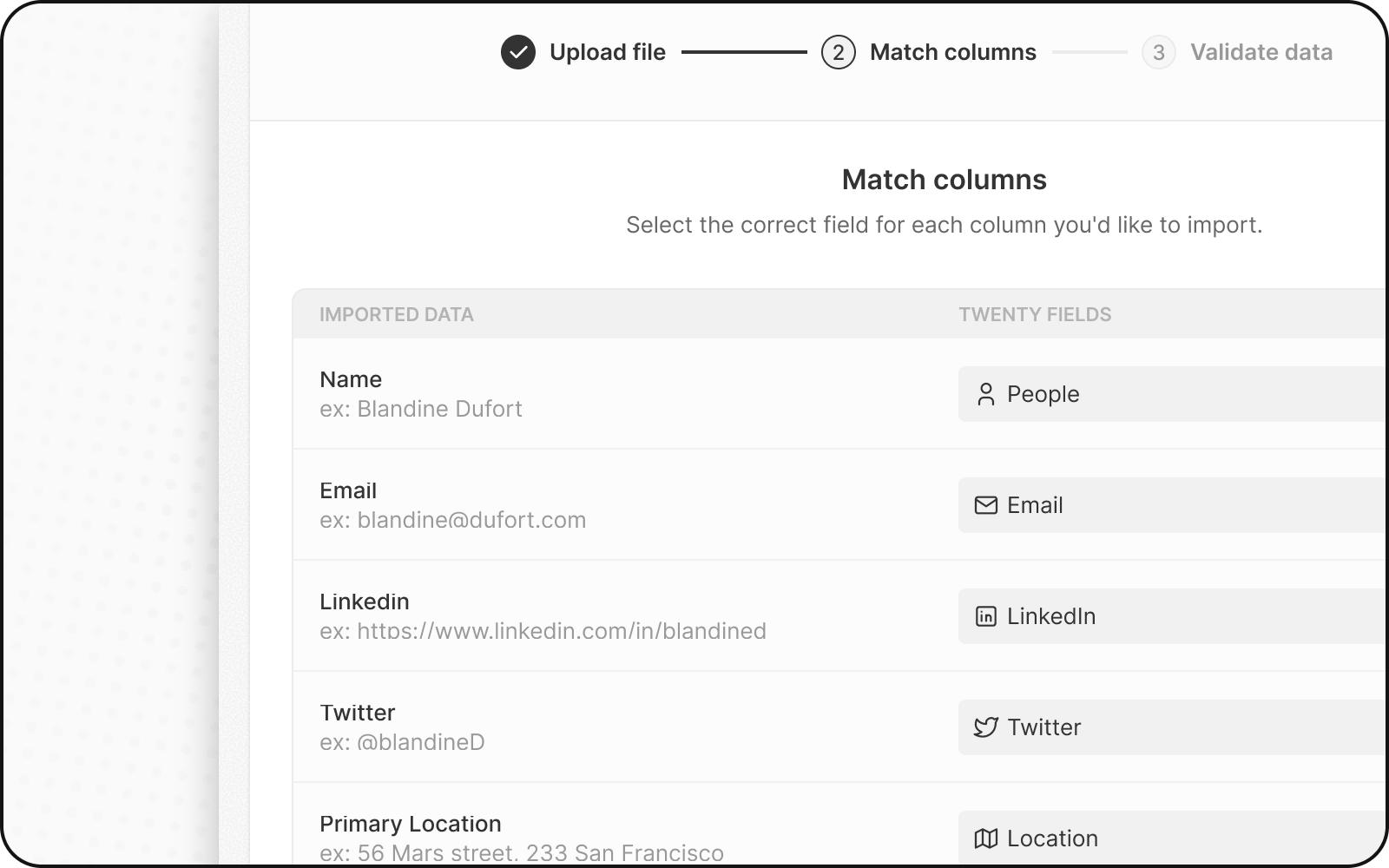
Pasul 4: Mapați coloanele
Twenty încearcă automat să potrivească coloanele cu câmpurile. Revizuiți și ajustați:- Verificați mapările automate — confirmați că sunt corecte
- Corectați mapările incorecte — faceți clic pe lista derulantă pentru a selecta câmpul corect
- Omiteți coloanele — selectați Do not map pentru coloanele pe care nu doriți să le importați
Reguli importante de mapare
- Domeniu: Mapați la Domain / Domain URL (nu la Domain Label)
- Adresă: Mapați fiecare parte la coloana sa specifică (City, State etc.)
- Câmpuri Select: Valorile trebuie să corespundă opțiunilor existente (sau le veți mapa în pasul următor)
Pasul 5: Mapați valorile câmpurilor Select
Dacă aveți câmpuri Select sau Multi-Select:- Twenty afișează valorile dvs. alături de opțiunile existente
- Asociați fiecare valoare din fișierul dvs. cu o opțiune Twenty
- Sau creați opțiuni noi, dacă este necesar
Opțiunile Select folosesc nume API, nu etichete de afișare. Accesați Setări → Model de date → activați Mod avansat pentru a vedea numele API.
Pasul 6: Revizuiți și remediați erorile
Înainte de a finaliza importul, Twenty vă validează datele:- Faceți clic pe Pașii următori
- Rândurile cu erori sunt evidențiate cu galben
- Remediați erorile direct — faceți clic pe o celulă și editați valoarea
- Eliminați rândurile problematice — faceți clic pe X pentru a sări peste acel rând
Erori frecvente la importul companiilor
Pasul 7: Finalizați importul
- Revizuiți rezumatul importului
- Faceți clic pe Confirmă pentru a importa
- Așteptați finalizarea importului
- Verificați consultând câteva înregistrări
După importarea companiilor
Acum puteți importa înregistrări care se leagă de Companii:- Importați Persoane — legați-le de Companii folosind domeniul
- Importați Oportunități — legați-le de Companii
- Verificați importul — verificați punctual câteva înregistrări pentru a vă asigura că datele sunt corecte
Actualizarea companiilor existente
Pentru a actualiza companiile în loc să creați unele noi:- Includeți coloana
domainsauidîn fișierul dvs. - Twenty potrivește înregistrările după acest identificator unic
- Companiile existente sunt actualizate; cele noi sunt create
Întrebări frecvente
De ce nu pot două companii să aibă același domeniu?
De ce nu pot două companii să aibă același domeniu?
Domeniul este un identificator unic în Twenty. Acest lucru previne companiile duplicate și asigură că sincronizarea emailului leagă corect emailurile de compania potrivită.
Ce fac dacă am companii fără domeniu?
Ce fac dacă am companii fără domeniu?
Puteți lăsa domeniul necompletat. Totuși, recomandăm să adăugați domenii atunci când este posibil, pentru o calitate mai bună a datelor și pentru legarea automată a emailurilor.
Pot importa companii fără nicio Persoană asociată?
Pot importa companii fără nicio Persoană asociată?
Da! Puteți importa mai întâi companiile, apoi să importați ulterior Persoane și să le asociați folosind domeniul companiei.
Ce se întâmplă dacă import un domeniu care există deja?
Ce se întâmplă dacă import un domeniu care există deja?
Dacă includeți un identificator unic (domeniu sau id) care se potrivește unei companii existente, Twenty actualizează acea companie în loc să creeze un duplicat.
Cum remediez erorile 'duplicate domain'?
Cum remediez erorile 'duplicate domain'?
Eliminați duplicatul din fișier sau includeți
id-ul companiei pentru a actualiza în schimb înregistrarea existentă.