
Panoramica
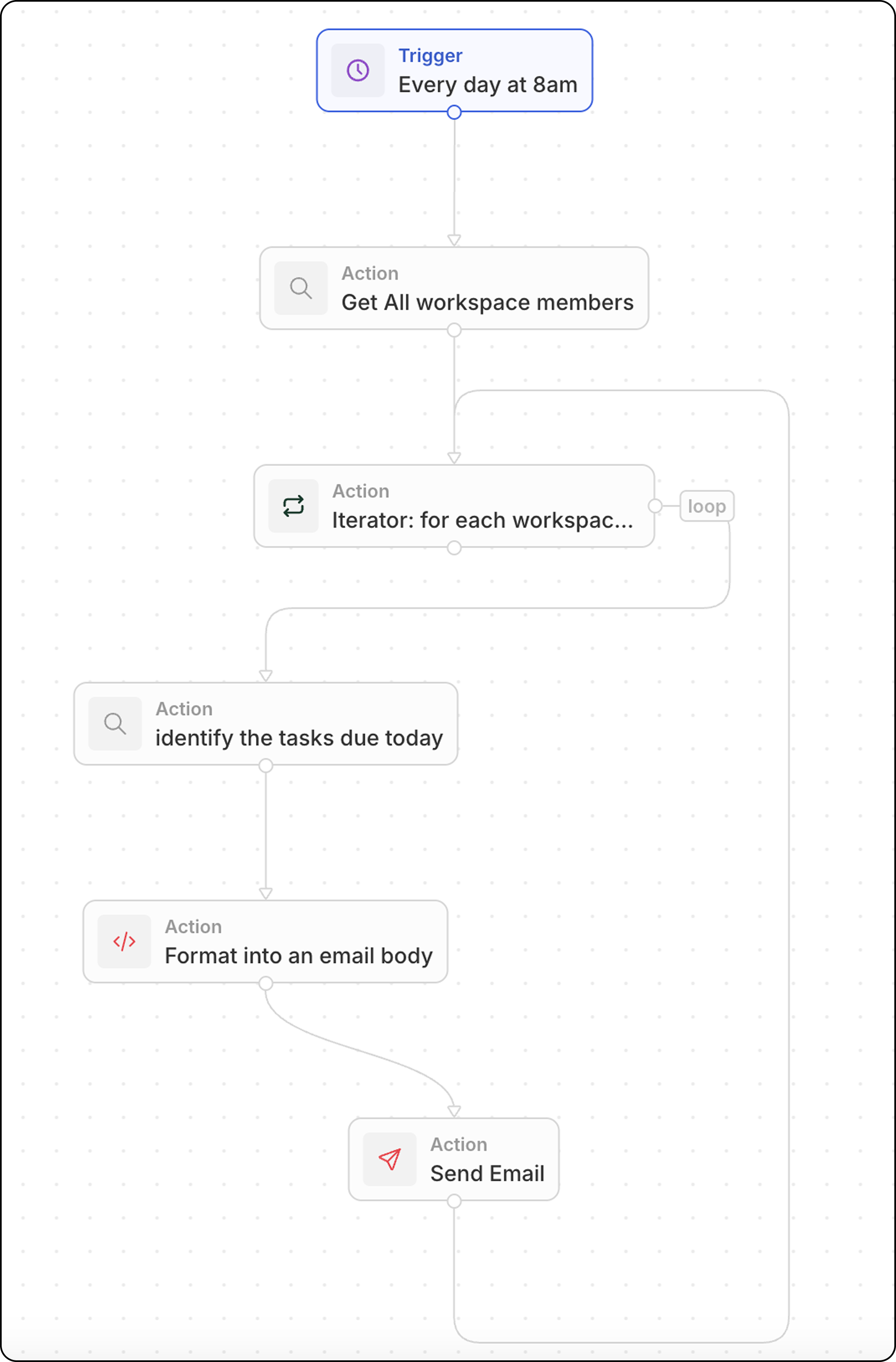
Questo flusso di lavoro viene eseguito secondo una pianificazione e:- Recupera tutti i membri dello spazio di lavoro
- Scorre ciascun membro
- Trova le loro attività in scadenza oggi
- Formatta e invia un’email personalizzata
Configurazione passo-passo
Passaggio 1: Configura il trigger
- Vai su Impostazioni → Flussi di lavoro e crea un nuovo flusso di lavoro
- Seleziona On a Schedule come trigger
- Usa un’espressione cron per ogni giorno alle 8:00:
0 8 * * *
Passaggio 2: Cerca tutti i membri dello spazio di lavoro
- Aggiungi un’azione Search Records
- Seleziona Workspace Members (nella sezione Oggetti avanzati)
- Non sono necessari filtri — questo restituisce tutti i membri
Passaggio 3: Aggiungi un Iterator
- Aggiungi un’azione Iterator
- Imposta l’array di input con i membri dello spazio di lavoro del passaggio precedente
- Tutte le azioni all’interno dell’Iterator verranno eseguite una volta per membro
Passaggio 4: Cerca le attività in scadenza oggi (all’interno dell’Iterator)
- All’interno dell’Iterator, aggiungi un’azione Search Records
- Seleziona Tasks come oggetto
- Aggiungi filtri:
- Assignee = membro corrente dello spazio di lavoro (dall’Iterator)
- Due Date = oggi
Passaggio 5: Formatta le attività nel corpo dell’email (all’interno dell’Iterator)
Aggiungi un’azione Code per formattare le attività in un elenco leggibile con link:Sostituisci
yourSubDomain con il tuo effettivo sottodominio dello spazio di lavoro Twenty.Passaggio 6: Invia email (all’interno dell’Iterator)
- Aggiungi un’azione Send Email (sempre all’interno dell’Iterator)
- Configura:
Passaggio 7: Testa e attiva
- Fai clic su Test per eseguire manualmente il flusso di lavoro
- Controlla le caselle di posta per le email
- Attiva il flusso di lavoro